JSON-LD is the better choice for most websites in 2026. It’s Google’s recommended schema format because it’s easier to maintain, integrates well with modern frameworks, and reduces errors in structured data. Microdata, while still supported, embeds directly into HTML, making it harder to manage and less scalable - especially for dynamic or complex websites.
Key Points:
- JSON-LD: Uses a separate
<script>block, making updates simpler and avoiding conflicts with your page layout. Ideal for large, dynamic, or AI-focused websites. - Microdata: Embeds schema directly into HTML, which works for small, static pages but becomes difficult to maintain on larger sites.
- SEO Impact: Both formats can produce Google Rich Results if implemented correctly. However, JSON-LD has fewer errors and is better suited for AI-driven search features.
- AI Integration: JSON-LD sites are cited 3.2x more often in AI-generated answers compared to sites without structured data.
Quick Comparison:
| Feature | JSON-LD | Microdata |
|---|---|---|
| Implementation | Separate <script> block |
Inline HTML attributes |
| Maintenance | Easier | Harder |
| Scalability | High | Low |
| Google Support | Preferred | Supported |
| Dynamic Content | Excellent with JS frameworks | Poor |
| Error Risk | Lower | Higher |
If you’re starting a new project or migrating, JSON-LD is the smarter long-term choice. For legacy systems or simple pages, Microdata may still work, but it’s less future-proof.
JSON-LD: A Modern Way to Add Structured Data
What Is JSON-LD and How Does It Work?
JSON-LD, short for JavaScript Object Notation for Linked Data, is a lightweight method for adding structured data to a webpage. It works by embedding the data in a single <script type="application/ld+json"> tag, which is usually placed in the <head> section or just before the closing </body> tag.
Take a look at this simple example of a JSON-LD block for a product:
<script type="application/ld+json">
{
  "@context": "https://schema.org",
  "@type": "Product",
  "name": "Wireless Noise-Canceling Headphones",
  "offers": {
    "@type": "Offer",
    "price": "149.99",
    "priceCurrency": "USD"
  }
}
</script>
What makes JSON-LD stand out is that it operates separately from your visible HTML. This separation keeps your structured data and page design neatly organized. It also supports complex relationships. For example, a Product can connect to its Manufacturer or Organization through nested arrays or the @graph pattern, all within a single JSON-LD block.
Now let’s dive into how this technical setup translates into better SEO outcomes.
Benefits of Using JSON-LD for SEO
One of the biggest advantages of JSON-LD is how it simplifies schema management. Instead of modifying multiple HTML elements across a site, you can update structured data by editing a single JSON-LD script block. For large e-commerce sites, this can save a lot of time and effort.
"JSON-LD wins because it is decoupled from your HTML. You add a single
<script>block anywhere on the page and you are done." - Jonathan Jean-Philippe, Founder & GEO Specialist, Rankeo [7]
Modern JavaScript frameworks like React, Vue, and Next.js also benefit from this decoupled approach. JSON-LD integrates seamlessly with these frameworks, making it easier to manage structured data dynamically. Additionally, it aligns well with how search engines process data. By early 2026, Google AI Overviews appeared in nearly 47% of standard searches [8]. As of 2024, over 308,000 pay-level domains tracked by the Web Data Commons project had adopted JSON-LD [1], cementing its role as the go-to format for structured data.
Of course, while JSON-LD offers clear advantages, it’s not without its challenges.
Limitations of JSON-LD
Using JSON-LD requires a basic understanding of JSON syntax. Errors like trailing commas, mismatched braces, or incorrect nesting can break your markup without any obvious warning. Another common pitfall is case sensitivity. For example, "@type": "Article" is valid, but "@type": "article" will be ignored by parsers [5].
Another challenge is schema drift. Since JSON-LD is separate from your page content, there’s a risk that it can fall out of sync. For instance, if you update a product price on your webpage but forget to update the JSON-LD, Google might detect a mismatch. This could even lead to a manual action penalty. To avoid this, automate your JSON-LD generation using the same database that powers your page content. This ensures both the visible content and structured data remain consistent.
Lastly, dates in JSON-LD must follow the ISO 8601 format (e.g., 2026-06-11). Using a regional format like 06/11/2026 will trigger validation errors [3].
These limitations highlight why some developers still consider alternatives like Microdata, which we’ll explore next.
sbb-itb-f4b2e1b
Microdata: The Inline HTML Approach
What Is Microdata and How Does It Work?
Microdata is a structured data format that integrates directly into your HTML, embedding information within the visible content of a webpage. Unlike JSON-LD, which operates separately, Microdata works inline using specific attributes within the HTML code.
The three main attributes that power Microdata are itemscope, itemtype, and itemprop. Here’s a quick example to illustrate how it looks in practice:
<div itemscope itemtype="https://schema.org/Product">
  <span itemprop="name">Wireless Noise-Canceling Headphones</span>
  <div itemprop="offers" itemscope itemtype="https://schema.org/Offer">
    <span itemprop="price">149.99</span>
    <meta itemprop="priceCurrency" content="USD" />
  </div>
</div>
itemscope: Marks the beginning of a structured data object.itemtype: Points to the Schema.org definition for the object type.itemprop: Indicates the specific properties of the object.
This inline approach ensures that structured data is tightly integrated with the visible content, making it a straightforward choice for embedding schema data into your HTML.
Benefits of Using Microdata for SEO
One of Microdata’s key strengths lies in its alignment with visible content. Since it’s embedded directly into the HTML, the structured data naturally reflects what users see on the page.
"The format kept things honest: whatever you told Google had to match what appeared on screen because the markup was the content." - Truelogic [1]
This makes Microdata particularly useful for simple, static pages like local business details, single product descriptions, or recipe pages. It’s also a practical choice for older CMS platforms or legacy systems where adding <script> tags (required for JSON-LD) might be restricted due to security concerns. Breadcrumb navigation is another great use case, as the structured data can map directly to the visible breadcrumb trail in the DOM [1][4].
Interestingly, when it comes to SEO performance, the choice between Microdata and JSON-LD doesn’t seem to make a difference. According to SearchPilot, split tests across various industries and website sizes revealed no measurable impact on organic traffic when switching between the two formats [4].
Drawbacks of Microdata
While Microdata has its perks, it’s not without challenges. Because it’s embedded directly into the HTML, even minor design changes can disrupt the schema. Errors can also pile up quickly.
"Microdata errors tend to cascade: one missing closing tag or misplaced itemprop attribute throws off every subsequent entity on the page." - Truelogic [1]
For more complex pages, like those requiring nested schemas (Article → Author → Organization), the code can become difficult to manage. Developers often need to stack multiple itemscope and itemprop attributes, which can turn clean HTML into a cluttered mess. This complexity makes debugging and collaboration harder.
Another downside is the increased DOM weight. On intricate pages, Microdata can add 2–4 KB of extra data, which can complicate integration with modern JavaScript frameworks like React or Vue.
These limitations have contributed to a decline in Microdata’s popularity. While it peaked between 2019 and 2021, its usage has been dropping since 2022 as more developers adopt JSON-LD [1].
Microdata vs JSON-LD: Which Structured Data Format Wins?
JSON-LD vs Microdata: A Direct Comparison
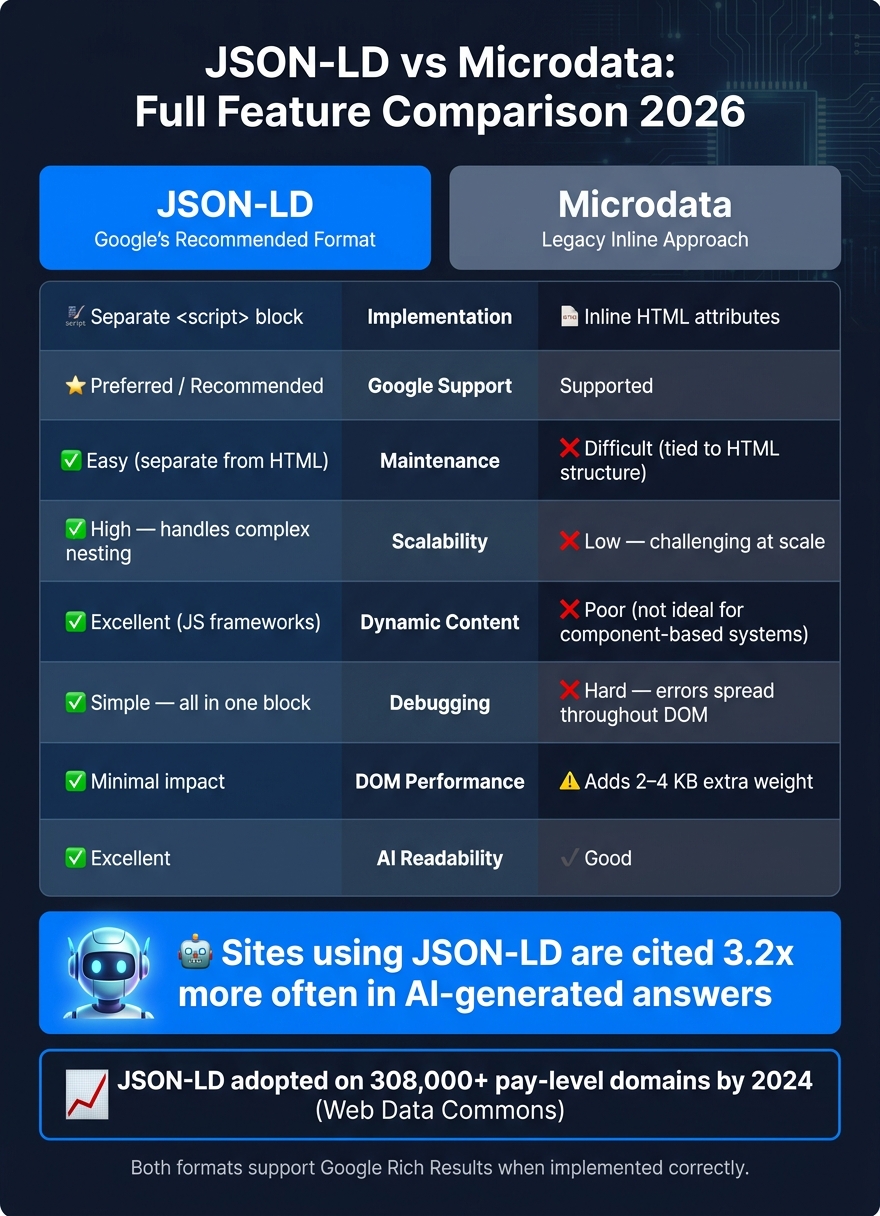
JSON-LD vs Microdata: Full Feature Comparison 2026
Comparison Table: JSON-LD vs Microdata
Both formats are designed to help search engines understand structured data, but they approach this task in distinct ways. Here's a practical breakdown of their key differences:
| Feature | JSON-LD | Microdata |
|---|---|---|
| Implementation | Separate <script> block |
Inline HTML attributes |
| Google Support | Preferred / Recommended | Supported |
| Maintenance | Easy (separate from HTML) | Difficult (tied to HTML structure) |
| Scalability | High - handles complex nesting with ease | Low - challenging to manage at scale |
| Dynamic Content | Excellent (works well with JS frameworks) | Poor (not ideal for component-based systems) |
| Debugging | Simple - all in one block | Hard - errors spread throughout the DOM |
| DOM Performance | Minimal impact | Adds 2–4 KB of extra weight [1] |
| AI Readability | Excellent | Good |
JSON-LD's design, which separates structured data from the HTML, ensures fewer disruptions during updates or redesigns. This separation makes it a more robust option for scaling websites, as explored further below.
Scalability for US Businesses
For smaller, static websites, Microdata may be sufficient. However, for larger operations - like e-commerce giants or healthcare networks spanning multiple locations - JSON-LD offers a clear advantage. With JSON-LD, businesses can assign unique @id values for each location within a single structured data block, streamlining management and reducing errors compared to juggling numerous inline Microdata tags [7].
Take e-commerce as an example: managing nested relationships such as Product → Offer → AggregateRating is far cleaner with JSON-LD. In contrast, using Microdata requires stacking multiple itemscope attributes, which can quickly become a maintenance headache.
The industry has already shifted in favor of JSON-LD. Platforms like Shopify and WordPress (via popular plugins like Yoast and Rank Math) have made JSON-LD their default structured data format. This shift has contributed to Microdata's decline since 2022 [1]. By 2024, JSON-LD was used on over 308,000 pay-level domains, according to the Web Data Commons project [1].
"JSON-LD's real advantage in the AI era is the same advantage it had before AI: separation of concerns makes the data easier to maintain, audit, and scale." - Truelogic [1]
How Each Format Affects Google Rich Results
Both JSON-LD and Microdata can produce Google Rich Results when implemented correctly. Google continues to support both formats, with eligibility for rich results depending on the accuracy and completeness of your markup.
However, JSON-LD often leads to fewer structured data errors compared to Microdata [2]. Fewer errors mean more chances to display enhanced search features like star ratings, product prices, and breadcrumb trails.
In the era of AI-powered search, JSON-LD's advantages become even more pronounced. Tools like Google AI Overviews and Perplexity favor JSON-LD for its clean and easily parsable format [1]. Websites with detailed structured data using JSON-LD are cited 3.2x more often in AI-generated answers compared to those without it [7]. With Google retiring FAQ rich results in May 2026, the focus has shifted toward schema's role in AI visibility, solidifying JSON-LD as the better choice for future-proofing your site [6].
How to Choose Between JSON-LD and Microdata
When to Use JSON-LD
If you're working on a new project using platforms like WordPress, Shopify, or modern frameworks such as React, Next.js, or Vue, JSON-LD is the way to go. Google prefers JSON-LD due to its simplicity, scalability, and reduced risk of errors. By keeping the structured data in a separate <script> block, it ensures consistency and avoids conflicts with visible content.
JSON-LD is especially useful for improving visibility in AI-driven search results. Websites with well-implemented JSON-LD markup are referenced 3.2× more often in AI-generated answers [7]. Its clean, well-defined structure makes it easier for language models to extract accurate and reliable data.
However, if you're dealing with older systems with limitations that prevent the use of JSON-LD, Microdata might still be a better fit.
When to Use Microdata
Microdata works best for legacy systems or basic, static websites. Its inline format ensures the structured data closely matches the visible content, reducing the risk of discrepancies. That said, for actively managed websites, the upkeep required for Microdata can outweigh its advantages, especially as JSON-LD offers a more efficient alternative.
How to Migrate from Microdata to JSON-LD
If your site currently uses Microdata, you can transition to JSON-LD while maintaining your rich results. Follow these steps to ensure a smooth migration without losing structured data benefits:
- Audit your current schema: Use tools like Schema Validator AI's URL audit to identify all the structured data currently in use on your site.
- Create matching JSON-LD blocks: For each entity in your Microdata, generate an equivalent JSON-LD block. Be sure to include explicit
@idvalues that correspond to theitemidattributes in your Microdata. This ensures Google understands both formats as referring to the same entity. Use absolute URLs for all resources like images, logos, and canonical links. - Deploy both formats temporarily: Implement both JSON-LD and Microdata simultaneously for 2 to 4 weeks [1]. During this period, monitor Google Search Console to ensure rich results remain consistent. Avoid mixing formats for the same schema type. Validate your JSON-LD using Schema Validator AI to confirm it meets Google Rich Results requirements. Once validated, you can safely remove the legacy Microdata.
This migration process not only improves your site's SEO but also prepares it for the growing role of AI-driven search.
"JSON-LD is still the safest default for most new projects because it is easier to implement and keep in sync." - Rishi Kumar Chawda [1]
Conclusion: Picking the Right Format for Your Site
Key Takeaways
As of 2026, JSON-LD has become the go-to format for structured data. It's the format Google officially recommends, and it aligns well with AI-driven search advancements. With AI Overviews now showing up in nearly 48% of Google searches [9], having structured data that’s clean and machine-readable is no longer optional - it’s a necessity.
That said, if your current Microdata implementation is valid and error-free, there’s no rush to switch. Studies show no noticeable difference in organic traffic between JSON-LD and Microdata when both are correctly set up [4]. The real perks of JSON-LD lie in its technical benefits: fewer errors, easier updates, and better scalability for future needs.
By separating schema from HTML, JSON-LD simplifies maintenance and makes scaling your site more manageable.
For new projects, JSON-LD is the smart choice. For older sites, consider upgrading to JSON-LD during planned redesigns or updates. The key is to have the right tools and strategies in place to implement these changes effectively.
How Schema Validator AI Can Help
To ensure your structured data is accurate and optimized for Google, Schema Validator AI offers some powerful features. Its URL audit function pinpoints schema issues, while the AI Schema Generator creates valid JSON-LD blocks for formats like Article, Product, and FAQ without requiring technical know-how.
Once your schema is implemented, Schema Validator AI checks it against Google’s Rich Results criteria, letting you see which elements qualify for enhanced search features before going live. For teams managing large websites, the Pro plan ($29/month) supports bulk generation for up to 20 URLs at once, making it easier to audit and update structured data on a larger scale.
FAQs
Where should I place my JSON-LD script on the page?
You can include your JSON-LD script in the head or body sections of your HTML. That said, putting it in the head section is generally recommended because it allows search engines to process the structured data sooner. Since JSON-LD doesn't rely on visible content, you can add or tweak it without impacting your page's layout or HTML structure.
Can I use both JSON-LD and Microdata on the same site safely?
Yes, it’s perfectly fine to use both JSON-LD and Microdata on the same site. Search engines, including Google, can process both formats without any issues. When duplicate markup exists, Google simply selects the version it successfully parses.
In fact, many developers use a combination of both formats during a transition period. For instance, they might leave the existing Microdata in place while adding JSON-LD. Once the JSON-LD implementation is confirmed through testing tools and search performance reports, the old Microdata can be safely removed from the HTML.
What’s the fastest way to catch structured data errors before Google does?
The fastest way to spot structured data issues is by leveraging tools like the Rich Results Test or Schema Markup Validator. These tools allow you to paste your JSON-LD code directly, giving you quick and clear feedback without the distraction of HTML. Because JSON-LD is standalone, troubleshooting is far simpler than with Microdata, where a single error can create a ripple effect. Consistently validating your structured data ensures it stays accurate and matches your page's content seamlessly.