If one required FAQ schema field is missing, Google and other parsers may ignore the whole block. The fix is simple: use FAQPage at the top, put every question in mainEntity, give each Question a name, and give each acceptedAnswer an Answer object with text.
As of May 7, 2026, Google no longer shows FAQ rich results worldwide. But valid FAQ markup still matters. I’d keep it clean because AI tools can still read, pull, and cite those question-and-answer pairs.
Here’s the short version:
- Use this path:
FAQPage→Question→acceptedAnswer→Answer - Required page fields:
@context,@type,mainEntity - Required question fields:
@type,name,acceptedAnswer - Required answer fields:
@type,text - Common failures:
"@type": "FAQ"instead of"FAQPage"- missing
mainEntity acceptedAnswerset as a plain string- blank or missing
name - using
suggestedAnswerinstead ofacceptedAnswer
- Your schema text should match the visible FAQ text on the page
- Check JSON syntax first, then validate the schema using a comprehensive audit checklist
- Recheck after plugin, theme, template, or CMS changes
A simple way to think about it: if the visible FAQ has 8 items, your JSON-LD should also have 8 Question objects - 100% parity. If those counts or texts drift apart, parsers may skip the markup.
I’d use this article as a short fix-it guide: what fields must be there, what errors show up most often, how to find them in validators, and how to clean them up in WordPress, Shopify, Webflow, or custom code.
How-To Fix Structured Data Missing Field Errors
After applying these fixes, you should validate schema markup to ensure your pages are eligible for rich results.
Required FAQPage Fields and Google's Basic Rules
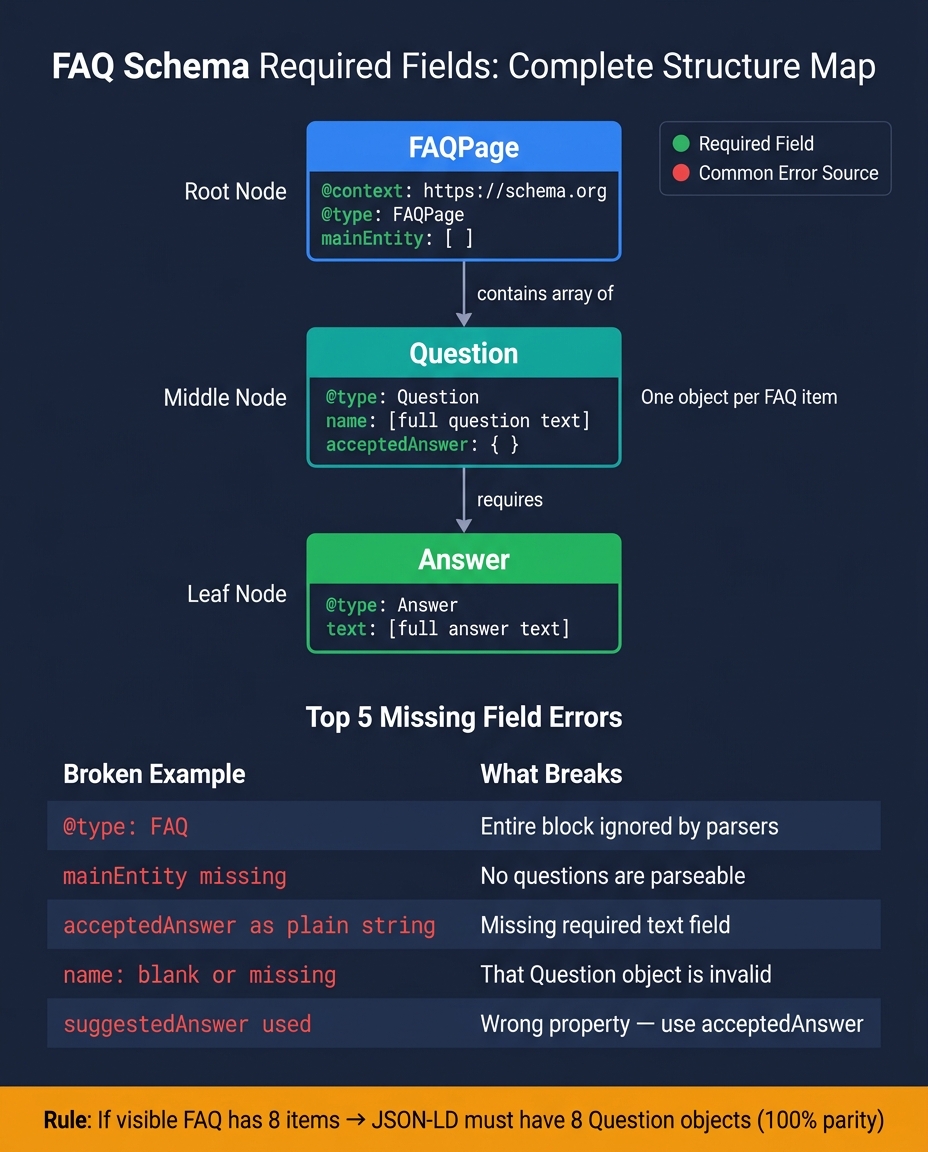
FAQ Schema Required Fields: Complete Structure Map
To fix missing-field errors, start with the required setup. FAQ schema follows a fixed nesting path: FAQPage → Question → acceptedAnswer → Answer.
Required Fields at the Page Level
The root JSON-LD object needs three fields:
@contextset tohttps://schema.org@typeset toFAQPagemainEntityas an array ofQuestionobjects
Use one FAQPage block, and put all questions inside mainEntity.
Required Fields for Each Question and Answer
Each item in mainEntity must be a Question object with:
@typeset toQuestionnamewith the full question textacceptedAnsweras anAnswerobject
The acceptedAnswer object must include:
@typeset toAnswertextwith the full answer
This is where people often slip up. acceptedAnswer can't be a plain string, and it can't use @type: "Text". It has to be an Answer object. If not, the markup is invalid. For those using CMS platforms, you can add schema to WordPress using dedicated plugins to automate this nesting.
The minimum valid structure looks like this:
{
  "@context": "https://schema.org",
  "@type": "FAQPage",
  "mainEntity": [
    {
      "@type": "Question",
      "name": "What is the minimum valid structure?",
      "acceptedAnswer": {
        "@type": "Answer",
        "text": "The minimum structure requires a FAQPage type with a mainEntity array containing Question and Answer objects."
      }
    }
  ]
}
There's another rule that trips up a lot of site owners: the text in your schema must match the visible content on the page. Your question and answer text should match what users can actually see, word for word. Hidden content or text that only appears after a click can fail validation.
Once that base structure is in place, the next step is spotting the fields that usually get left out.
Common Missing Field Errors and What They Break
The Missing Fields That Show Up Most Often
Most FAQ schema failures come down to a small set of missing or wrong fields. The one that breaks things most often is the wrong @type. If you use "@type": "FAQ" instead of "@type": "FAQPage", FAQ parsing stops completely [6][3].
From there, the next job is simple: find the errors your validator flags first.
A missing or malformed acceptedAnswer breaks the question. It needs to be an Answer object with text [6][8]. If mainEntity is missing, the page has no parseable questions. And if any Question has a blank name, that block becomes invalid [6].
There’s another mix-up that shows up a lot: suggestedAnswer used instead of acceptedAnswer. For FAQPage, use acceptedAnswer. suggestedAnswer belongs to QAPage [3][4][6].
How These Errors Appear in Tools and Reports
Once the structure is fixed, look at how validators report each missing field. Tools like validator.schema.org and Schema Validator AI can spot missing fields, invalid object types, and bad nesting. Errors stop parsing. Warnings point to markup that works, but isn’t very strong.
Here are the failures that show up most often:
| Broken Example | Result in Tools |
|---|---|
"@type": "FAQ" |
Invalid object; ignored by parsers |
mainEntity field missing |
Entire block is invalid |
"acceptedAnswer": "Just a string" |
Missing field text |
"name": "" or missing |
Missing field name |
"text": "Learn more here" |
Valid but weak; reduces answer quality |
Even one broken Question or Answer object can take down the whole FAQPage block [6][4]. That’s why it pays to fix each issue one by one instead of assuming the rest of the markup is fine.
sbb-itb-f4b2e1b
How to Find and Fix Missing Required Fields
A Simple Debugging Process Anyone Can Follow
Once you know a required field is missing, you can track it down pretty fast.
Start with validator.schema.org. It points to the exact node with the missing or broken property, such as mainEntity, name, or text.
Then open the page source and find the <script type="application/ld+json"> block. From there, go step by step:
- Count the FAQ items shown on the page and make sure the
mainEntityarray includes the same number ofQuestionobjects. If those counts don't line up, the FAQ block can become invalid [2]. - Check that the visible question matches
name, and the visible answer matchestext, exactly. If the schema doesn't match what users see, the markup may be ignored [2][5]. - Fix syntax first, then field errors. Run the JSON through
jsonlint.combefore anything else so you can catch syntax issues early [7]. - Revalidate after each edit. Paste the updated markup back into
validator.schema.organd make sure all required fields are present before you publish [2][1].
Using Schema Validator AI to Audit and Regenerate FAQ Markup
If checking the markup by hand is taking too long, Schema Validator AI can help speed things up.
Its URL Schema Audit flags missing or malformed fields automatically. The Schema Health Score gives you a quick compatibility check. And if the markup is too broken to clean up by hand, the AI Schema Generator can rebuild a compliant JSON-LD block.
It's built for non-technical users working in WordPress, Shopify, and Webflow.
Platform Issues That Often Remove Required Fields
Sometimes the problem isn't the editor at all. The platform itself can strip required fields without warning.
| Implementation Pattern | Common Failure | Fix |
|---|---|---|
| WordPress (SEO plugin + theme) | Duplicate FAQPage blocks; conflicting mainEntity |
Disable schema in either the theme or the plugin; revalidate with validator.schema.org |
| Shopify Liquid Templates | Missing acceptedAnswer or text after template edits |
Manually edit the relevant Liquid template; lint JSON with jsonlint.com first |
| Next.js App Router | JSON-LD not injected into the page | Inject via a <script> tag directly in the page component |
| Webflow Custom Code | Syntax errors from manual edits break name or text |
Use a JSON linter before publishing |
| Manual Static JSON-LD | Trailing commas or mismatched brackets invalidate the block | Lint with jsonlint.com, then validate with validator.schema.org |
Conclusion: Preventing FAQ Schema Errors Over Time
Templates change. CMS migrations happen. Content gets edited in a hurry. And that’s usually when FAQ schema breaks.
It often fails quietly. A template update removes a required field, a migration drops acceptedAnswer, or a new FAQ shows up on the page but never gets added to the JSON-LD. So this isn’t something you fix once and forget. It needs a repeatable process.
Key Takeaways for Ongoing Compliance
The core rules stay the same: every FAQPage block needs a mainEntity array, every Question needs a name, and every acceptedAnswer needs a text field.
What changes is why this still matters. FAQ markup no longer triggers Google FAQ results, but it can still help AI systems extract and cite Q&A pairs.
The safest approach is to treat these required fields as part of every content update, not as a one-time setup. If your team manages FAQs at scale, it helps to:
- Render the visible FAQ section and the JSON-LD from the same data array
- Run a quick parity check to make sure the number of visible questions matches the number of
Questionobjects - Revalidate after every major content update or template change [2]
- Review pages every quarter to remove stale entries and keep answers current [9]
For teams that update FAQs often, a single source of data, page-to-JSON-LD parity checks, and revalidation after major changes can save a lot of cleanup later. Schema Validator AI can audit, validate, and regenerate FAQ markup for teams managing frequent updates.
FAQs
Why keep FAQ schema if Google no longer shows FAQ rich results?
Keep FAQ schema. It still helps search engines and AI systems understand your content.
Even without the visual FAQ dropdown, valid FAQPage markup makes your question-and-answer pairs easier to parse and use.
That can improve the odds that your site gets cited in AI-generated answers. It also keeps your content machine-readable, even if there’s no direct visual gain in search results.
Can one broken question invalidate my entire FAQ schema block?
Yes. One broken question can invalidate the entire FAQ schema block.
FAQPage schema needs a specific structure for each entry. Every question should include:
- a
name - an
acceptedAnswer - text inside that
acceptedAnswer
If even one item is missing a field or uses the wrong format, search engines may fail to parse the markup as intended. And when that happens, the whole block can be ignored.
Schema Validator AI can help audit pages, spot missing or broken fields, and validate JSON-LD.
How do I keep my visible FAQs and JSON-LD in sync?
Use a single source of truth for both. Put your questions and answers in one shared data structure, then use it to generate the visible HTML and the JSON-LD at the same time.
That keeps both versions in sync. When you update the content, the change shows up in both places automatically, which helps prevent content drift.
Schema Validator AI can also audit live pages for differences between rendered content and schema markup.