Without schema markup, your website is at a disadvantage. Search engines struggle to understand your content, which means you miss out on rich results like star ratings, price snippets, and FAQ dropdowns. These features can increase click-through rates by 15% to 40%, giving your competitors an edge in search visibility.
Here's the main takeaway: schema markup doesn’t directly improve rankings but makes your content more appealing in search results. Missing or broken schema can hurt your impressions, especially with AI-driven search tools relying heavily on structured data in 2026.
Key Points:
- What happens without schema? No rich results, lower click-through rates, and missed opportunities for visibility in AI-driven search summaries.
- Common issues: Missing fields, syntax errors, outdated formats like Microdata, or mismatched schema and page content.
- How to fix it: Use tools like Google Search Console and Rich Results Test to identify errors. Implement JSON-LD for structured data and validate your fixes.
Regular schema audits and maintenance are essential to keep your SEO strategy strong. Fixing schema errors can lead to quick gains in visibility and traffic.
How Missing Schema Markup Affects SEO
What Schema Markup Is and How It Works
Schema markup is like a translator for your website. It takes the content you’ve written for people and adds a layer that search engines can easily understand. Maintained by Schema.org, this standardized vocabulary ensures that every piece of information on your site - whether it’s a phone number, price, or rating - is clearly defined for search engines.
Without schema, search engines have to make educated guesses about what your content means. With schema, there’s no guessing. For example, a number on your page could be a price, a rating, or a phone number. Schema removes that ambiguity by labeling it explicitly. As Alfons Marques, Founder of Technova Partners, explains:
"Structured data stopped being a 'quick win for gold stars' a long time ago. It's the layer that connects your content to search engines and, increasingly, to generative engines." [9]
This clarity is what enables rich results - those eye-catching extras like star ratings, pricing details, and FAQ dropdowns that make your search listings stand out. Without schema, your content risks being overlooked, which sets the stage for the SEO challenges that come with missing or broken schema.
SEO Problems Caused by Missing or Broken Schema
The biggest issue with missing schema? You’re out of the running for rich results altogether. With about 75% of Google search results now featuring some form of rich result [8], plain blue links are becoming less common. If your competitors are using schema to enhance their listings, they’re likely grabbing more attention - and clicks.
Beyond visibility, there are technical consequences. In early 2026, Marcus Teo, a technical SEO specialist, audited 22 enterprise sites and uncovered a troubling pattern. Sites with over 100 unresolved structured data errors saw declining impressions for rich results. Those with more than 300 errors experienced a staggering 50%–80% drop in rich result visibility within just 90 days. Fixing these issues isn’t instant either - it can take 6 to 12 weeks to regain trust with search engines [4].
"Google's parsing system stops trusting a domain's structured data after a certain error threshold. Once trust drops, even valid structured data on new pages stops generating rich results." - Marcus Teo, Technical SEO Specialist, Seomytics [4]
The rise of AI-driven search adds another layer of complexity. Platforms like Google AI Overviews depend on structured data to identify key facts and entities. Without schema, your content becomes harder for these systems to process and reference, which can hurt your visibility in AI-generated summaries [8][7].
Common Misconceptions About Schema Markup
One of the biggest myths about schema is that it directly boosts your search rankings. It doesn’t. Schema isn’t a ranking factor. Instead, it works by making your existing rankings more effective. Enhanced listings attract more clicks and bring in better-targeted traffic [9].
Another misunderstanding lies in the choice of schema format. Some websites still rely on outdated methods like Microdata or RDFa, which embed structured data directly into the HTML. These older formats are fragile - something as simple as a CMS update can break them. JSON-LD, on the other hand, is placed in a separate <script> block, keeping it isolated from the rest of your page’s code. Google recommends JSON-LD because it’s easier to maintain and scales better [9]. Mixing formats, such as combining JSON-LD with Microdata on the same page, can confuse search engines and lead to errors.
Finally, passing a syntax validation test doesn’t guarantee rich results. Google has its own filters for quality and relevance. Even if your schema is technically correct, it won’t generate enhancements if the data doesn’t match what’s visible on your page or if your site’s trust score has been hurt by previous errors [6]. Understanding these common pitfalls is essential to avoid the SEO setbacks caused by missing or flawed schema markup.
sbb-itb-f4b2e1b
How to Find Missing or Broken Schema Markup
Using Google Search Console and Testing Tools
Schema errors can be sneaky. Even if your pages look fine on the surface, missing or broken schema markup can quietly block your site from achieving rich results [4][14].
Start with Google Search Console (GSC). Head to the Enhancements section, where you'll find a breakdown of validations, warnings, and errors. This tool is great for spotting trends - like a sudden spike in issues after a theme update or plugin change. GSC organizes issues into two categories: red errors, which prevent rich results, and amber warnings, which reduce the quality of listings but don’t block them from appearing [10].
Once you’ve identified problem areas, use the Rich Results Test to dig deeper into specific pages. Enter a URL or a raw JSON-LD snippet, and the tool will show you exactly how Googlebot interprets the markup, including which properties are missing or invalid. Think of it as Google’s built-in debugging tool for checking if your page qualifies for rich results [10][12]. After fixing an issue, hit the "Validate Fix" button in GSC to prompt a recrawl and update the URL status [11][12].
Focus on template-level fixes. Most schema issues don’t stem from individual pages but from CMS templates. Correcting a single broken template can resolve errors across hundreds - or even thousands - of pages [4][11].
Here’s a quick guide to common GSC error messages and how to address them:
| GSC Error Message | What It Means | How to Fix It |
|---|---|---|
| Missing field 'name' | A required property is missing | Add the 'name' property to your JSON-LD [10] |
| Invalid value type for field 'price' | A number was expected, but a string or symbol was provided | Remove currency symbols and use a quoted numeric string like "19.99" [10] |
| Unparsable structured data | There's a syntax error in the JSON | Check for issues like trailing commas, missing brackets, or "smart quotes" [5] |
| Either 'offers', 'review', or 'aggregateRating' should be specified | Product schema lacks required blocks | Add at least one of these elements [10] |
For a broader view of schema health across your site, consider a full-site audit with Schema Validator AI.
Using Schema Validator AI for Full Site Audits
While GSC is great for page-level insights, it has limitations. It only shows data for pages Google has crawled, and the Rich Results Test can only analyze one URL at a time. To get a complete picture of your schema health, you’ll need a dedicated audit tool.
Enter Schema Validator AI, a tool designed for comprehensive schema audits. Its URL Schema Audit generates detailed reports that identify all schema types on a page, flag syntax errors, and check for rich result eligibility. One standout feature is the Schema Health Score, which provides a single metric to measure how well your structured data is performing - perfect for tracking improvements over time or comparing pages. The Rich Result Opportunity Discovery feature goes even further, identifying schema types you’re not using that could unlock new SERP features for your content.
"Passing validation means you are eligible - not guaranteed. Google evaluates additional signals like page authority and content quality before showing rich results." - SchemaValidator.org [10]
This distinction is crucial. A clean validation report is the starting point, not the finish line. For larger audits, Schema Validator AI’s Pro plan supports bulk generation for up to 20 URLs, making it ideal for reviewing entire categories, such as all product pages or blog posts, in one go.
Adding Schema Checks to Your SEO Workflow
Fixing schema issues once is helpful, but preventing them from piling up is what keeps your rich results intact.
- Check GSC Enhancement reports monthly to catch any regressions caused by theme updates or plugin conflicts.
- Run a full site audit quarterly to spot missing schema on new pages.
- Test every CMS template change before going live using the Rich Results Test in a staging environment. This avoids site-wide errors before they even start [4][14][15].
Making schema validation a regular part of your SEO routine is far more effective than scrambling to fix problems after they’ve caused damage. Data from 22 enterprise audits in early 2026 showed that sites with more than 300 unresolved schema errors experienced a 50%–80% drop in rich result impressions within 90 days. Rebuilding trust with Google after such a decline took 6 to 12 weeks of clean markup [4].
How to Fix Schema Markup Issues & Drive More Traffic?
Key Schema Types to Add to Your Site
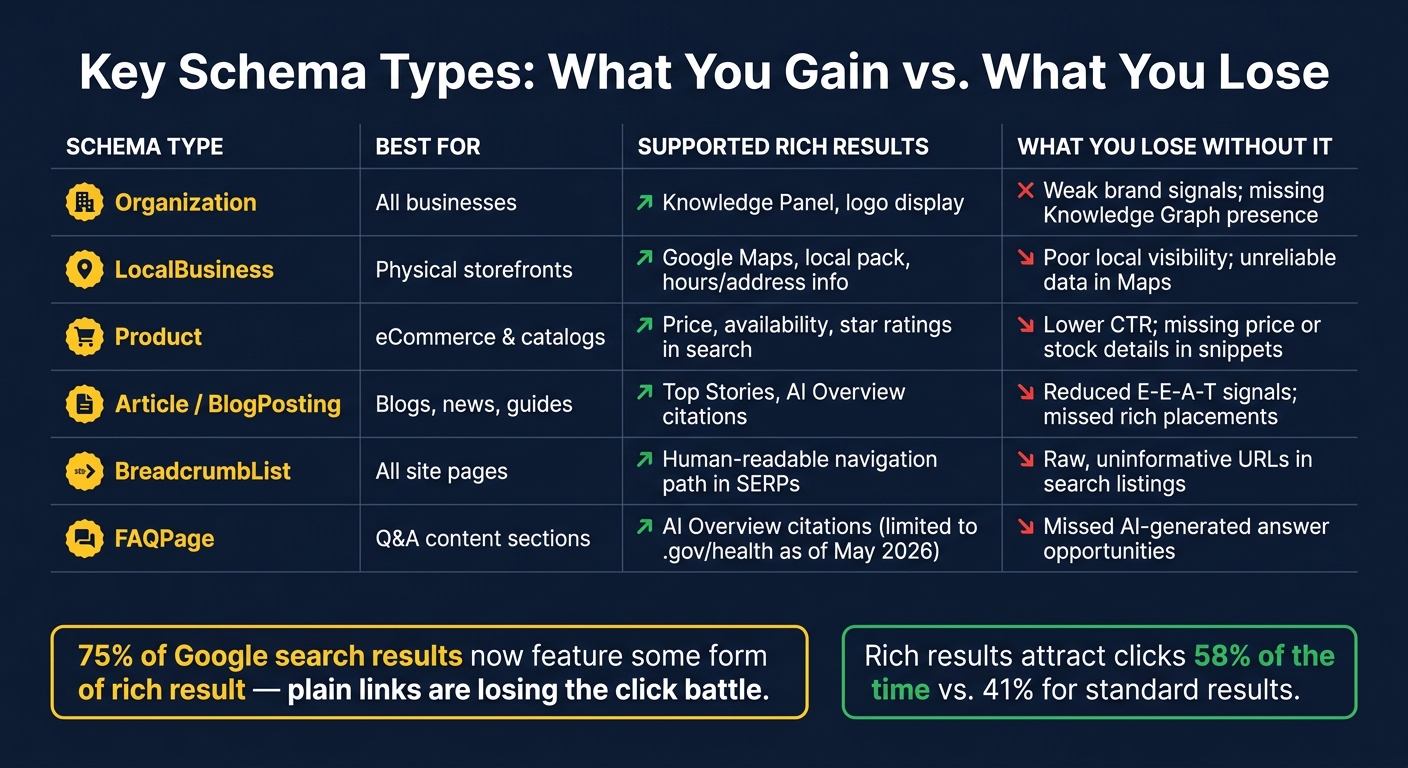
Schema Markup: Key Schema Types, Rich Results & What You Lose Without Them
Structured data plays a crucial role in SEO, and adding the right schema types can significantly improve your site's visibility. Let’s break down the most impactful schema types and what happens when they’re missing.
High-Impact Schema Types for Common Page Types
Some schema types stand out for their ability to enhance search visibility and user experience.
Organization schema is a must-have for any business. This schema provides Google with key details about your brand, such as your name, logo, social media links, and contact information. It feeds directly into Google’s Knowledge Graph, helping ensure your Knowledge Panel displays accurate information. Without it, Google might fill in the blanks incorrectly.
LocalBusiness schema is essential for businesses with physical locations. It organizes critical details like your address, phone number, and operating hours, making it easier for Google Maps and local search results to display your information accurately. For even better precision, use subtypes like Restaurant, Dentist, or AutoRepair to align with specific industries. This schema is key to appearing in the local pack and ensuring customers can find you.
Product schema is a game-changer for eCommerce sites. It allows you to showcase product details such as pricing, availability, and customer reviews directly in search results. For U.S. businesses, ensure the priceCurrency is set to "USD" and use numeric formats like "29.99" for proper display in both organic search results and Google Shopping [5].
Article and BlogPosting schema is vital for content-heavy sites. These schemas highlight content freshness and author credentials, which are increasingly important for building trust and credibility. Author verification has also become a key factor for AI-generated citations in search results as of 2026 [17][19]. Additionally, BreadcrumbList schema enhances search results by replacing plain URLs with a clear navigation path, improving both appearance and user experience.
Omitting these schema types can lead to missed opportunities. Let’s explore the consequences.
What You Lose Without These Schema Types
Skipping these schema types can directly impact your site's performance in search. Rich results, for example, attract clicks 58% of the time, compared to just 41% for standard search results [9].
For local businesses, not using LocalBusiness schema forces Google to rely on page scraping to populate Maps listings. This method is slower, less reliable, and prone to errors like outdated hours or incorrect contact details [20]. And as AI-driven search engines like ChatGPT and Perplexity gain traction, structured data has become the backbone for accurate citations.
"AI systems pull from structured data first because it reduces hallucination risk." - Vinay Upadhyay, Founder, RankSages [8]
Without schema, you’re not just losing rich snippets - you’re also losing opportunities to appear in AI-generated answers, which rely heavily on structured data for accuracy.
Schema Type Comparison Table
| Schema Type | Best For | Supported Rich Results | What You Lose Without It |
|---|---|---|---|
| Organization | All businesses | Knowledge Panel, logo display | Weak brand signals; missing Knowledge Graph presence |
| LocalBusiness | Physical storefronts | Google Maps, local pack, detailed hours/address info | Poor local visibility; unreliable data in Maps |
| Product | eCommerce & catalogs | Display of price, availability, star ratings | Lower CTR; missing price or stock details in search snippets |
| Article/BlogPosting | Blogs, news, guides | Inclusion in Top Stories and AI Overview citations | Reduced E-E-A-T signals; missed opportunities for rich placements |
| BreadcrumbList | All site pages | A clear, human-readable navigation path in search results | Raw, uninformative URLs appearing in search listings |
| FAQPage | Q&A content sections | AI Overview citations (rich results now limited to .gov/health sites as of May 7, 2026) | Missed chances for AI-generated answer opportunities |
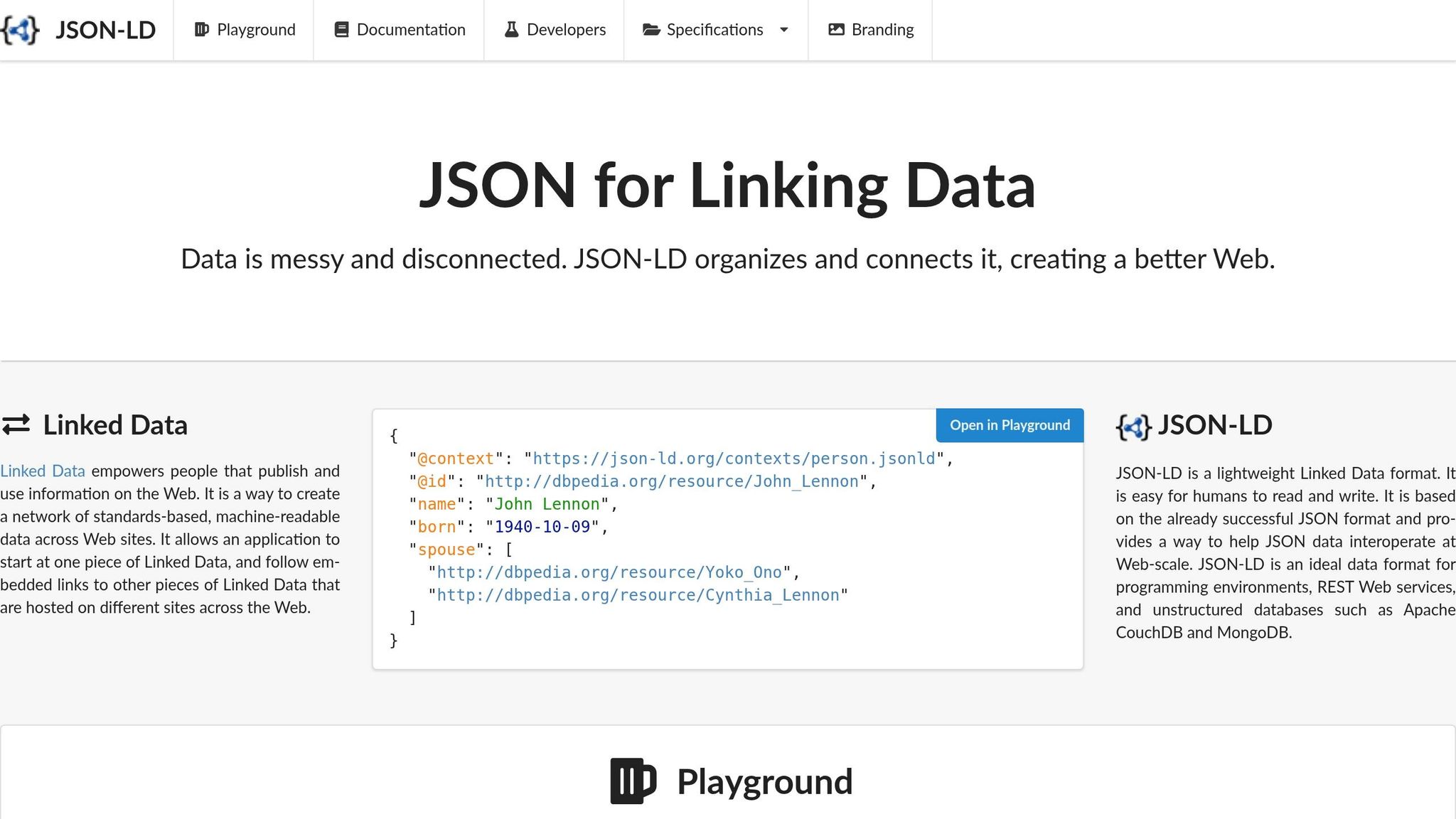
How to Fix Missing Schema Markup with JSON-LD
Mapping Out Your Schema Coverage
Before diving into coding, it's essential to evaluate your site's schema coverage. Start by reviewing your main page templates - like the homepage, product pages, blog posts, and location pages - and assign a primary schema type to each. A simple spreadsheet can help: one column for the template, another for the schema type, and a third to track whether all required properties are included.
Why focus on required fields? They determine whether your page qualifies for rich results. For instance, Google expects an Article to include properties like "headline", "image", and "author." A Product requires "name", "image", and an Offer block with "price" and "priceCurrency." Missing even one of these can disqualify a page from rich results. The good news? Many errors are template-based, so fixing one template can resolve issues across thousands of pages [4].
Once you’ve mapped out your schema types, follow these steps to implement JSON-LD efficiently.
Step-by-Step JSON-LD Implementation Guide
-
Choose your schema type
Match the schema to the page's purpose. For example:- Blog posts:
ArticleorBlogPosting - Product pages:
Product - Location pages:
LocalBusiness
- Blog posts:
-
Generate the JSON-LD block and align it with your visible content
You can create this manually or use a generator. Here's an example for an Article:
Ensure the values in your schema match the content on your page. For instance, if the product price displayed is<script type="application/ld+json"> { "@context": "https://schema.org", "@type": "Article", "headline": "Your Article Title Here", "image": "https://yoursite.com/images/article-image.jpg", "datePublished": "2026-06-11T09:00:00+00:00", "author": { "@type": "Person", "name": "Jane Smith" } } </script>$29.99, your schema should include"price": "29.99"and"priceCurrency": "USD". Any mismatch could trigger manual actions from Google [18]. -
Validate before publishing
Use validation tools to catch syntax errors like trailing commas, incorrect quotes, or missing braces [23]. -
Deploy and verify
Add the<script>block to your page, either in the<head>or just before</body>. After deployment, use Google's Rich Results Test to ensure Googlebot can parse the schema correctly [21].
By following these steps, you can address SEO issues tied to missing schema markup effectively.
Best Practices for JSON-LD Implementation
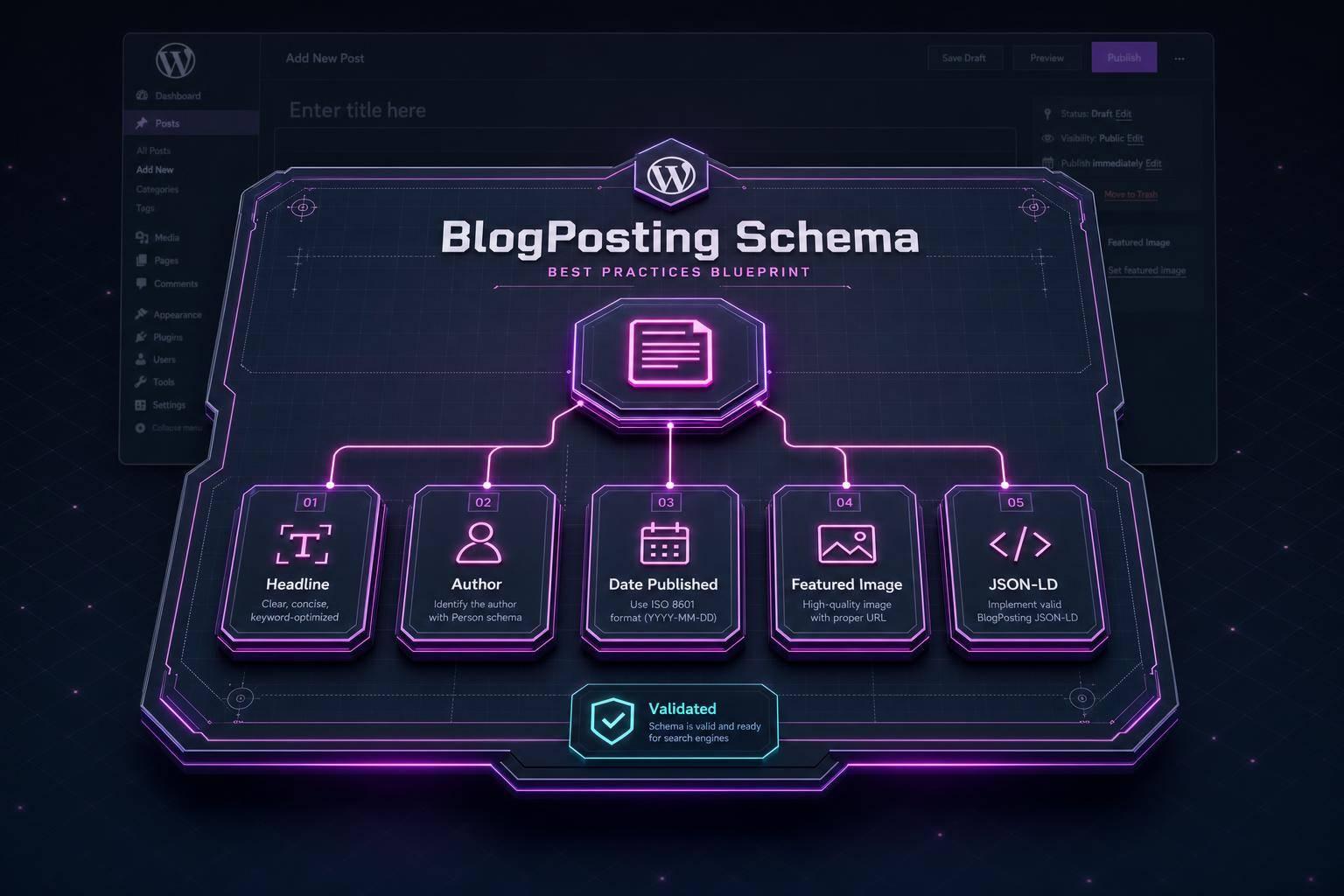
- Use ISO 8601 date formats (e.g.,
2026-06-11T09:00:00+00:00). - Always include absolute URLs for images (starting with
https://). - Define the author as an object with
@typeandnamerather than plain text. - Double-check for syntax issues, such as trailing commas or smart quotes.
"Structured data is one of the most underrated ways of doing SEO. It is not about technical expertise... if you implement schema properly, you are giving yourself an unfair advantage." - Apurv Singh, Growth Architect, HQ Digital [22]
How Schema Validator AI Simplifies the Process
If manual setup feels overwhelming, tools like Schema Validator AI can make your life easier. This tool automates schema implementation, detecting the page type and generating a complete, valid JSON-LD block - no coding required. For sites with numerous pages, the Bulk Generation feature can handle up to 20 URLs at once, allowing you to update entire sections in one go.
Each schema block is automatically validated for compatibility with Google Rich Results, saving you from toggling between tools. The free plan includes 2 URL audits and 3 schema generations per month, while the Pro plan, available for $29/month, offers unlimited audits and bulk generation capabilities.
Keeping Your Schema Markup Up to Date
Why Schema Markup Breaks Over Time
Schema markup can break over time for a variety of reasons, and when it does, the consequences for your SEO can be serious. Websites are constantly changing - whether it's updated prices, redesigned templates, or new CMS plugin versions - and any of these changes can disrupt your structured data without any immediate, visible signs.
Take this example: if you update a product's price but forget to adjust the schema, you create a mismatch between the content and the schema. Google detects this inconsistency and might suppress your rich result or, in more severe cases, issue a manual action [23][13]. Similarly, when developers modify site templates but skip updating the schema logic, "schema drift" happens. It’s a subtle issue that’s easy to miss [24][25].
Even WordPress plugin updates or theme changes can mess with JSON-LD generation or remove key properties altogether [23][4]. These technical hiccups highlight the importance of regular checks and collaboration across teams. On top of that, Google occasionally changes its supported rich result types - like when it deprecated HowTo snippets in 2023 or limited FAQPage rich results to government and health sites [5].
The damage to SEO can be long-lasting. If Google loses confidence in a domain's structured data, rebuilding that trust takes time and consistent, error-free markup [4].
"Google's parsing system stops trusting a domain's structured data after a certain error threshold. Once trust drops, even valid structured data on new pages stops generating rich results." - Marcus Teo, Technical SEO Specialist, Seomytics [4]
Building a Schema Monitoring Routine
With so many potential risks, having a solid monitoring routine is essential. A three-tiered approach - weekly, monthly, and quarterly reviews - can help you stay ahead of issues.
- Weekly: Use the Enhancements section in Google Search Console (GSC) to spot errors, warnings, and valid items. A sudden drop in valid items often signals recent template changes or plugin issues [26]. Don’t forget to check the "Unparsable structured data" report for syntax errors like trailing commas or unclosed brackets [26].
- Monthly: Check if your valid schema is translating into rich result impressions and clicks. Use the Search Appearance filter in the GSC Performance report to track this. If impressions drop but error counts remain steady, it might indicate changes in eligibility or deprecations [26][12].
- Quarterly: Perform a deep audit of 10–15 representative URLs to catch issues that GSC might not immediately flag, such as outdated schema types or deprecated properties [23][1]. Tools like Schema Validator AI can bulk-audit multiple URLs, and once fixes are made, GSC’s "Validate Fix" button can prompt a faster recrawl [26].
Making Schema Part of Your Team's Workflow
To prevent schema issues from slipping through the cracks, it’s crucial to integrate schema validation into your team’s everyday processes. Since structured data involves input from content, SEO, and development teams, everyone needs to know when and how to check schema.
For instance, schema validation should be part of the checklist during page template updates, new content launches, or site migrations. Migrations and theme changes, in particular, are prime opportunities for schema drift to occur because technical updates often overlook SEO details [16].
Content teams can add schema validation as a final step before publishing. WordPress users, for example, can use plugins like RankMath or Yoast to validate markup upon saving [4]. For larger or more technical teams, schema checks can be built into CI/CD pipelines, ensuring errors are caught during staging rather than after a page goes live [27].
"Every warning is technical debt with a deadline you can't predict." - Squin.org [26]
The goal isn’t about achieving perfection right away. It’s about creating a steady, reliable process that keeps your schema accurate as your site evolves.
Conclusion: Taking Action on Schema Markup
Schema markup plays a key role in staying competitive in today’s search landscape. With about 75% of Google search results featuring some form of rich result[8], websites without structured data are at a clear disadvantage. In fact, sites lacking valid schema often suffer a 15–40% drop in click-through rates compared to competitors displaying features like star ratings, pricing, and other enhanced listings[2]. As AI-driven search becomes more dependent on structured data, this disparity will only grow.
Errors in schema markup can severely impact your visibility. High error rates not only reduce rich result impressions but also damage trust with search engines. Recovery can take weeks, making it difficult to regain lost traffic during that time[4]. This makes addressing schema issues a time-sensitive priority.
Fixing schema errors is one of the most effective technical SEO tasks you can tackle. For example, in February 2026, SEO consultant Sadekur Rahman resolved schema issues on an e-commerce site. Within two weeks, the site’s product listings began showcasing star ratings and pricing details, leading to a 34% boost in click-through rates[28]. The process involved a detailed audit, corrections at the template level, and rigorous validation both before and after deployment.
"Fixing structured data errors is one of the highest-ROI technical SEO activities available - often requiring less than a day of developer time for substantial gains." - Guy Sheetrit, Over The Top SEO[3]
FAQs
Which pages on my site need schema first?
Start by prioritizing the pages that matter most to your business and attract qualified traffic. Take a close look at your CMS templates to address schema issues across multiple URLs efficiently. Pay special attention to high-traffic templates, such as Product, Article, or LocalBusiness pages, as these are often eligible for rich search results. Always make sure your schema aligns with the visible content on the page. This consistency is crucial for maintaining search engine trust and preventing your markup from being ignored.
How long until rich results return after fixes?
The time it takes for rich results to reappear depends on how severe the issue was and how quickly Googlebot revisits your pages. Generally, recovery happens within 5–14 days after a successful recrawl.
However, if your site had numerous errors, it might take 6–12 weeks of consistently maintaining valid markup for full recovery. To speed things up, use the URL Inspection tool in Google Search Console to request a recrawl and double-check that your content follows your schema guidelines.
How do I stop schema from breaking again?
To avoid problems with schema markup, it's a good idea to centralize schema logic within templates or reusable components instead of embedding it directly on individual pages. Before going live, validate your pages in a staging environment using tools like the Rich Results Test. You can also set up automated validation through pre-publish checks in your CMS. Finally, keep an eye on potential errors by reviewing Google Search Console weekly. This way, you can quickly identify and resolve any issues that may arise after updates.