Schema markup is a powerful tool that helps search engines understand your content and display rich results like star ratings, FAQs, and breadcrumbs. These enhancements can boost click-through rates by 30–50%, increase AI citations, and improve your site's visibility. Here's a quick rundown of the top schema types you should focus on:
- Organization Schema: Defines your brand details like name, logo, and social profiles.
- LocalBusiness Schema: Highlights location, hours, and contact info for businesses with physical locations.
- Article Schema: Optimizes blog posts and news articles for features like Top Stories and Google Discover.
- Product Schema: Displays product details like price, availability, and reviews in search results.
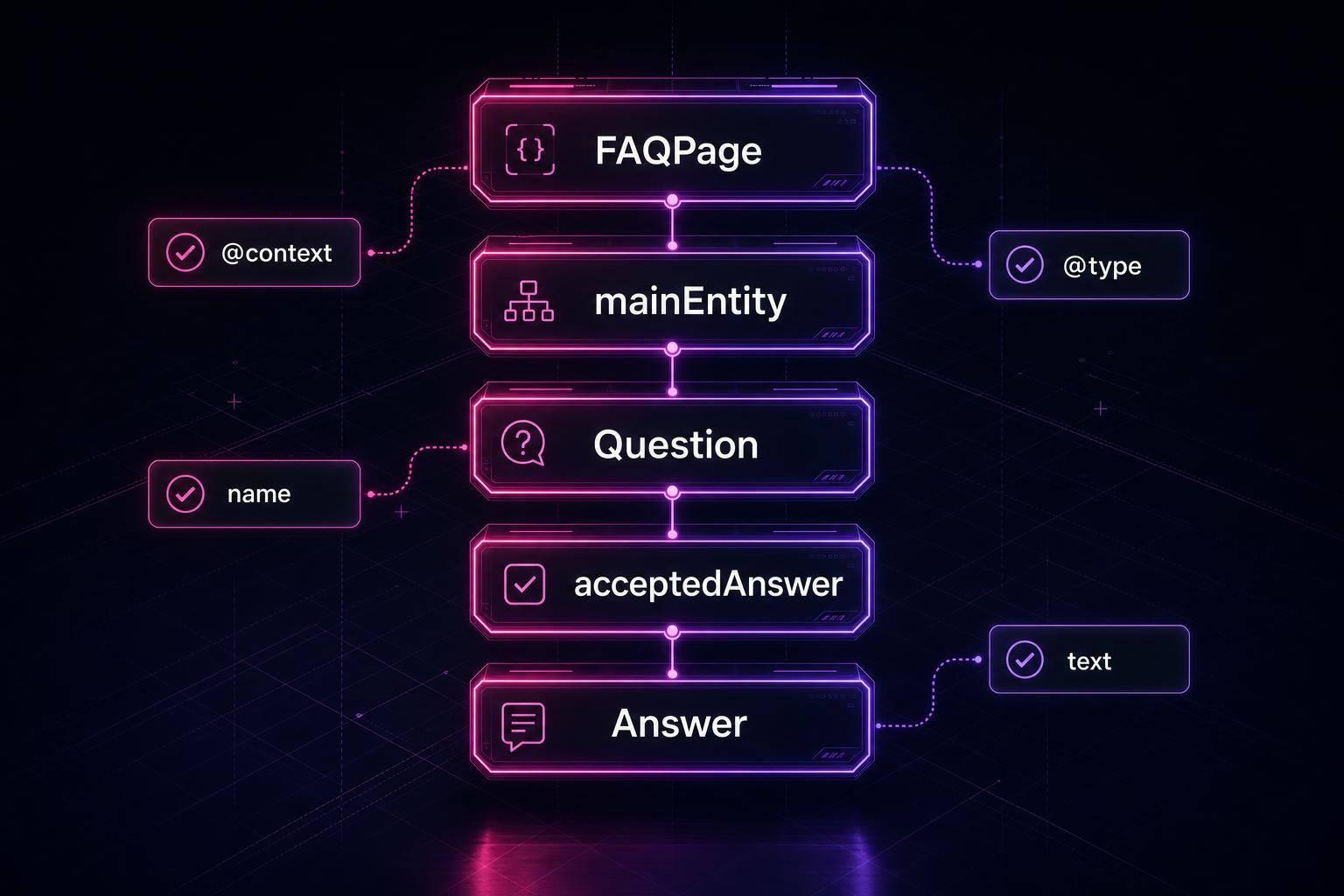
- FAQPage Schema: Structures question-and-answer content for better AI citations.
- HowTo Schema: Organizes step-by-step guides for better AI recognition.
- Review and AggregateRating Schema: Showcases ratings and reviews to make listings stand out.
- BreadcrumbList Schema: Improves navigation clarity with clickable breadcrumb trails.
These schema types are implemented using JSON-LD, Google's preferred format. Proper implementation ensures your content is eligible for rich results and AI-driven citations, making it more visible and engaging for users. Start with the basics like Organization and BreadcrumbList schema, then expand based on your site's needs. For a deeper dive, check out these schema markup essentials for beginners.
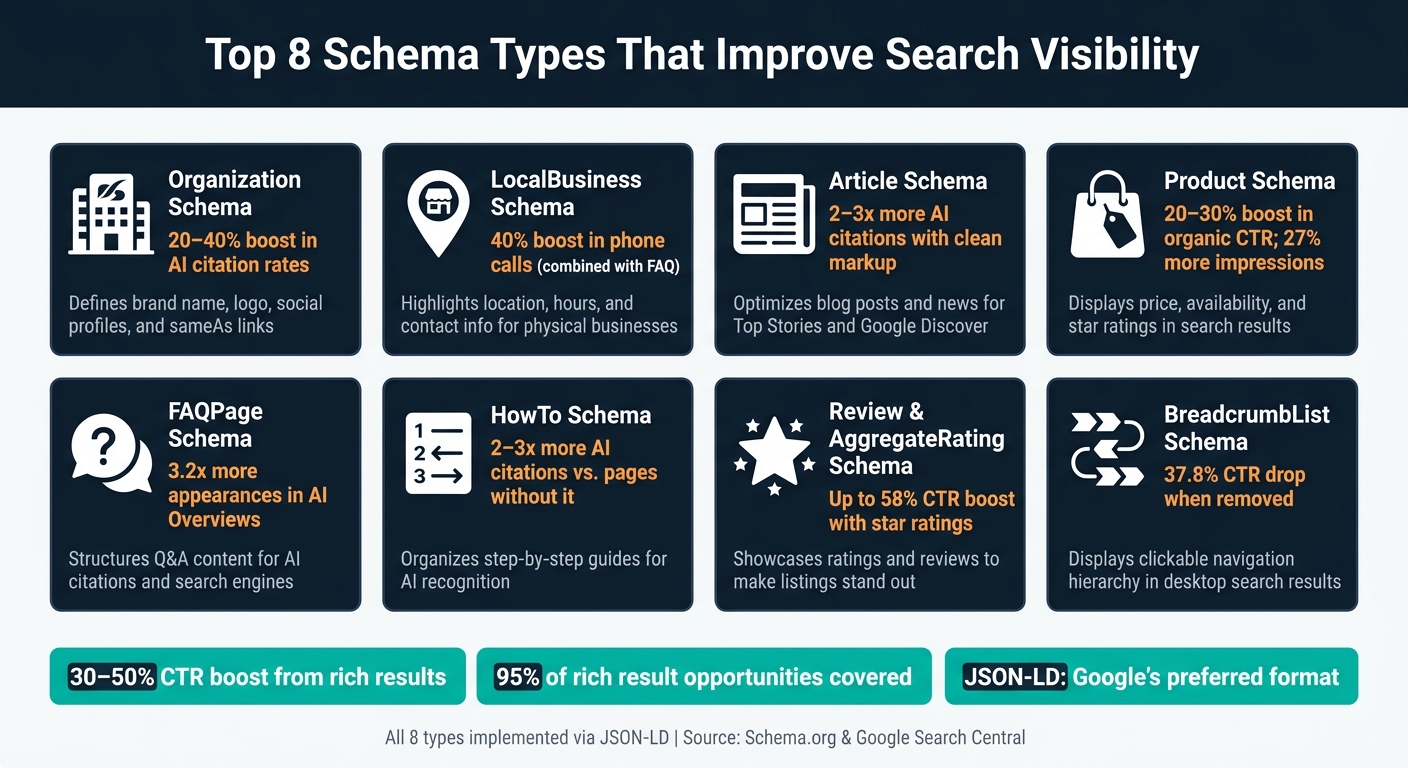
Top 8 Schema Types for Search Visibility: Benefits & Use Cases
Rich Results and Structured Data | Set Your Site Apart With These Search Features
sbb-itb-f4b2e1b
How These Schema Types Were Selected
Schema.org offers over 800 types, but Google supports only about 30–35 for rich results[5]. The selection process started with a simple rule: only schemas officially supported by Google for rich results were included. This ensures that each type directly contributes to visible search improvements.
The second consideration was practical impact. The eight schema types discussed here are tailored to common website categories - like e-commerce, local businesses, and content-driven sites - and cover around 95% of rich result opportunities[1]. These can be thought of as "Tier 1" schemas: they provide significant visual benefits with minimal implementation effort.
"Pick the wrong type and Google ignores you. Pick the right type and you get sitelinks, star ratings, FAQ accordions, breadcrumbs, video chips, and citations from Perplexity and ChatGPT inside two weeks." - Gaurav Tiwari, Gatilab[2]
By 2026, clean schema has become a key quality signal for AI-powered engines, boosting the likelihood of appearing in AI-generated answers[2]. Each schema type was chosen for its ability to enhance both traditional search engine results pages (SERPs) and AI-driven citations. This approach aligns seamlessly with the advantages of JSON-LD, which is covered in the next section.
Lastly, all the schema types here are implemented using JSON-LD, the format Google explicitly recommends[1]. With JSON-LD, you can update your page layout without affecting the schema, making it far easier to manage over time[1].
1. Organization Schema
Organization schema helps search engines understand your brand by outlining key details like your name, logo, contact information, and social media profiles.
"Organization defines your brand entity (and is what AI engines parse to identify you as a citation source)." - Gaurav Tiwari, Founder, Gatilab [2]
This schema works across nearly every industry. However, whenever possible, use specific subtypes such as MedicalOrganization, LegalService, or OnlineStore instead of the generic Organization.
One often-overlooked property is sameAs. This field links your schema to external profiles like LinkedIn, Wikipedia, and Wikidata, helping AI systems recognize your brand as a single, credible entity. For example, websites that included a comprehensive sameAs list with 8–12 entries experienced a 20–40% boost in AI citation rates within six weeks [2]. Companies like Nestlé saw an 82% jump in click-through rates after applying structured data across their sites [7], while SAP achieved a staggering 400% increase in clicks from rich results by integrating connected structured data [8].
Here’s a practical JSON-LD example for an Organization schema:
<script type="application/ld+json">
{
  "@context": "https://schema.org",
  "@type": "Corporation",
  "@id": "https://www.example.com/#organization",
  "name": "Example Inc.",
  "url": "https://www.example.com",
  "logo": {
    "@type": "ImageObject",
    "url": "https://www.example.com/logo.png"
  },
  "contactPoint": {
    "@type": "ContactPoint",
    "telephone": "+1-800-555-0100",
    "contactType": "customer service"
  },
  "sameAs": [
    "https://www.linkedin.com/company/example",
    "https://twitter.com/example",
    "https://en.wikipedia.org/wiki/Example_Inc"
  ]
}
</script>
The @id field is particularly important. It serves as a stable identifier, allowing other schemas - like Article or Product - to reference your organization without duplicating information. Add the full Organization schema to your homepage (or add schema to WordPress using a plugin) and use its @id elsewhere on your site to maintain consistent signals [9]. This structured setup creates a solid foundation for enhancing other schema types.
2. LocalBusiness Schema
Building on the Organization schema, the LocalBusiness schema focuses on businesses with a physical location. If your business has a storefront or office that customers can visit, this schema is a must. It helps search engines understand your location, operating hours, and contact details - essential information for appearing in Google's local pack, on maps, and in Knowledge Panels.
"LocalBusiness is one of the most under-implemented schema types I see in audits. Every business with a physical address customers can visit should have it." - Gaurav Tiwari, Gatilab [2]
When using this schema, always opt for specific subtypes like Dentist, AutoRepair, or Restaurant instead of the generic LocalBusiness. These subtypes unlock additional properties tailored to your industry. For example, the Restaurant subtype allows for details like servesCuisine and menu, while MedicalClinic includes specialties and credentials. As Kunal Kerkar, Founder of Kerkar Media, explains: "Specific subtypes are better than generic LocalBusiness... MedicalClinic is better than LocalBusiness for a clinic." [6]
Accurate local markup not only strengthens your broader brand signals but also boosts visibility across search results and AI-driven platforms. One often-overlooked property is geo. Including GeoCoordinates with latitude and longitude (to five decimal places) ensures precise map pin placement in local search results. With AI search engines increasingly prioritizing complete LocalBusiness data, having clean and detailed schema has become even more crucial [2].
For instance, a plumbing company experienced a 40% boost in phone calls by combining LocalBusiness and FAQ schemas, appearing in rich results for "emergency plumber near me" searches [11]. Overall, schema markup can increase click-through rates by up to 30% [11].
Here’s an example of a JSON-LD implementation for a restaurant:
<script type="application/ld+json">
{
  "@context": "https://schema.org",
  "@type": "Restaurant",
  "name": "The Corner Table",
  "address": {
    "@type": "PostalAddress",
    "streetAddress": "456 Oak Avenue",
    "addressLocality": "Chicago",
    "addressRegion": "IL",
    "postalCode": "60601",
    "addressCountry": "US"
  },
  "geo": {
    "@type": "GeoCoordinates",
    "latitude": 41.88325,
    "longitude": -87.63241
  },
  "telephone": "+1-312-555-0187",
  "servesCuisine": "American",
  "priceRange": "$",
  "openingHoursSpecification": [
    {
      "@type": "OpeningHoursSpecification",
      "dayOfWeek": ["Monday", "Tuesday", "Wednesday", "Thursday", "Friday"],
      "opens": "11:00",
      "closes": "22:00"
    },
    {
      "@type": "OpeningHoursSpecification",
      "dayOfWeek": ["Saturday", "Sunday"],
      "opens": "10:00",
      "closes": "23:00"
    }
  ],
  "image": "https://www.thecornertable.com/images/storefront.jpg"
}
</script>
Make sure that your schema reflects only the information visible on your website. For example, if you display operating hours or ratings, they must match what users see on the page. Google may issue penalties for misleading markup [2]. Regularly check your schema using tools like Schema Validator AI and monitor Google Search Console's Enhancements report to ensure compliance and fix any errors. These steps will help you maximize the impact of your LocalBusiness schema.
3. Article Schema
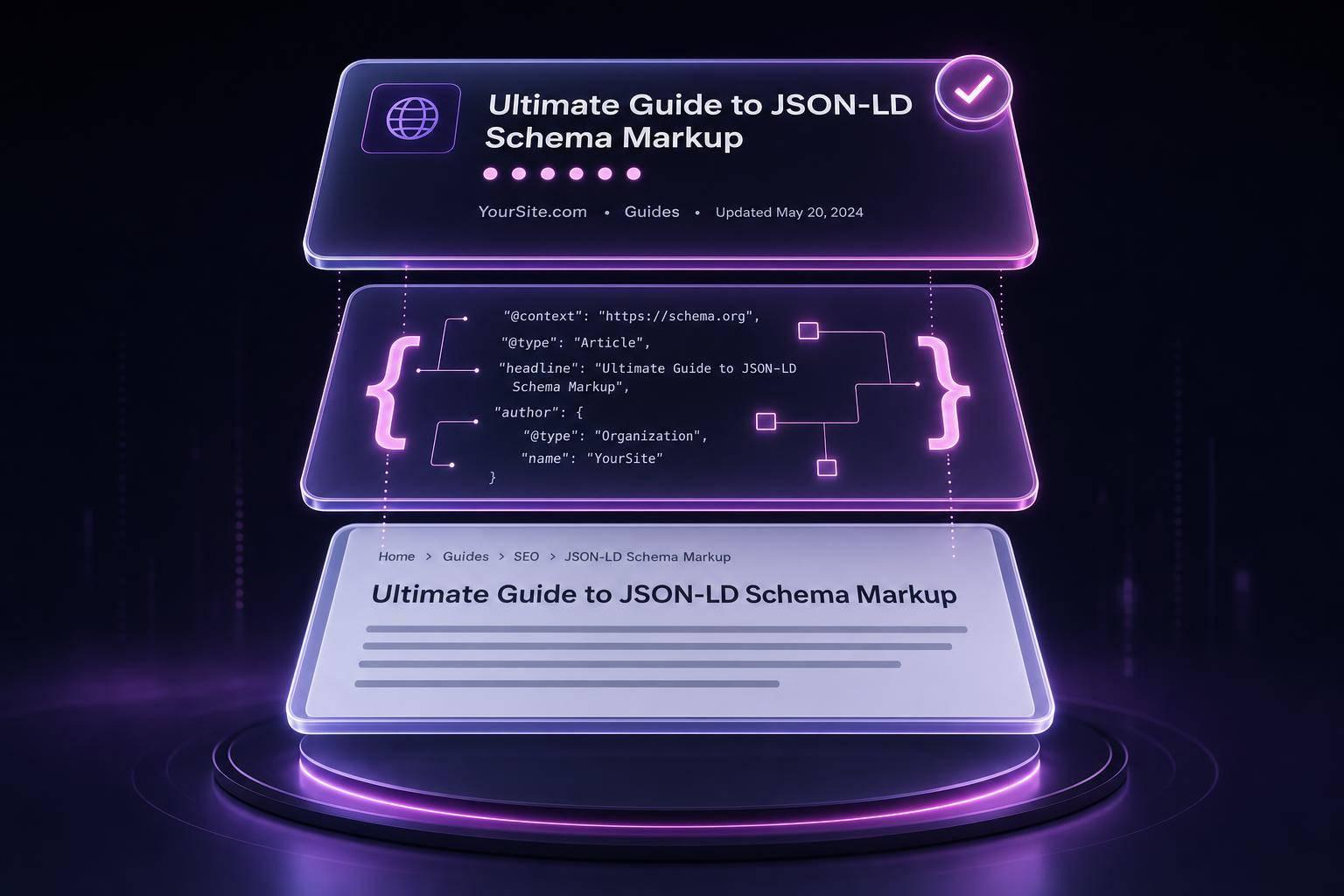
Article schema is a key tool for giving search engines structured details about your content, such as the author, publication date, and headline. This metadata helps blog posts, news articles, and other editorial pieces qualify for rich results like the Top Stories carousel or Google Discover.
"Article schema is foundational... it ensures Google has clear context about the content type, author identity, and publication freshness." - Celestine Abaka, AI Visibility Engineer, AuthorityStack.ai [4]
There are three main subtypes to focus on:
NewsArticle: Ideal for news-related content.BlogPosting: Suited for blogs or SaaS platforms.Article: A general option for other editorial content.
These subtypes help Google better understand and categorize your content, making it easier to match with relevant search features.
Why dateModified Matters
Including the dateModified property is crucial. Skipping it can make your content appear outdated, which could hurt its performance. As Gaurav Tiwari of Gatilab points out:
"Skipping dateModified is the single most common mistake I see; it's what lets Google know your evergreen guide is still being maintained." [2]
This is especially relevant because 50% of AI citations come from content updated within the last 13 weeks. Older content may face penalties in AI-generated results [3].
Boosting Authoritativeness with Structured Data
Pages that use clean Article, Organization, and FAQPage markup are cited 2 to 3 times more often by AI engines than similar pages without structured data [2]. To further enhance credibility and support E-E-A-T principles, include a detailed Person object in the author property. Don’t just use a name - add the author's URL or social media profile for more depth.
Example: JSON-LD for a BlogPosting
Here’s a practical example of how to implement a BlogPosting schema:
<script type="application/ld+json">
{
  "@context": "https://schema.org",
  "@type": "BlogPosting",
  "headline": "Top 8 Schema Types That Improve Search Visibility",
  "image": "https://www.example.com/images/schema-types.jpg",
  "datePublished": "2026-06-12T08:00:00+00:00",
  "dateModified": "2026-06-12T08:00:00+00:00",
  "author": {
    "@type": "Person",
    "name": "Jane Doe",
    "url": "https://www.example.com/about/jane-doe"
  },
  "publisher": {
    "@type": "Organization",
    "name": "Example Media",
    "logo": {
      "@type": "ImageObject",
      "url": "https://www.example.com/images/logo.png"
    }
  },
  "mainEntityOfPage": {
    "@type": "WebPage",
    "@id": "https://www.example.com/blog/schema-types"
  },
  "description": "A practical guide to the top schema types that boost search visibility and enable rich results.",
  "inLanguage": "en-US"
}
</script>
This setup not only provides clear metadata but also aligns with best practices to improve your content's visibility and chances for rich result features.
4. Product Schema
Product schema is a powerful tool to improve your site's visibility by providing search engines with structured data about your products. This includes details like price, availability, and customer ratings. When implemented correctly, it enables rich search results - think price badges, in-stock labels, and star ratings - making your products stand out in search results.
E-commerce websites that use Product schema typically see a 20–30% boost in organic click-through rates. Moreover, product detail pages experience an average 27% increase in impressions over 90 days [12]. Correctly marked-up product pages are 58% more likely to generate rich results compared to those missing or using improper schema [12].
"Product schema is essential for e-commerce sites. It powers the price, in-stock label, star rating, and review count under your listing." - Gaurav Tiwari, Gatilab [2]
This schema isn't just for retail. Industries like automotive (vehicle specs and inventory), real estate (property listings), B2B manufacturing (catalogs), and SaaS (software details) also use it. Each sector tailors the schema to highlight the most relevant details for their audience. Starting in 2026, including shippingDetails and hasMerchantReturnPolicy will be necessary to maintain eligibility for retail-related rich results. Be cautious with hardcoded prices; if they don't match visible prices, it can lead to warnings and prevent rich results [2][12].
Key Properties to Include
| Property | Requirement | Purpose |
|---|---|---|
name, image, description |
Required | Ensures basic validity and indexing |
offers (price, priceCurrency, availability) |
Required | Enables price and stock badges |
shippingDetails, hasMerchantReturnPolicy |
Functionally Required | Needed for price snippets in many regions [2] |
aggregateRating, review |
Recommended | Adds star ratings and review counts |
brand, sku, gtin |
Recommended | Helps search engines uniquely identify products |
Example: JSON-LD for a Product Page
<script type="application/ld+json">
{
  "@context": "https://schema.org",
  "@type": "Product",
  "name": "Wireless Noise-Canceling Headphones",
  "image": "https://www.example.com/images/headphones.jpg",
  "description": "Over-ear wireless headphones with active noise cancellation and 30-hour battery life.",
  "brand": {
    "@type": "Brand",
    "name": "SoundCore"
  },
  "sku": "SC-WH1000XM5",
  "gtin": "0123456789012",
  "offers": {
    "@type": "Offer",
    "price": "299.99",
    "priceCurrency": "USD",
    "availability": "https://schema.org/InStock",
    "priceValidUntil": "2026-12-31",
    "shippingDetails": {
      "@type": "OfferShippingDetails",
      "shippingRate": {
        "@type": "MonetaryAmount",
        "value": "0",
        "currency": "USD"
      },
      "deliveryTime": {
        "@type": "ShippingDeliveryTime",
        "businessDays": {
          "@type": "OpeningHoursSpecification",
          "dayOfWeek": ["Monday", "Tuesday", "Wednesday", "Thursday", "Friday"]
        },
        "cutoffTime": "17:00:00-05:00",
        "handlingTime": {
          "@type": "QuantitativeValue",
          "minValue": 1,
          "maxValue": 2,
          "unitCode": "DAY"
        },
        "transitTime": {
          "@type": "QuantitativeValue",
          "minValue": 2,
          "maxValue": 5,
          "unitCode": "DAY"
        }
      }
    },
    "hasMerchantReturnPolicy": {
      "@type": "MerchantReturnPolicy",
      "returnPolicyCategory": "https://schema.org/MerchantReturnFiniteReturnWindow",
      "merchantReturnDays": 30,
      "returnMethod": "https://schema.org/ReturnByMail"
    }
  },
  "aggregateRating": {
    "@type": "AggregateRating",
    "ratingValue": "4.7",
    "reviewCount": "1284"
  }
}
</script>
For best results, dynamically source values like price and availability instead of hardcoding them. Use Schema.org URLs (e.g., https://schema.org/InStock) for the availability property rather than plain text. Also, avoid injecting Product schema through Google Tag Manager, as it may load too late for Google to process during crawling [2]. Use tools like Schema Validator AI to check both the structure and eligibility of your markup for rich results.
Up next, learn how to implement and validate schema markup using JSON-LD to ensure everything stays accurate and eligible for rich results.
5. FAQPage Schema
The FAQPage schema is a way to let search engines know that your page includes structured question-and-answer content. It's implemented as a JSON-LD block, which helps crawlers quickly identify and extract Q&A pairs without needing to analyze the whole page.
Important Update: As of May 2026, Google has officially removed the visual FAQ accordion from standard search results [15]. While expandable snippets are no longer displayed, the FAQPage schema now plays a key role in powering AI Overviews and ChatGPT Search. Pages with this markup appear in AI Overviews about 3.2 times more often than similar pages without it [15]. This change reflects the growing importance of structured data in AI-driven search.
"The visual snippet died. The structured data behind it did not. Those are two different things, and the gap between them is exactly where most SEO advice is now wrong." - Molixa [15]
The FAQPage schema is versatile and works across many industries. For example:
- SaaS companies use it for help centers and troubleshooting guides.
- E-commerce sites apply it to product compatibility details and return policies.
- Logistics companies focus on delivery-related FAQs.
- Health and government websites, which were among the last to display rich results before deprecation, also rely on it for clear, direct answers.
In all cases, the purpose is the same: provide AI systems with concise, structured answers that can be quoted directly.
Key Properties to Include
| Property | Requirement | Purpose |
|---|---|---|
@type: FAQPage |
Required | Identifies the page as an FAQ resource |
mainEntity |
Required | Holds the array of Question objects |
name (within Question) |
Required | The question text, which must match visible content |
acceptedAnswer → text |
Required | The answer text; 40–150 words is recommended |
dateModified |
Recommended | Indicates content freshness to AI systems [16] |
Example: JSON-LD for an FAQPage
<script type="application/ld+json">
{
  "@context": "https://schema.org",
  "@type": "FAQPage",
  "mainEntity": [
    {
      "@type": "Question",
      "name": "Does the headphone work with Bluetooth 5.0 devices?",
      "acceptedAnswer": {
        "@type": "Answer",
        "text": "Yes, the SoundCore WH1000XM5 is fully compatible with Bluetooth 5.0 and later. It supports multipoint pairing, allowing simultaneous connection to two devices. Battery life remains at 30 hours with active noise cancellation enabled."
      }
    },
    {
      "@type": "Question",
      "name": "What is the return window for this product?",
      "acceptedAnswer": {
        "@type": "Answer",
        "text": "You can return the product within 30 days of delivery. Returns are accepted by mail with a prepaid shipping label included in the original packaging."
      }
    }
  ]
}
</script>
Just like Organization or Product schemas, FAQPage markup boosts visibility in both traditional SERPs and AI-generated citations. To ensure proper implementation:
- Use straight double quotes (
") throughout your JSON-LD. - Keep each page's questions limited to 5–8; going beyond 12 could trigger keyword-stuffing penalties [14].
- Ensure every question and answer matches the visible text on the page exactly. Google ignores hidden FAQ markup, which is critical for accurate AI extraction [13][14].
6. HowTo Schema
HowTo schema is a way to structure step-by-step instructional content so search engines can better understand and display it. Think of it as a machine-readable guide that organizes each step in a clear, ordered format. While its visual impact in search results has diminished, its importance for AI-driven citations has grown.
Important Update: As of September 2023, Google removed HowTo rich results from all devices, restricting their visual display in search results to trusted government and health websites [17]. Although the accordion-style feature is no longer widely available, HowTo schema still plays a critical role. Pages with this markup are cited 2–3 times more often by AI systems like ChatGPT, Perplexity, and Gemini compared to pages without it [2]. This trend mirrors the shift seen with FAQPage and Article schemas, where structured data increasingly fuels AI citations rather than enhancing visual search features.
"HowTo - same status as FAQ. Useful for AI; rare in SERPs." - Gaurav Tiwari, Gatilab [2]
HowTo schema is versatile and works across industries. SaaS companies use it for technical guides, food blogs integrate it with Recipe schema for cooking instructions, and DIY sites rely on it for repair tutorials. Educational platforms also use it for step-by-step lesson plans. Essentially, if your content involves a sequence of actions, HowTo schema can help.
However, not all content benefits equally. A short, 300-word tutorial may not need markup, but a detailed, 1,800-word guide with well-defined steps is more likely to be recognized by AI systems [10]. As Martial Notarangelo, Founder of Authority Specialist, puts it:
"Poorly implemented schema adds no value. Structured data amplifies content quality when used on comprehensive guides." - Martial Notarangelo, Authority Specialist [10]
Key Properties to Include
| Property | Requirement | Description |
|---|---|---|
@type: HowTo |
Required | Identifies the content as a procedural guide |
name |
Required | Title of the task or tutorial |
step |
Required | Array of HowToStep objects with name and text |
totalTime |
ISO 8601 | Total duration (e.g., PT45M) |
supply |
Optional | Materials or ingredients needed |
tool |
Optional | Equipment or software required |
safetyConsideration |
Optional | Warnings or safety notes for physical tasks |
Example: JSON-LD for a HowTo Guide
<script type="application/ld+json">
{
  "@context": "https://schema.org",
  "@type": "HowTo",
  "name": "How to Set Up Two-Factor Authentication in Your SaaS Account",
  "totalTime": "PT10M",
  "tool": [
    {
      "@type": "HowToTool",
      "name": "Authenticator app (e.g., Google Authenticator)"
    }
  ],
  "step": [
    {
      "@type": "HowToStep",
      "position": 1,
      "name": "Open Account Settings",
      "text": "Log in to your account and navigate to Settings > Security."
    },
    {
      "@type": "HowToStep",
      "position": 2,
      "name": "Enable Two-Factor Authentication",
      "text": "Toggle the Two-Factor Authentication option to 'On' and select 'Authenticator App' as your method."
    },
    {
      "@type": "HowToStep",
      "position": 3,
      "name": "Scan the QR Code",
      "text": "Open your authenticator app, tap 'Add Account,' and scan the QR code displayed on screen."
    }
  ]
}
</script>
When implementing HowTo schema, keep these tips in mind:
- Ensure every step in your JSON-LD matches the visible text on the page exactly. Hidden steps can result in manual penalties from Google [17].
- Use ISO 8601 format for time values (e.g.,
PT10Mfor 10 minutes). - Always validate your schema using tools like the Schema.org Validator and the Google Rich Results Test.
7. Review and AggregateRating Schema
Review and AggregateRating schemas turn customer feedback into structured data, enabling star ratings to appear in search results. These visual elements can significantly affect click-through rates (CTR). Listings with star ratings can boost CTR by up to 58% compared to standard results [18], while product pages featuring ratings and price data may experience a 40–60% increase in CTR [20].
Each schema has a distinct purpose. AggregateRating summarizes the overall feedback, including the average rating and total review count. Review, on the other hand, focuses on individual details like the reviewer's name, their rating, and the text of their review. For e-commerce sites, combining these schemas within a Product schema ensures accurate and impactful structured data. This approach converts customer feedback into a powerful signal for search engines.
"Structured data isn't just about feeding robots; it's about translating customer sentiment into a technical language that algorithms reward with visibility. It is the only way to ensure your social proof travels beyond your product page." - Amit Bachbut, eCommerce Retention Expert [18]
These schemas enhance visibility in both e-commerce and local search by showcasing ratings and reviews. SaaS platforms often embed AggregateRating within the SoftwareApplication schema to highlight user satisfaction directly in search snippets [2].
When implementing, ensure that only reviews visible to users on the page are marked up. Google discourages marking up numerous reviews that aren't displayed and may penalize such practices [18]. Additionally, LocalBusiness and Organization schemas cannot include reviews collected by the business about itself, as Google considers these self-serving. However, this restriction does not apply to the Product schema [18].
Key Properties for AggregateRating
| Property | Required | Description |
|---|---|---|
ratingValue |
Yes | The average rating score (e.g., "4.7") |
reviewCount |
Yes* | Total number of text-based reviews |
ratingCount |
Yes* | Total number of ratings (including non-text ones) |
bestRating |
Recommended | Highest value in the scale (e.g., 5) |
worstRating |
Recommended | Lowest value in the scale (e.g., 1) |
*You must include either reviewCount or ratingCount, but using both is ideal.
Example: JSON-LD for Product with AggregateRating and Review
<script type="application/ld+json">
{
  "@context": "https://schema.org",
  "@type": "Product",
  "name": "Wireless Noise-Canceling Headphones",
  "aggregateRating": {
    "@type": "AggregateRating",
    "ratingValue": "4.7",
    "reviewCount": "1284",
    "bestRating": "5",
    "worstRating": "1"
  },
  "review": [
    {
      "@type": "Review",
      "author": {
        "@type": "Person",
        "name": "Jamie Torres"
      },
      "reviewRating": {
        "@type": "Rating",
        "ratingValue": "5",
        "bestRating": "5"
      },
      "reviewBody": "Exceptional sound quality and the battery lasts all day. Best purchase I've made this year."
    }
  ]
}
</script>
When using ratingValue, stick to a decimal format (e.g., "4.7"), and always use ISO 4217 currency codes (e.g., "USD") [21][19]. For large catalogs, consider server-side schema generation to keep the data in sync with new reviews, avoiding discrepancies between the markup and the visible content [18].
"Partial implementation produces zero rich result lift - completeness is non-negotiable." - Digital Applied [20]
After deploying your schema, validate it using the Google Rich Results Test to ensure eligibility for star ratings. Regularly check the Enhancements tab in Google Search Console to catch and fix any errors before they impact your search performance [18][19]. The next section will cover more practical implementation details.
8. BreadcrumbList Schema
BreadcrumbList schema takes navigation clarity to the next level by displaying a clickable breadcrumb trail in desktop search results. Instead of showing raw URLs, it provides a clear, hierarchical structure of a page’s location within a website. This not only improves user experience but also strengthens trust and sends strong topical signals to search engines powered by AI [22][23].
The impact on SEO is clear. For instance, one site experienced a 37.8% drop in click-through rate (CTR) after removing breadcrumbs, but the CTR bounced back after the BreadcrumbList markup was restored [23]. However, keep in mind that starting January 2025, Google will no longer display breadcrumbs in mobile search results, though mobile indexing remains unaffected [23].
BreadcrumbList schema can be applied across a wide range of industries, making it incredibly versatile:
| Industry | Example |
|---|---|
| E-commerce | Home > Shoes > Running > Men's Size 10 |
| Editorial/News | Home > Technology > AI > Article Title |
| SaaS/Software | Home > Features > Integrations > Zapier |
| Local Business | Home > Locations > Chicago > Lincoln Park Branch |
| Education | Home > Courses > Data Science > Lesson 3 |
Implementing BreadcrumbList schema involves using JSON-LD. At its core, the BreadcrumbList container must include at least two ListItem elements. Each element should specify a position (starting at 1), a name, and an item URL. For the last item in the breadcrumb trail, the item property is optional - Google will default to the page’s URL if it’s not provided [22].
Example: JSON-LD for BreadcrumbList
<script type="application/ld+json">
{
  "@context": "https://schema.org",
  "@type": "BreadcrumbList",
  "itemListElement": [
    {
      "@type": "ListItem",
      "position": 1,
      "name": "Home",
      "item": "https://example.com/"
    },
    {
      "@type": "ListItem",
      "position": 2,
      "name": "Blog",
      "item": "https://example.com/blog/"
    },
    {
      "@type": "ListItem",
      "position": 3,
      "name": "Top 8 Schema Types That Improve Search Visibility",
      "item": "https://example.com/blog/schema-types-search-visibility/"
    }
  ]
}
</script>
When implementing, always use absolute URLs and ensure the breadcrumb schema mirrors the breadcrumbs displayed on the page [22]. The example above illustrates a simple yet effective way to set up BreadcrumbList schema.
How to Implement and Validate Schema Markup with JSON-LD
As mentioned earlier, using JSON-LD correctly is essential for achieving rich results in search. JSON-LD is Google's preferred format for structured data, and it’s implemented within a <script type="application/ld+json"> tag. This tag can be placed anywhere in your HTML - whether in the <head> or <body> - keeping it separate from your visible content. This separation allows developers to manage it independently without affecting the user interface.
Each JSON-LD block must include two key elements: @context (typically set to "https://schema.org") and @type (e.g., Product or FAQPage). From there, you add the necessary fields relevant to the schema type. To maintain consistency, always use stable @id values to link related entities. For example, you can connect an Organization entity to a Product entity as its brand. This approach avoids duplicating data across multiple schema blocks.
Here’s how to implement schema markup depending on your platform:
| Implementation Path | Best For | Key Tradeoff |
|---|---|---|
| SEO Plugin | WordPress | Simple to set up, but limited for specialized schema types |
| Tag Manager (GTM) | Shopify, Webflow, Wix | Avoids theme edits but may result in data inconsistencies |
| Manual Theme Injection | Custom sites, niche schema types | Offers full control but risks breaking if templates change |
This framework ensures your structured data remains manageable as your website grows.
Validating Your Schema Markup
Once your schema is in place, validation is critical. Use these two tools for a thorough check:
- Google Rich Results Test: Confirms whether Google can generate features like star ratings or FAQ accordions from your markup.
- Schema.org Validator: Ensures your JSON-LD complies with Schema.org’s standards.
Testing with both tools ensures your implementation is accurate and fully compliant.
For a more streamlined approach, tools like Schema Validator AI can simplify this process. This platform combines URL audits, Google Rich Results validation, and AI-driven schema recommendations into one tool, making it easier to manage structured data.
Monitoring Performance and Avoiding Common Pitfalls
After validation, track your schema’s performance using Google Search Console. Check the Enhancement reports for any flagged Errors - these can prevent your page from appearing with rich results. While Warnings are less urgent, they highlight missing recommended properties that could improve your outcomes.
As Gaurav Tiwari, Founder of Gatilab, emphasizes:
"The compounding effect of clean schema across a site is the single most under-appreciated SEO win in 2026."
To avoid penalties, steer clear of these two common mistakes:
- Marking up non-visible content: Google may penalize you for including structured data that users can’t see.
- Mismatching dynamic data: For example, ensure prices or other dynamic information in your schema match what’s displayed on the page.
Conclusion
This guide explored schema types that can greatly improve search visibility and interaction with AI systems. By using schema markup, you can achieve practical SEO gains that directly impact your site's performance. The eight schema types covered - Organization, LocalBusiness, Article, Product, FAQPage, HowTo, Review/AggregateRating, and BreadcrumbList - target key opportunities for nearly all kinds of websites. Together, they help unlock rich search results, establish your brand's credibility, and make your content more accessible to both search engines and AI tools.
Throughout this guide, we’ve shown how these schema types can lead to measurable improvements, such as higher click-through rates (CTR), increased AI citation rates, and greater visibility in search results. These benefits grow over time as you expand schema implementation across your site.
"Schema is not a direct ranking factor... Treat it as visibility infrastructure, not a ranking lever." - Gaurav Tiwari, Founder, Gatilab [2]
A good starting point is to implement Organization, BreadcrumbList, and one schema type tailored to your site's content. As your website grows and goals shift, you can gradually adopt additional schema types. If you're unsure how to proceed, tools like Schema Validator AI can audit your URLs, identify missing or broken markup, and even generate ready-to-use JSON-LD code.
The earlier you incorporate accurate schema markup, the more benefits you’ll see over time. Take the first step today to lay the groundwork for long-term SEO success.
FAQs
Which schema types should I add first for my site?
To improve your site's visibility and make it easier for both search engines and AI to understand your content, start with foundational schemas like Organization, WebSite, and BreadcrumbList. These provide a solid base for site-wide recognition and help with content discoverability.
Next, add schemas tailored to your specific content. For example, use Article, FAQPage, or Product schemas based on your site's focus. If you're running an e-commerce site, incorporating Product, Offer, and Review schemas can significantly enhance your shopping-related visibility.
This layered strategy helps ensure your site has a stronger presence in search results and is better understood by AI systems.
How do I validate my JSON-LD so Google can use it?
To make sure your JSON-LD is set up correctly for Google, you’ll need to use a couple of tools. Start with the Schema.org Validator to verify that your structured data is accurate. Then, run it through Google’s Rich Results Test to check if it qualifies for rich results. Once it’s live, keep an eye on Google Search Console’s Enhancement reports. These reports will help you spot any warnings or errors, ensuring your markup meets schema.org standards and boosts your search visibility.
Why use FAQ and HowTo schema if Google doesn’t show them anymore?
Although Google has scaled back the visibility of FAQ and HowTo rich results, these schemas still hold importance. They contribute to AI citation, improve how your content is interpreted, and serve as subtle indicators of your page's depth. This adds value by boosting your site's relevance and improving its overall structure.