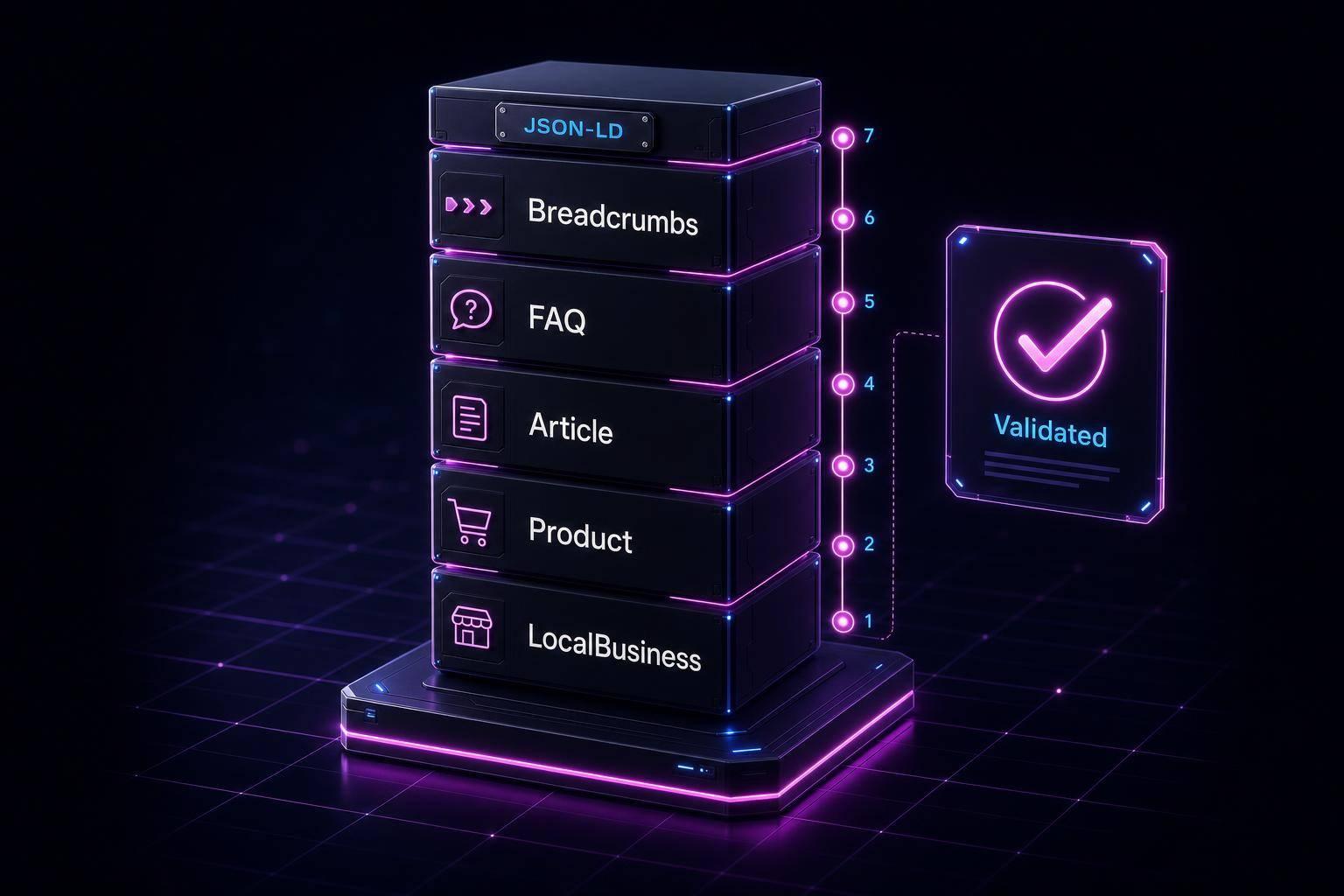
Schema markup is essential for making your website content easier for search engines to understand and display in rich formats, like star ratings, FAQs, and prices. This can increase your click-through rates by 20–40%, even without improving your ranking. Here's a quick breakdown of what you need to know:
- What is Schema Markup? It's a set of HTML tags that helps search engines interpret your content. Using Schema.org's vocabulary, you can describe things like articles, products, or events.
- Choosing the Right Schema Type: Match your page's content to the correct schema type (e.g.,
Productfor e-commerce orArticlefor blogs). Only a subset of schema types supports rich results. - Use JSON-LD: Google recommends JSON-LD format for structured data. It's easy to add and maintain using a
<script>block. - Keep Schema Accurate: Your schema must match the visible content on your page. Mismatched or outdated data can lead to penalties or loss of rich results.
- Validate Your Schema: Use tools like Google Rich Results Test or Schema.org Validator to ensure your markup works and qualifies for rich results.
- Stay Updated: Update your schema whenever you change content, like prices or dates, to maintain accuracy.
- Track Performance: Use Google Search Console to monitor schema errors and measure the impact of rich results on clicks and impressions.
Key takeaway: Start small by applying schema to your most important pages, validate it, and monitor performance to improve search visibility.
Schema Markup: A Beginner's Guide to Structured Data for SEO
sbb-itb-f4b2e1b
1. What Schema Markup Is and How Schema.org Works
Schema markup involves adding specific tags to your HTML, helping search engines better understand the meaning of your content. The backbone of this system is Schema.org, a shared vocabulary that defines these tags and their properties.
Launched in 2011 by Google, Bing, Yahoo, and Yandex, Schema.org acts as a universal reference for web content. It includes over 900 types - like Product, Recipe, or Event - and more than 1,500 properties to describe them [10]. When you use Schema.org terms in your markup, search engines immediately recognize and interpret the content you're presenting. The vocabulary is organized hierarchically, with every type ultimately inheriting from the root type, Thing. For example, BlogPosting is a subtype of Article, which is a subtype of CreativeWork, all stemming from Thing [10]. The more specific your schema type, the more context it provides, helping search engines better understand your page.
Why should this matter to you? Adding schema markup makes your pages eligible for rich results - those enhanced search listings that can display features like star ratings, prices, or FAQ sections directly in search results. These rich results can boost click-through rates by 18–35%, even if your ranking stays the same [1]. Surprisingly, only about 33% of websites currently use structured data [8], so implementing schema now gives you a competitive edge.
2. How to Pick the Right Schema Type for Your Content
First, ask yourself: What is this page primarily about? Whether you're dealing with a product page, a blog post, or a local business listing, aligning your content with the correct schema type is key.
Details make a difference. Schema.org offers over 900 schema types, but only a small portion of these are recognized by Google for rich results [6]. For example, a dental practice should use the Dentist schema instead of the broader LocalBusiness to provide more precise context. Similarly, food-related content benefits from the Recipe schema, which can display cook time, calorie details, and images - information that a generic Article schema won't provide.
Here’s a quick guide to common U.S.-focused page types and their ideal schema options:
| Page Type | Best Schema Type | Rich Result Potential |
|---|---|---|
| Blog or news article | Article / BlogPosting |
Headline, author, date; Top Stories carousel [11][2] |
| E-commerce product | Product |
Price, availability, star ratings [11][5] |
| Physical business | LocalBusiness (or subtype) |
Knowledge Panel, Google Maps, Local Pack [11][2] |
| Homepage | Organization + WebSite |
Brand logo, social profiles [11][4] |
| Food or cooking | Recipe |
Cook time, calories, images [11][2] |
| Events | Event |
Dates, locations, ticket availability [11][12] |
| Site navigation | BreadcrumbList |
Readable path in search instead of raw URL [2][4] |
| Job listings | JobPosting |
Salary, location, Google for Jobs listing [11] |
It’s important to note that not all schema types will result in visual enhancements in search results. Before implementing, check your schema type against Google Search Central's Search Gallery. Currently, Google supports 22 rich result types [3]. For instance, HowTo rich results were removed in 2023, and FAQ rich results are now mostly restricted to government and health-related websites [5][6].
"Schema markup is not a direct ranking factor. However, it enables rich results that improve click-through rates." - Schema.biz [2]
If you’re just getting started, focus on applying one impactful schema type to your most important pages. For example, use Product for e-commerce pages or Article for blogs. Once you’ve validated your markup, you can expand to other schema types.
3. How to Use JSON-LD for Structured Data
After choosing the right schema type for your page, the next step is integrating it. JSON-LD (JavaScript Object Notation for Linked Data) is the format you’ll use, and it’s the one Google officially recommends.
"Google recommends using JSON-LD for structured data whenever possible." - Google Search Central [13]
JSON-LD is added within a separate <script> block, keeping it isolated from your visible content. This separation ensures the structured data doesn’t interfere with your page layout or design. By placing it in its own <script> block, you can enhance your content without altering what users see.
Here’s an example of a simple Article JSON-LD snippet:
<script type="application/ld+json">
{
  "@context": "https://schema.org",
  "@type": "Article",
  "headline": "Schema Markup for Beginners",
  "author": {
    "@type": "Person",
    "name": "Jane Smith"
  },
  "datePublished": "2026-06-10",
  "image": "https://example.com/images/schema-guide.jpg"
}
</script>
Every JSON-LD snippet must include two essential properties: "@context" (always set to "https://schema.org") and "@type" (the type of entity, like Article or Product). Keep in mind that Schema.org types are case-sensitive - for instance, "Article" will work, but "article" won’t pass validation [13]. Additionally, always use absolute URLs (e.g., https://example.com/image.jpg) and follow the ISO 8601 date format (e.g., 2026-06-10) for proper parsing [6]. Adding this snippet correctly is a big step toward improving your search visibility.
If coding feels overwhelming, there are tools to simplify the process. WordPress users can rely on plugins like Yoast SEO or Rank Math, while Shopify offers apps such as JSON-LD for SEO. Platforms like Wix, Squarespace, and Webflow also provide built-in options for adding or injecting JSON-LD scripts [14]. When implemented correctly, structured data can increase click-through rates by 20–40% [2].
4. Why Your Schema Must Reflect Your Page Content
Your schema should always match the visible content on your page. Think of it as a "label maker" for your site - it identifies what’s already there but doesn’t create anything new. This principle is central to Google's guidelines for structured data, and ignoring it can lead to serious issues.
"Treat schema like a label maker: it should label what's already there - not invent it." - TopOut Group [16]
One of the biggest pitfalls is data mismatch. This happens when the information in your JSON-LD schema doesn’t align with what’s displayed on your page. For instance, if your schema lists a product price as "$49.99" but your page shows "$59.99", Google could penalize your site or remove those rich search results entirely [2][8]. What makes this issue tricky is that it’s silent - your website will still function, but features like star ratings or price snippets will disappear from search results without any warning [5].
Another common issue is stale data. Whenever you update your page - whether it’s product prices, business hours, or other details - you need to adjust your schema as well. Don’t forget to update the dateModified field to reflect these changes [6][15].
It’s also crucial to avoid marking up content that users or crawlers can’t see. If something is hidden behind a login, concealed with CSS, or tucked into a tab that crawlers can’t easily access, it shouldn’t be included in your schema. This applies to prices, reviews, FAQs, or any other type of data [7][9].
Keeping your schema accurate and up-to-date ensures a solid foundation for validating your markup in the next step.
5. How to Validate Your Schema Markup
Once you've added schema markup that aligns with your page content, the next step is to ensure it works as intended. The best tool for this is the Google Rich Results Test. With this tool, you can either enter your page URL or paste your raw JSON-LD code. It will check if your page qualifies for rich features like star ratings, FAQ dropdowns, or product price snippets, and even show you a preview of how it might appear in search results. For a more in-depth technical check, the Schema.org Validator can help identify structural issues that the Rich Results Test might overlook.
"Implementing schema without testing is like writing code without running it." - Vinay Upadhyay, Founder, RankSages [18]
Even if your syntax is correct, leaving out required properties - like price for a Product or datePublished for an Article - can stop your page from generating rich results [17]. The Rich Results Test will flag these missing elements, making it easier to identify and fix them.
When reviewing results, focus on red "Errors" first, as these prevent rich results from appearing. Amber "Warnings" are less urgent and can be addressed later. Once errors are fixed on your live page, use the "Validate Fix" option in Google Search Console to request a faster re-crawl, instead of waiting for Google's regular crawl schedule.
For beginners, a good workflow is to validate your JSON-LD code in snippet mode before publishing your page. Once the page is live, re-test the URL to ensure everything is functioning correctly. To monitor schema health over time, use the Enhancements report in Google Search Console. This report shows which pages have errors, warnings, or are successfully generating rich results.
If you're looking for a more streamlined approach, tools like Schema Validator AI combine Google Rich Results validation with AI-powered recommendations. This makes it easier to catch and fix issues without manually digging through raw code.
Finally, remember to update your schema whenever your content changes to keep it accurate and effective.
6. How to Keep Your Schema Current as Content Changes
Your schema markup needs to stay in sync with your content. Whenever you update your site, your schema should reflect those changes to maintain its effectiveness.
"Schema markup is not a set-it-and-forget-it task. When you change prices, update hours, or modify content, the structured data must change too." - Schema.biz Team [2]
If details like prices or hours in your schema don’t match your actual content, Google might disregard your rich results entirely [5]. Outdated schema, whether caused by price adjustments or CMS updates, can lead to the removal of rich results. And once they’re gone, it could take weeks to get them back [5][6].
Changes to your site - like content updates, redesigns, or new templates - can cause "data drift", where your schema no longer aligns with your content. To avoid this, active monitoring is key. Catching and fixing these inconsistencies early helps protect your search visibility [9][5].
One way to ensure consistency is by linking your schema to your CMS fields. This allows schema to automatically update whenever you make changes to your content, a strategy that reinforces alignment [20]. For blog posts and articles, remember to update the dateModified property whenever you make significant edits. This signals to search engines that the content is fresh [6].
To stay on top of things, conduct a quarterly schema audit on your highest-traffic pages. Also, keep an eye on the Enhancements report in Google Search Console to catch any errors or warnings that might pop up after content updates [5].
7. How to Track Schema Performance and Improve Over Time
Once your schema is validated, the next step is to keep an eye on its performance. This ongoing tracking ensures your search visibility remains strong and any issues are promptly addressed. Google Search Console (GSC) is your go-to tool for this. Head to the Enhancements section in GSC, where you'll find reports for each detected schema type - like Products, FAQ, and Breadcrumbs. These reports classify your pages into three categories: Valid, Valid with warnings, or Error. Focus on fixing errors first, as pages with errors won’t qualify for rich results [21].
GSC Status and Its Impact
| GSC Status | Meaning | Impact on Rich Results |
|---|---|---|
| Valid | Schema meets all required criteria and syntax is correct. | Fully eligible for rich result display. |
| Valid with warnings | Schema works but lacks some recommended (optional) properties. | Eligible, but might miss certain enhanced features. |
| Error | Schema has missing required fields or coding issues. | Ineligible; rich results won’t appear for these pages. |
Measuring Schema's Business Impact
Once your schema is validated, it’s time to measure its effect on your search performance. The Performance report in GSC is key here. Filter by Search Appearance to focus on metrics like clicks, impressions, and click-through rate (CTR) specifically for rich results. Enhanced listings often outperform standard results, with rich results achieving up to a 30% higher CTR. For example, Product schema pages featuring star ratings can see a CTR boost of around 35% [15][21][22].
"Schema markup is not a direct ranking factor, but it can improve click-through rates through rich results and help search engines better understand your content." - Analyze AI [22]
Keeping Your Schema Up to Date
After resolving errors, use the Validate Fix option in GSC or the URL Inspection tool to prompt Google to recrawl the affected pages. This can speed up the reappearance of enhanced listings [2][17]. Make it a habit to check the Enhancements report regularly, especially after making content updates, to catch and fix any new issues [19]. It’s also wise to prioritize high-traffic URLs to maintain their visibility and performance [22].
Comparison Table
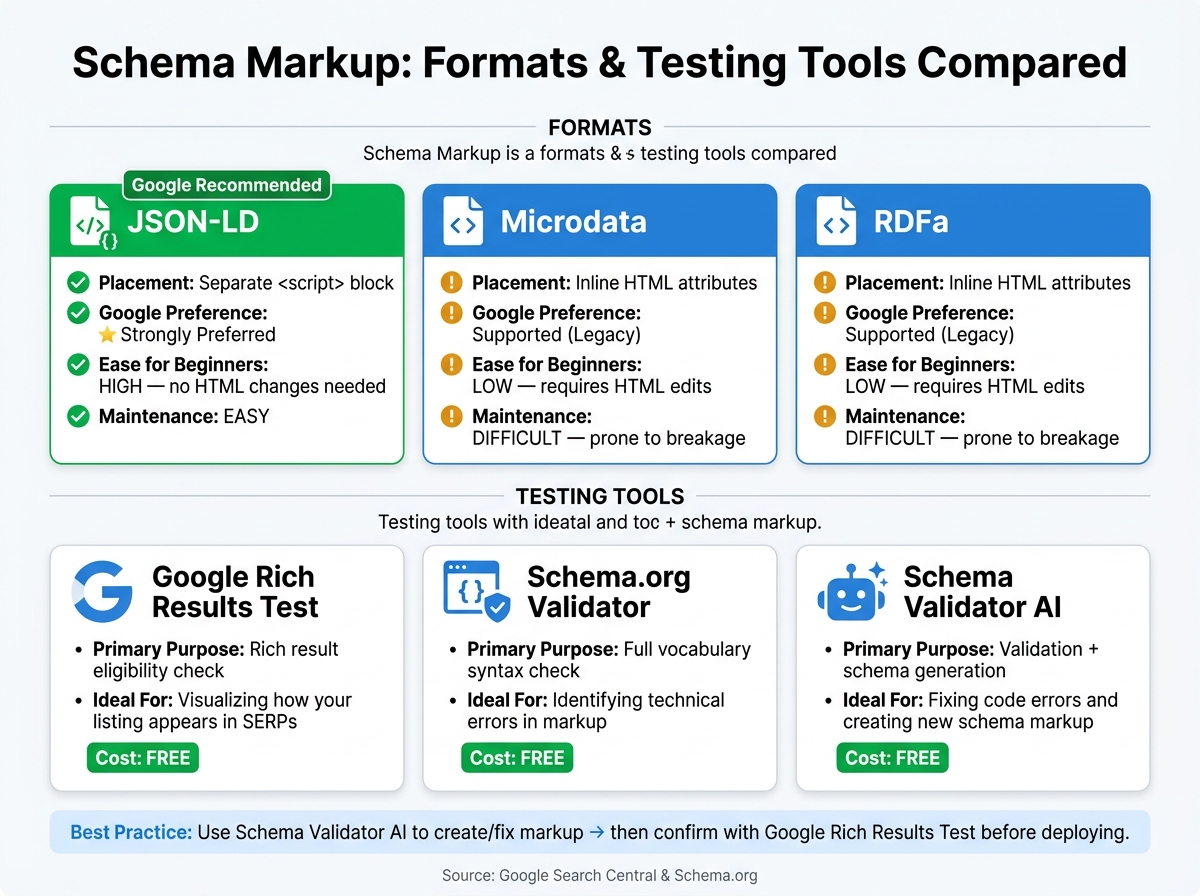
Schema Markup Formats & Tools Compared: JSON-LD vs. Microdata vs. RDFa
Not all schema formats or testing tools are created equal. Knowing their differences can help you make informed choices right from the start.
Schema Formats: JSON-LD vs. Microdata vs. RDFa
Choosing the right schema format is a key step for beginners looking to implement structured data. JSON-LD stands out because it resides in a separate <script> block, making it easy to add, update, and debug without touching visible HTML. On the other hand, Microdata and RDFa require inline HTML edits, which can complicate site maintenance and increase the risk of errors during updates.
Google strongly recommends JSON-LD for structured data, making it the go-to option for beginners.
| Feature | JSON-LD | Microdata | RDFa |
|---|---|---|---|
| Placement | Separate <script> block |
Inline HTML attributes | Inline HTML attributes |
| Google Preference | Strongly Preferred | Supported (Legacy) | Supported (Legacy) |
| Ease for Beginners | High - no HTML changes needed | Low - requires HTML edits | Low - requires HTML edits |
| Maintenance | Easy | Difficult; prone to breakage | Difficult; prone to breakage |
Once you've chosen the right format, the next step is ensuring the schema is error-free using proper testing tools.
Schema Testing Tools: What Each One Does
After selecting a schema format, validating it is critical. Here’s a breakdown of three tools that serve different purposes:
- Google Rich Results Test: This tool checks if your schema qualifies for enhanced search features, such as star ratings, FAQs, or product prices, and shows how your listing might appear in Google search results.
- Schema.org Validator: This validator helps ensure your markup adheres to the complete Schema.org vocabulary, catching syntax issues and other technical errors.
- Schema Validator AI: A versatile tool that combines schema validation with generation. It provides detailed error explanations and supports both URL and raw JSON-LD input, all without requiring a login.
| Tool | Primary Purpose | Ideal For | Cost |
|---|---|---|---|
| Google Rich Results Test | Rich result eligibility check | Visualizing how your listing appears in SERPs | Free |
| Schema.org Validator | Full vocabulary syntax check | Identifying technical errors in markup | Free |
| Schema Validator AI | Validation plus schema generation | Fixing code errors and creating new schema markup | Free |
For the best results, use Schema Validator AI to create and fix your schema markup. Then, validate it with the Google Rich Results Test to ensure it qualifies for enhanced search features before deploying it. These tools and comparisons can help you fine-tune your schema markup for better visibility in search results.
Conclusion
Schema markup is a powerful tool that helps search engines better interpret your content. When used correctly, it can make your pages eligible for rich results like star ratings, FAQ sections, and price displays. By 2026, schema will likely play an even bigger role as a trust signal for AI-driven search engines, aiding in fact-checking and source attribution[2][3].
To get started, focus on implementing one schema type at a time. For instance, if you operate a blog, begin with the Article schema. If you're managing a business homepage, start with the Organization schema. By mastering one type, you’ll set a solid groundwork for expanding your schema strategy as your site grows.
"Schema is often the difference between getting clicked and getting scrolled past." - GetRevised[5]
Once your schema is live, validating it is critical. Tools like Schema Validator AI can help you audit your structured data, catch errors, and ensure your markup stays compliant with Google's guidelines. The free plan offers 2 URL audits per month with Google validation checks, while the Pro plan ($29/month) provides unlimited audits and bulk generation for up to 20 URLs. Regular validation ensures your schema remains accurate and keeps your pages optimized for rich result visibility and performance.
FAQs
How do I know which schema type fits my page?
To pick the right schema type, start by determining the primary purpose or content of your page. For example, use Article for blog posts, Product for items in an online store, or LocalBusiness for physical storefronts. Always go for the most specific schema type instead of broad ones like Thing. Make sure the schema aligns with the content users can see on the page. Also, review Google's list of supported schema types to ensure it fits your SEO objectives.
Where should I place JSON-LD on my site?
Place your JSON-LD code inside a <script> tag within the <head> section of your HTML. Although Google allows it to be placed in the body, the <head> is generally the preferred and safer location for most pages. JSON-LD works independently, meaning it doesn’t have to be part of visible content. Just make sure it’s present in the rendered DOM so search engines can crawl and interpret it correctly.
How long does it take for rich results to appear?
There’s no set timeline for rich results to show up after you’ve added schema markup. Google decides this based on several factors, including the quality of your content, how well it aligns with their guidelines, and the authority of your page. Since rich results aren’t a sure thing, it’s a good idea to keep an eye on the Google Search Console Rich Results status report. This tool lets you track your page performance and see if rich results appear after your pages are indexed.