If you want a voice assistant to read the right part of your page, mark a short answer and keep the markup clean. If you are new to this, check out these schema markup basics. With 27% of mobile searches happening by voice, I’d keep the focus on one thing: a short passage that sounds good out loud and matches the page code.
Here’s the short version:
- Speakable schema points voice tools to a small section of text, not the whole page
- The best passage is usually 50–90 words
- I’d mark 2–4 short sections per page, not every paragraph
- Good picks include summaries, definitions, FAQ answers, service overviews, and key findings
- The markup should use stable CSS selectors in JSON-LD vs Microdata
- The copy should sound natural when spoken: short sentences, plain words, no layout-dependent phrases
- You still need to test and recheck the markup after copy edits or template changes
A simple rule helps: if I wouldn’t want to hear the passage read aloud on its own, I wouldn’t mark it as speakable.
This article boils down to three jobs: choose the right text, point schema to the exact HTML, and keep both the copy and selectors in sync over time.
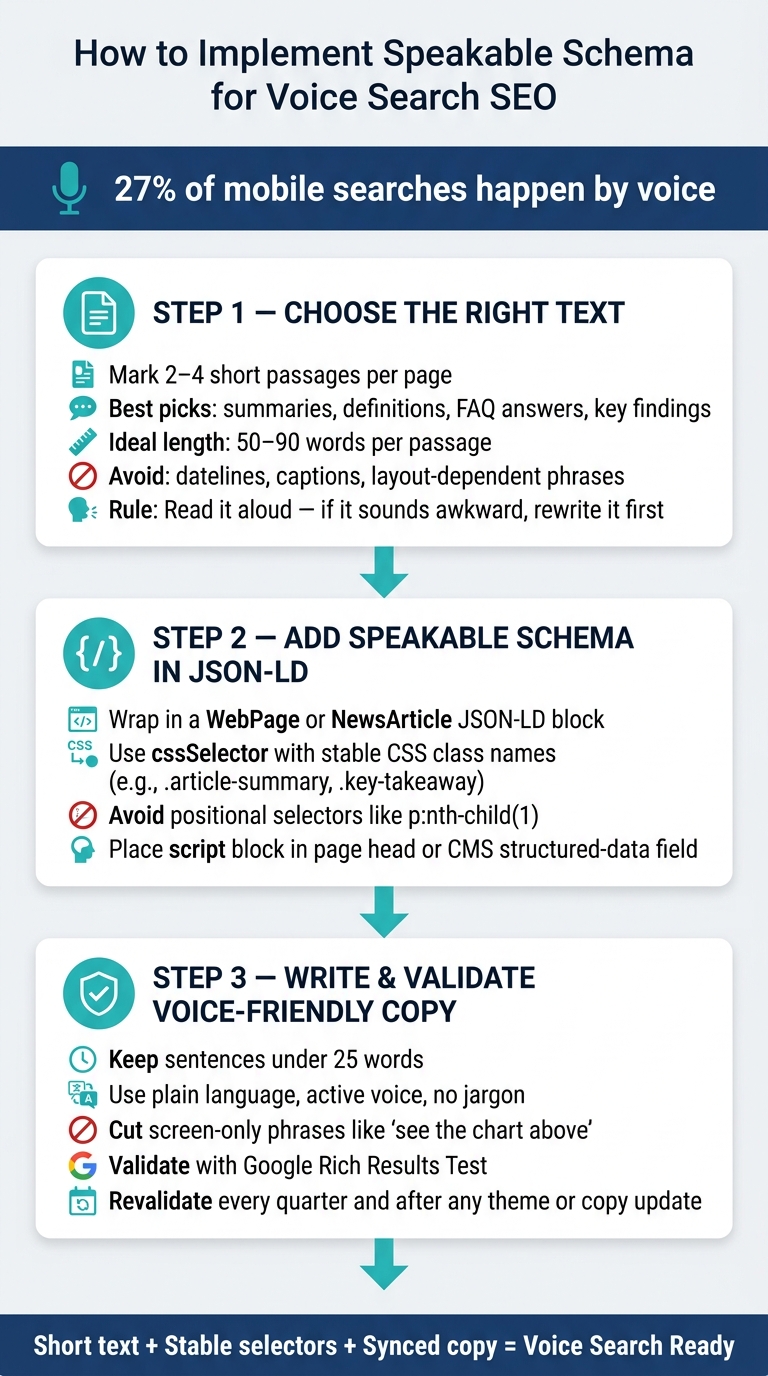
How to Implement Speakable Schema for Voice Search SEO
How to add "Speakable" Schema to Wordpress Posts
sbb-itb-f4b2e1b
Choose the Right Content to Mark as Speakable
Only a small part of a page should get speakable markup. The goal is simple: pick passages that give one complete answer. Think about what a voice assistant should read out loud, not what looks good on the full page.
Mark short summaries, not the full page
The best picks are short summaries, key findings, definitions, and direct answers to headings. In plain English, you want content that sounds clean when read as one spoken response [1][4][2].
A good rule of thumb is to mark 2–4 passages per page. That gives assistants a few solid options without watering down the signal [4][5]. From there, choose the paragraph that states the answer most clearly.
Lead with the answer. Skip the warm-up. Direct statements work better than setup language.
Avoid text that does not read cleanly aloud
Some text just falls apart when spoken. Leave out datelines, bylines, captions, legal text, and navigation labels. Without a screen, those bits turn into stray fragments [1][5].
Also skip any wording that depends on page layout, like directions tied to where something appears on the screen [1]. The text you choose needs to be visible on the page and still make sense on its own [1][4].
A simple test helps here: read the passage out loud. If it sounds stiff, awkward, or unfinished, fix the wording before you add markup. Then map those chosen passages to the exact page elements in JSON-LD, ensuring you audit your schema markup for errors before deployment.
Add Speakable Schema in JSON-LD
Once you’ve picked the speakable passages, map them in JSON-LD. The speakable property sits inside a WebPage or NewsArticle JSON-LD block and uses SpeakableSpecification to mark the parts that should be read aloud.
Build the markup and point to exact page sections
Give each speakable paragraph a stable CSS class, then reference those classes in cssSelector. From there, map those passages to selectors that won’t shift around.
Here’s a minimal working example:
{
  "@context": "https://schema.org",
  "@type": "NewsArticle",
  "url": "https://example.com/your-page",
  "speakable": {
    "@type": "SpeakableSpecification",
    "cssSelector": [".article-summary", ".key-takeaway"]
  }
}
Skip positional selectors like p:nth-child(1). They look fine at first, but a small template edit can break them. Keep your selectors tied to the same text unless the copy itself changes. [1][4]
Place the code on the page and keep it in sync with the copy
Put the <script type="application/ld+json"> block in the page <head> or in your CMS’s structured-data field. Then keep it synced with the copy. If a CSS class is removed or renamed, the selector points nowhere, and the markup can fail without any warning.
Use Schema Validator AI to check for broken selectors and invalid JSON-LD before publishing. After that, polish the copy so it sounds natural when read aloud.
Write Copy That Works for Text-to-Speech
Speakable copy needs to stay clear when read aloud. A voice assistant reads only the short passage you mark, then speaks it with text-to-speech (TTS). That matters because the marked passage is the one assistants are most likely to use. If it’s dense, full of jargon, or depends on visuals, the result can sound robotic or get skipped.
Use Short, Direct Sentences That Sound Natural Out Loud
Aim for sentences under 25 words [2]. Use plain US English, active voice, and common words. Skip acronyms, technical jargon, and complex punctuation like semicolons or nested parentheticals. Those often create awkward pauses in synthesized speech.
Also cut screen-only phrases like "as shown below" or "see the chart above." If a passage still feels heavy, split it into separate blocks. Think of it this way: if it sounds clunky when you say it out loud, it’ll probably sound worse through a voice assistant.
Split Long Intros into Stand-Alone Speech Blocks
Start with the main point, then add support. Cut filler at the top and give the answer in the first sentence. If an intro runs long, split it into two stand-alone blocks. Each block should make sense on its own, even without the text around it.
Use US-friendly formats like "July 14", "12 PM", and spelled-out units when needed. Spell out any unit that may sound unclear when spoken aloud. After the wording is clean, check that the schema markup targets the same text. Then make sure the markup still points to the final copy.
Validate the Markup and Keep It Updated
Check Schema Accuracy and Google Rich Results Validation
Once your speakable text and selectors are in place, check the live page. Run Google's Rich Results Test on the live URL, then inspect the rendered element in DevTools to make sure the selector catches JSON-LD errors and matches only the text you meant to mark up. You can also use document.querySelectorAll() to verify that the selector returns only the intended passage [1][3].
Schema Validator AI can audit, validate, and generate JSON-LD for fast checks.
After that first live review, put the markup on a regular maintenance schedule. Check each template on its own, because a selector that works on one layout can break on another. It's smart to use stable class-based selectors [1].
Revalidate every quarter and after any theme update, class rename, or copy rewrite [1][5].
Conclusion: Keep Speakable Sections Short, Clear, and Validated
Speakable schema works best when the marked text stays short, the selectors stay stable, and the markup stays aligned with the live copy [1][5].
FAQs
How do I choose the best speakable text on a page?
Pick 2 to 4 short passages that can stand on their own and answer a clear user question. Each passage should sound natural when read aloud and should make sense without extra context.
Keep each passage between 20 and 120 words. Use short sentences, ideally under 25 words. Focus on direct answers, simple definitions, and key facts. Skip sales language, filler, bullet points, and tables.
Can I use Speakable schema on pages that aren’t news articles?
Yes. Google first put the spotlight on Speakable schema for news content, but you can use it on non-news pages too.
It tends to work best on pages like educational blog posts, FAQ pages, buying guides, and product comparison articles. The key is to mark sections that stand on their own, stay concise, and answer common questions directly.
You can also use Schema Validator AI to check that your JSON-LD markup is valid and error-free.
What should I do if my CSS selectors break after a site update?
If your CSS selectors break after a site update, your Speakable schema might stop pointing to the right content. That’s an easy thing to miss, especially if the page still looks fine on the front end. Run your structured data through Google’s Rich Results Test to spot missing elements or selectors that no longer match.
For better stability, skip positional selectors like p:nth-child(1). They can fall apart the moment someone adds a new paragraph or moves a block on the page. Class-based selectors like .speakable-content tend to hold up better.
You can also sanity-check your selector right in the browser console with:
document.querySelectorAll('your-selector')
If that returns the wrong nodes - or nothing at all - you’ve found the problem fast.