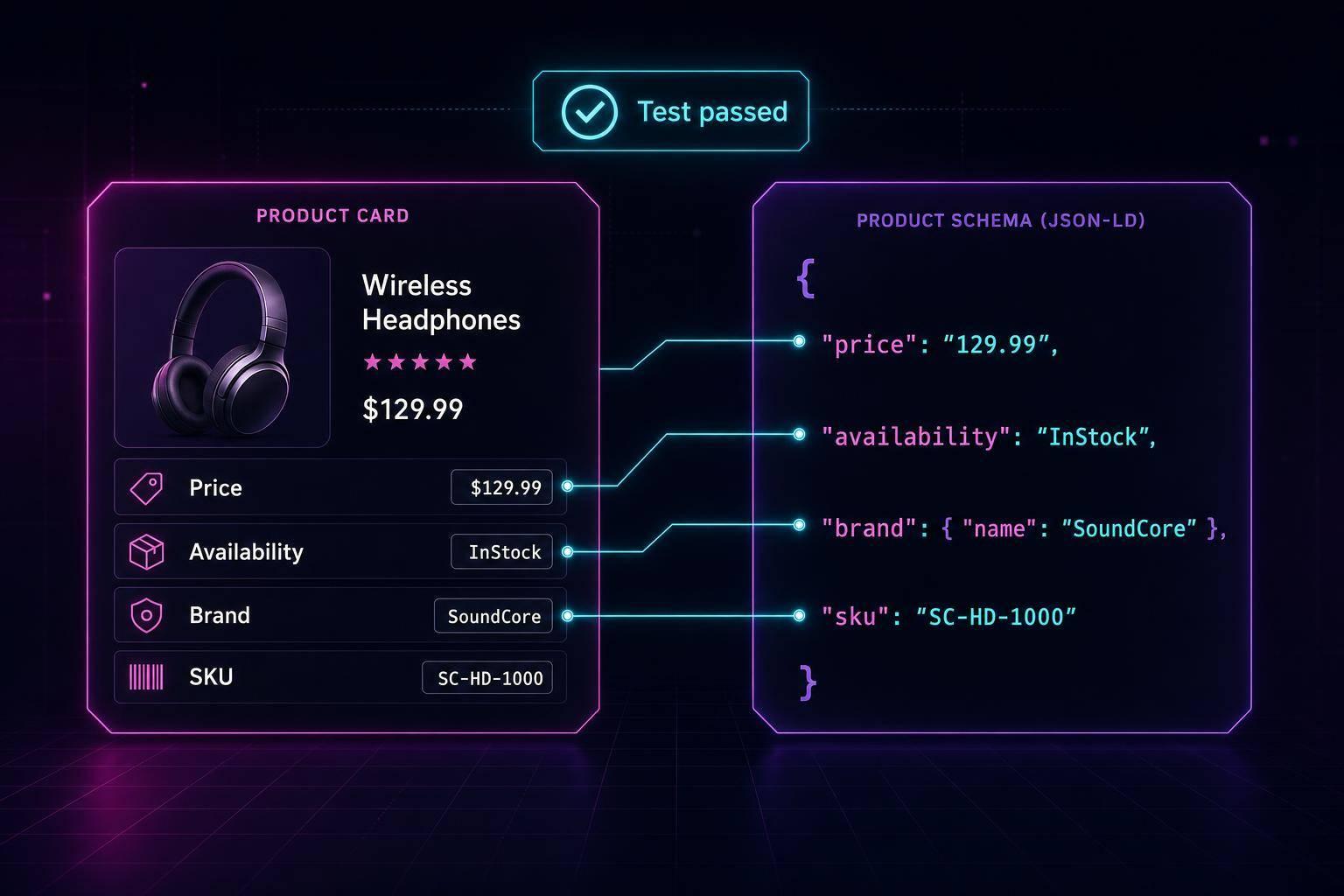
If you mark up U.S. property pages, the main rule is simple: use RealEstateListing for the page, then pair it with the right property type inside itemOffered.
I’d boil the article down to this:
- House listings use
SingleFamilyResidence - Condo listings use
Condominium - Rental unit listings use
Apartment - Land listings use
LandParcel - Sale pages use
offers.price - Rental pages use
priceSpecificationfor monthly rent - Every page should match the on-page facts, including price, status, address, beds, baths, and dates
There are 4 main property setups in the article, but the wrapper stays the same in 100% of them. What changes is the nested type and a small set of property fields. For example, houses focus on beds, baths, parking, and square footage. Condos add HOA fees and shared amenities. Rentals switch to lease terms, monthly rent, and pet rules. Land pages focus on acreage, zoning, and utility access.
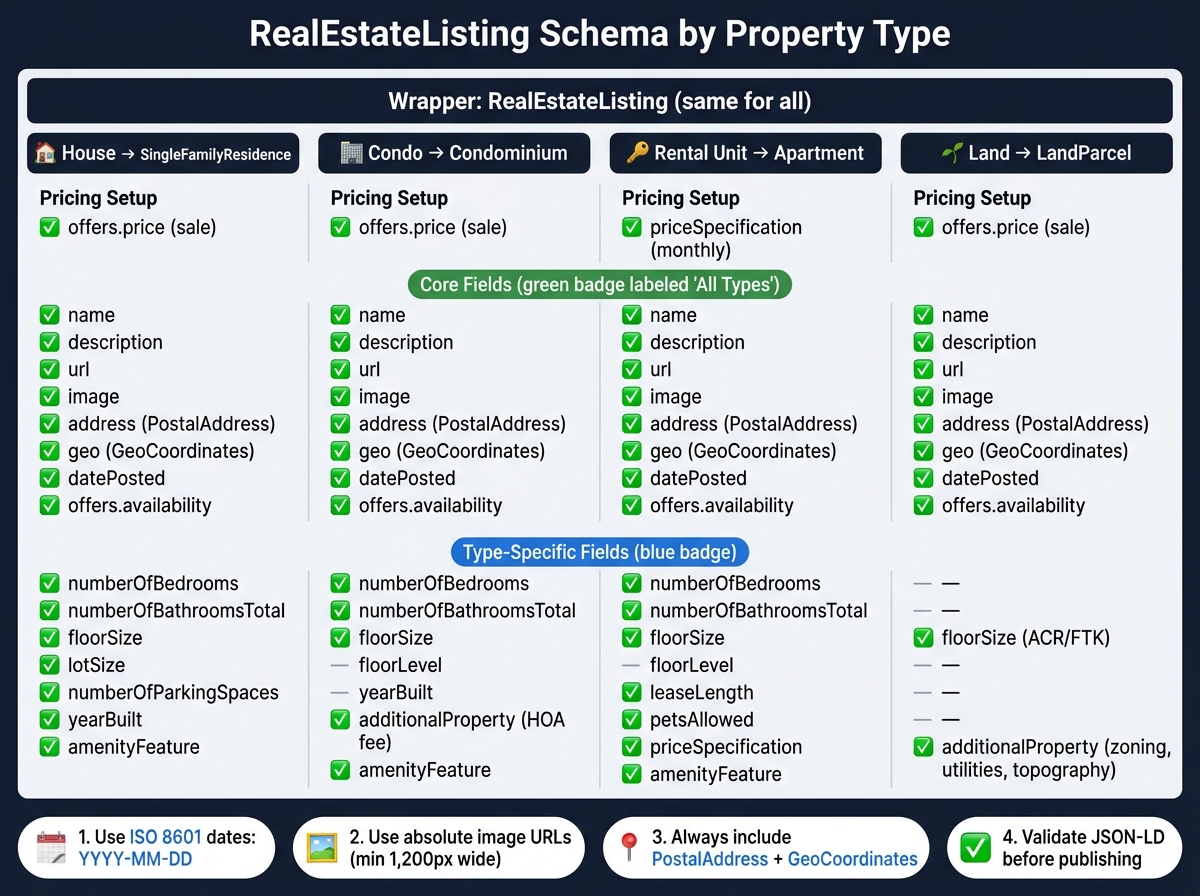
RealEstateListing Schema: Property Type Comparison Guide
Structured Data for Real Estates: Apartment, Real Estate Listing , Real Estate Agent
sbb-itb-f4b2e1b
Quick Comparison
| Listing page | Wrapper | Nested type | Main pricing setup | Main extra fields |
|---|---|---|---|---|
| House | RealEstateListing |
SingleFamilyResidence |
offers.price |
bedrooms, bathrooms, parking, lot size |
| Condo | RealEstateListing |
Condominium |
offers.price |
floor level, HOA fee, amenities |
| Rental unit | RealEstateListing |
Apartment |
priceSpecification by month |
lease length, pet policy, move-in date |
| Land | RealEstateListing |
LandParcel |
offers.price |
zoning, acreage, utilities, topography |
A few rules stand out. Use ISO dates like 2026-07-16. Use absolute image URLs. Include PostalAddress and GeoCoordinates when the page has a street address or map point. And before publishing, validate the JSON-LD so template errors do not slip through.
That’s the core of the article: same outer listing type, right inner property type, and pricing fields that match whether the page is for sale or for lease.
House and Condo Schema Examples
House and condo pages use the same top-level wrapper. The main changes happen inside the property type, plus a few listing fields.
House Listing: RealEstateListing + SingleFamilyResidence
For a house page, use SingleFamilyResidence as the nested type. The pattern below is your base. If you are new to this, review our schema markup guide to understand how to pick types and validate your code. If you're marking up a condo unit instead, keep the outer wrapper and switch the inner fields to match the unit and building details. Also, make sure the listing status matches the page.
{
  "@context": "https://schema.org",
  "@type": "RealEstateListing",
  "name": "4-Bedroom Home in Austin, TX",
  "description": "Spacious single-family home with hardwood floors, central A/C, and a 2-car garage on a quiet cul-de-sac.",
  "url": "https://example.com/listings/austin-tx-4bed-house",
  "datePosted": "2026-07-01",
  "image": "https://example.com/images/austin-house-front.jpg",
  "offers": {
    "@type": "Offer",
    "price": "685000",
    "priceCurrency": "USD",
    "availability": "https://schema.org/InStock"
  },
  "itemOffered": {
    "@type": "SingleFamilyResidence",
    "name": "4-Bedroom Home in Austin, TX",
    "address": {
      "@type": "PostalAddress",
      "streetAddress": "2814 Ridgewood Ct",
      "addressLocality": "Austin",
      "addressRegion": "TX",
      "postalCode": "78704",
      "addressCountry": "US"
    },
    "geo": {
      "@type": "GeoCoordinates",
      "latitude": "30.2500",
      "longitude": "-97.7500"
    },
    "numberOfBedrooms": "4",
    "numberOfBathroomsTotal": "3",
    "floorSize": {
      "@type": "QuantitativeValue",
      "value": "2450",
      "unitCode": "SQF"
    },
    "lotSize": {
      "@type": "QuantitativeValue",
      "value": "0.28"
    },
    "numberOfParkingSpaces": "2",
    "yearBuilt": "2008",
    "amenityFeature": [
      { "@type": "LocationFeatureSpecification", "name": "Hardwood Floors", "value": true },
      { "@type": "LocationFeatureSpecification", "name": "Central Air Conditioning", "value": true }
    ]
  }
}
Match every schema value to what's shown on the page. That includes price, bed and bath count, address, and listing status. For images, use absolute URLs, and make sure they're at least 1,200 px wide.
Here’s the field checklist for a house listing:
| Field | Status |
|---|---|
address (PostalAddress) |
Required |
numberOfBedrooms |
Required |
numberOfBathroomsTotal |
Required |
price + priceCurrency |
Required |
availability |
Required |
floorSize (SQF) |
Required |
lotSize |
Recommended |
yearBuilt |
Recommended |
geo (GeoCoordinates) |
Recommended |
numberOfParkingSpaces |
Recommended |
amenityFeature |
Recommended |
Condo Listing: RealEstateListing + Condominium
The condo version keeps the same wrapper, but the property type changes to Condominium. You'll also swap out house-only fields for unit and building details. That means removing lotSize, replacing SingleFamilyResidence with Condominium, and adding floorLevel, the unit number in the address, HOA fees with additionalProperty, and shared amenities with amenityFeature.
{
  "@context": "https://schema.org",
  "@type": "RealEstateListing",
  "name": "2-Bedroom Condo at The Meridian, Chicago, IL",
  "description": "Modern condo on the 12th floor with city views, in-unit laundry, and access to a rooftop pool and fitness center.",
  "url": "https://example.com/listings/chicago-meridian-unit-1204",
  "datePosted": "2026-07-05",
  "image": "https://example.com/images/meridian-unit1204.jpg",
  "offers": {
    "@type": "Offer",
    "price": "429000",
    "priceCurrency": "USD",
    "availability": "https://schema.org/InStock"
  },
  "itemOffered": {
    "@type": "Condominium",
    "name": "Unit 1204 – The Meridian",
    "address": {
      "@type": "PostalAddress",
      "streetAddress": "540 N Lake Shore Dr, Unit 1204",
      "addressLocality": "Chicago",
      "addressRegion": "IL",
      "postalCode": "60611",
      "addressCountry": "US"
    },
    "geo": {
      "@type": "GeoCoordinates",
      "latitude": "41.8930",
      "longitude": "-87.6160"
    },
    "floorLevel": "12th Floor",
    "numberOfBedrooms": "2",
    "numberOfBathroomsTotal": "2",
    "floorSize": {
      "@type": "QuantitativeValue",
      "value": "1180",
      "unitCode": "SQF"
    },
    "yearBuilt": "2015",
    "additionalProperty": [
      {
        "@type": "PropertyValue",
        "name": "HOA Fee",
        "value": "485"
      }
    ],
    "amenityFeature": [
      { "@type": "LocationFeatureSpecification", "name": "Rooftop Pool", "value": true },
      { "@type": "LocationFeatureSpecification", "name": "Fitness Center", "value": true },
      { "@type": "LocationFeatureSpecification", "name": "24-Hour Concierge", "value": true }
    ]
  }
}
After the house pattern, this condo example shows the same wrapper with shared amenities and HOA details.
Apartment, Rental, and Land Schema Examples
For rentals and vacant land, the top-level wrapper still stays RealEstateListing. What changes is the nested property type and the fields tied to it, though the JSON-LD format remains the preferred implementation method. For rental units, use Apartment. For lots, use LandParcel.
Apartment and Rental Listing: RealEstateListing + Apartment
Use Apartment when you're marking up a single unit inside a multi-unit building.
Rental listings also handle pricing differently from sale listings. Instead of a sale price, use monthly rent. That means using priceSpecification with UnitPriceSpecification, setting unitText to "month", and adding leaseLength, availabilityStarts, and petsAllowed.
If you need to show a security deposit, put it in description or additionalProperty. For furnished status or utilities included in rent, use amenityFeature.
{
  "@context": "https://schema.org",
  "@type": "RealEstateListing",
  "name": "1-Bedroom Apartment for Rent – Denver, CO",
  "description": "Bright 1-bed unit on the 3rd floor with in-unit washer/dryer, stainless appliances, and mountain views. Security deposit: one month's rent.",
  "url": "https://example.com/listings/denver-co-1bed-apt-304",
  "datePosted": "2026-07-10",
  "image": "https://example.com/images/denver-apt-304.jpg",
  "offers": {
    "@type": "Offer",
    "businessFunction": "http://purl.org/goodrelations/v1#LeaseOut",
    "priceSpecification": {
      "@type": "UnitPriceSpecification",
      "price": 2100,
      "priceCurrency": "USD",
      "unitText": "month"
    },
    "availability": "https://schema.org/InStock",
    "availabilityStarts": "2026-08-01",
    "leaseLength": {
      "@type": "QuantitativeValue",
      "value": 12,
      "unitCode": "MON"
    }
  },
  "itemOffered": {
    "@type": "Apartment",
    "name": "Unit 304 – Larimer Square Flats",
    "address": {
      "@type": "PostalAddress",
      "streetAddress": "1820 Blake St, Unit 304",
      "addressLocality": "Denver",
      "addressRegion": "CO",
      "postalCode": "80202",
      "addressCountry": "US"
    },
    "geo": {
      "@type": "GeoCoordinates",
      "latitude": 39.752,
      "longitude": -104.996
    },
    "floorLevel": "3rd Floor",
    "numberOfBedrooms": 1,
    "numberOfBathroomsTotal": 1,
    "floorSize": {
      "@type": "QuantitativeValue",
      "value": 780,
      "unitCode": "SQF"
    },
    "petsAllowed": "Dogs and cats under 25 lbs allowed",
    "amenityFeature": [
      { "@type": "LocationFeatureSpecification", "name": "In-Unit Washer/Dryer", "value": true },
      { "@type": "LocationFeatureSpecification", "name": "Water and Trash Included", "value": true }
    ]
  }
}
Use this setup any time the page is for a unit available to lease, not to buy.
Sale listings and rental listings don't use the same pricing fields:
| Field | Sale Listing | Rental Listing |
|---|---|---|
businessFunction |
#Sell |
#LeaseOut |
| Price meaning | Total purchase price | Monthly recurring rent |
| Price structure | price + priceCurrency |
priceSpecification (UnitPriceSpecification) |
| Lease fields | N/A | leaseLength, availabilityStarts |
| Deposit fields | N/A | description or additionalProperty |
| Pet policy | N/A | petsAllowed |
If the unit has already been leased, set availability to https://schema.org/OutOfStock.
Land Listing: RealEstateListing + LandParcel
For vacant lots, keep the same listing wrapper and switch the nested type to LandParcel.
Use LandParcel inside itemOffered, then map lot size with floorSize. For the measurement, use QuantitativeValue with ACR for acres or FTK for square feet. Put zoning and topography in additionalProperty.
{
  "@context": "https://schema.org",
  "@type": "RealEstateListing",
  "name": "5.2-Acre Residential Lot – Dripping Springs, TX",
  "description": "Gently sloping lot with Hill Country views, road frontage on FM 150, and access to water and electric utilities. Zoned R-1 residential. Ideal for custom home construction.",
  "url": "https://example.com/listings/dripping-springs-tx-5ac-lot",
  "datePosted": "2026-07-12",
  "image": "https://example.com/images/dripping-springs-lot.jpg",
  "offers": {
    "@type": "Offer",
    "price": 349000,
    "priceCurrency": "USD",
    "availability": "https://schema.org/InStock"
  },
  "itemOffered": {
    "@type": "LandParcel",
    "name": "5.2-Acre Lot – FM 150, Dripping Springs",
    "address": {
      "@type": "PostalAddress",
      "streetAddress": "FM 150 W",
      "addressLocality": "Dripping Springs",
      "addressRegion": "TX",
      "postalCode": "78620",
      "addressCountry": "US"
    },
    "geo": {
      "@type": "GeoCoordinates",
      "latitude": 30.19,
      "longitude": -98.086
    },
    "floorSize": {
      "@type": "QuantitativeValue",
      "value": 5.2,
      "unitCode": "ACR"
    },
    "additionalProperty": [
      { "@type": "PropertyValue", "name": "Zoning", "value": "R-1 Residential" },
      { "@type": "PropertyValue", "name": "Permitted Use", "value": "Single-Family Residential" },
      { "@type": "PropertyValue", "name": "Water Access", "value": "Available at Road" },
      { "@type": "PropertyValue", "name": "Electric Access", "value": "Available at Road" },
      { "@type": "PropertyValue", "name": "Topography", "value": "Gently Sloping" }
    ]
  }
}
Field Mapping Across Property Types
This map helps you match each property type to the right fields. The examples above follow these same rules. The table below makes it easy to see which fields stay the same and which ones change. Use it as a quick check before you validate the markup.
Core Fields Every Listing Should Include
Every U.S. listing page should include:
name,description,url,imageaddressasPostalAddress,geoasGeoCoordinatesdatePostedoffers.price,offers.priceCurrency,offers.availability
For U.S. listings, include addressRegion and addressCountry: "US". Add latitude and longitude under geo too.
Type-Specific Fields to Add Only When They Apply
The examples above use these same rules. This table shows what stays shared and what changes by property type.
| Field | House | Condo | Apartment or rental | Land | Status |
|---|---|---|---|---|---|
name, description, url, image |
✓ | ✓ | ✓ | ✓ | Core |
address, geo, datePosted |
✓ | ✓ | ✓ | ✓ | Core |
offers.price, offers.priceCurrency, offers.availability |
✓ | ✓ | ✓ | ✓ | Core |
numberOfBedrooms |
✓ | ✓ | ✓ | - | Type-specific |
numberOfBathroomsTotal |
✓ | ✓ | ✓ | - | Type-specific |
floorSize |
✓ | ✓ | ✓ | ✓ | Type-specific |
yearBuilt |
✓ | ✓ | - | - | Type-specific |
floorLevel |
- | ✓ | ✓ | - | Type-specific |
amenityFeature |
✓ | ✓ | ✓ | - | Type-specific |
additionalProperty for HOA fees |
- | ✓ | - | - | Type-specific |
leaseLength, petsAllowed |
- | - | ✓ | - | Type-specific |
priceSpecification |
- | - | ✓ | - | Type-specific |
additionalProperty for zoning and utilities |
- | - | - | ✓ | Type-specific |
Use amenityFeature for shared amenities. Use additionalProperty for HOA fees. For rentals, use priceSpecification. For land, use floorSize and additionalProperty to mark zoning and utilities.
With the field map in place, the next step is validation.
Validation Workflow and Key Takeaways
How to Validate Listing Schema Before Publishing
After you map fields by property type, validate the JSON-LD before you publish. Start by checking that each page uses the most specific matching @type. Residence is too broad.
Next, look at your Offer object. Sale pages use price. Rental pages use monthly priceSpecification plus leaseLength. If those pricing fields don't match the page type, your structured data will be wrong.
Then run the markup through Schema Validator AI, which audits the URL, flags missing or broken fields, and checks Google Rich Results compatibility. Then review post-indexing errors in Google Search Console. [1]
If you add schema to WordPress or update your CMS or change a template, validate again. Small template edits can throw things off fast.
Key Takeaways from the Property Type Roundup
Before publishing, use these checks as a final pass:
RealEstateListingwraps every listing.- Use the most specific nested type that fits the property.
- Sale listings use a flat
price. - Rentals use
priceSpecificationwithleaseLength. - Use ISO 8601 dates (
YYYY-MM-DD) and integers fornumberOfBedrooms.
FAQs
Which property type should I use for a townhouse or duplex listing?
For a townhouse or duplex listing, Apartment is usually the best Schema.org type.
Here’s why: Schema.org doesn’t have a specific type for a duplex, and Apartment is meant for multi-unit dwellings.
Use it with RealEstateListing to set the main context of the offer.
Schema Validator AI can help audit, validate, and generate the JSON-LD markup.
Should I include both sale price and monthly rent on mixed-use listing pages?
Yes. You can include both a sale price and a monthly rent on a mixed-use listing page by using multiple Offer objects in your structured data.
Just make sure each offer clearly shows the price, currency, and availability. That way, search engines and users won't get the wrong idea.
Schema Validator AI can help audit the markup and check that it follows Google's rich result structure.
What happens if your schema values do not match the page content?
If your schema values don't match the content on your page, search engines may penalize your site or take away your eligibility for rich results. Put simply, your JSON-LD needs to match what visitors actually see.
The biggest trouble spots are usually fields like price and availability. If your markup says one thing and the page says another, that's a red flag. Regular audits with Schema Validator AI can help catch those mistakes and keep your structured data in line with your live content.