Use ImageObject when the image itself is the main thing on the page. Use Product when the page is meant to sell. That’s the whole decision in one line.
If I had to make this even simpler, I’d say:
ImageObject= image-first pageProduct= sales-first page- Both can appear together on a product page if the image supports the item being sold
- Wrong markup can weaken rich result eligibility, including price, stock, review stars, image badges, and shopping visibility
A few facts from the article stand out fast:
Productmarkup often needs live fields like price and availabilityImageObjectmarkup is usually more static after setup- Google can treat these schemas very differently in Images, shopping results, and rich snippets
- Pages with more complete
ImageObjectmarkup were cited more often in AI search answers in a 2026 study
If you run a store, this rule will save you time: mark up the page’s main entity, not just the nicest asset on it. A jacket product page is still a Product page, even if the hero image does a lot of the work.
Structured Data Training 11: How to create Products using Structured Data
sbb-itb-f4b2e1b
Quick Comparison
| Criteria | ImageObject | Product |
|---|---|---|
| Main thing described | The image file | The item or service for sale |
| Best page type | Portfolio, gallery, diagram, infographic | Product page, booking page, rental page |
| Main fields | contentUrl, caption, creator, license |
name, image, offers, brand, sku |
| Search impact | Image understanding, badges, visual citations | Price, availability, ratings, merchant listings |
| Upkeep | Low | Higher, since stock and price can change |
Bottom line: if you want search engines to read the page the way you do, the schema has to match what the page is mainly about.
What Each Schema Type Is Designed to Describe
ImageObject Schema for Image-Led Pages
ImageObject describes the image itself, not the page around it.
Its main properties include contentUrl, caption, description, creator, and license. In plain English, this markup tells search engines who made the image, what’s in it, and how people are allowed to use it.
This schema makes sense when the image is the main subject of the page. Think a photography portfolio, an editorial image gallery, or a technical diagram. The description field can hold much more context than alt text, which helps search engines understand the image better [1]. That’s why it works well for informational pages, not pages built to sell.
Product Schema for Pages Selling an Item or Service
Product schema describes pages made for selling.
It covers the commercial details of an item with fields like name, image, brand, offers, sku, and aggregateRating. At a minimum, it needs name, image, and offers with price [4].
There’s also an important split here. Merchant Listing fits pages where users can buy directly on the page, and it asks for stricter fields like shipping and returns, which you should verify during a schema markup audit. Product Snippet fits editorial pages like reviews or comparisons, where no purchase happens [2]. So if your page is meant to show up in shopping results, Product schema sends the stronger signal.
How Each Schema Supports Visual Search
Both schema types can help with image discovery, but they do different jobs.
ImageObject helps search systems treat an image as a primary source in answers. In a 2026 study, pages with complete ImageObject markup showed up in AI search answers far more often than pages relying on alt text and file names alone [1].
Product schema supports shopping-focused visual search and acts as the canonical signal for merchant listing experiences in Google Images [2][3].
A simple way to think about it:
- Use
ImageObjectwhen the image is the subject. - Use
Productwhen the page is selling something.
That’s the core difference, and it becomes much easier to see when the two schema types are placed side by side.
Key Differences Between ImageObject and Product Schema
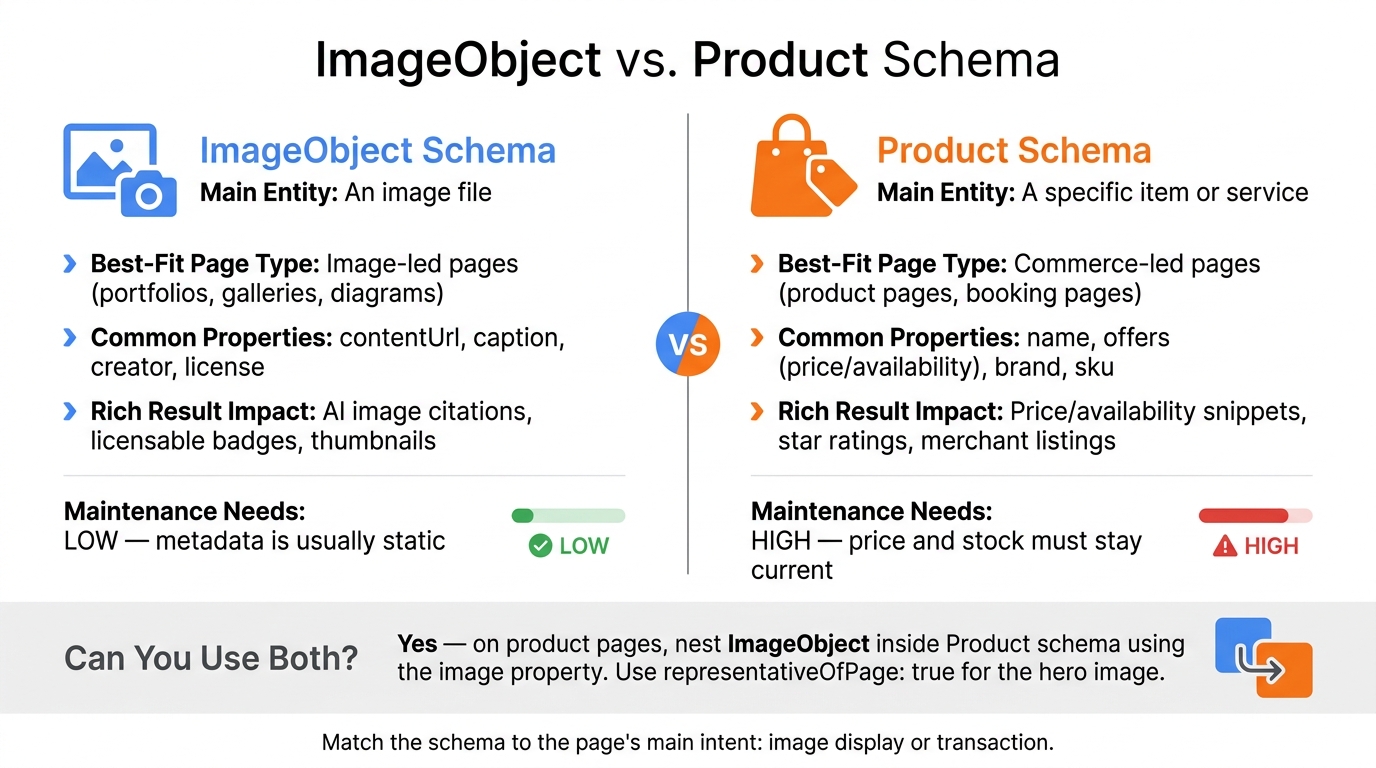
ImageObject vs. Product Schema: Quick Visual Guide
Comparison Table: Entity Type, Use Case, Rich Result Impact, and Upkeep
These two schema types do different jobs. And that shows up pretty fast in how they describe a page.
The table below lays out the practical tradeoff: what each schema is about and what kind of upkeep it needs after publishing.
| Feature | ImageObject Schema | Product Schema |
|---|---|---|
| Main Entity | An image file | A specific item or service |
| Best-Fit Page Type | Image-led pages | Commerce-led pages |
| Common Properties | contentUrl, caption, creator, license |
name, offers (price/availability), brand, sku |
| Rich Result Impact | AI image citations, licensable badges, thumbnails | Price/availability snippets, star ratings, merchant listings |
| Maintenance Needs | Low - metadata is usually static | High - price and stock need to stay current |
The biggest difference isn't technical. It's about page intent.
If the page exists mainly to show or explain an image, ImageObject usually makes sense. It tends to be fairly static, so once the metadata is in place, there often isn't much to update.
Product works differently. It's built for pages centered on selling a specific item or service. That means the markup has to stay in sync with live details like price and availability. When those details change, Product markup can go out of date fast [5].
Which Schema Fits Image-Led vs. Commerce-Led Pages
A simple rule works well here: match the schema to the page's main purpose.
- Use
ImageObjectfor image-led pages - Use
Productfor commerce-led pages
If the page is built to help people view, understand, or license an image, mark up the image. If the page is built to help people buy something, mark up the product.
Using the wrong schema creates a mismatch between the markup and the page itself. So keep it simple: match the schema to the page's primary intent - image display or transaction.
How to Apply and Validate the Markup
Use JSON-LD and Match the Visible Page Content
After you pick the right schema, add it in JSON-LD and make sure it matches the page itself. JSON-LD is the format to use for structured data because it lets you add markup without changing what visitors see.
The main rule is simple: your schema needs to match the visible page content. If users see a certain price, availability, or rating, the markup should show the same thing. If those details don't line up, Google may disqualify the page from rich results.[2][3] And if the page doesn't support a field, leave that field out.
Test with Google and Check Pages After Publishing
Once the markup is live, the job isn't done. Validation turns into regular upkeep. Structured data can break after theme, CMS, or app updates.[3]
Test the page with Google's Rich Results Test before you publish. After launch, check the rendered page in Google Search Console to make sure Google sees the markup as expected.[2][3] If your site depends on JavaScript, server-render prices and availability.
Using Schema Validator AI to Audit and Generate JSON-LD
For day-to-day checks, Schema Validator AI can help audit existing markup, flag missing fields like price or image, validate Google Rich Results compatibility, and generate JSON-LD for ImageObject and Product pages on Shopify, WordPress, and Webflow.
When to Use One, When to Use Both, and Final Takeaways
Use ImageObject for Visual Content and Product for Transactions
Once setup and validation are done, the last call is simple: match the schema to the page’s intent.
Use ImageObject when the image is the main subject of the page. Use Product when the page is built to sell something.
Cases Where Both Can Appear on the Same Page
On product pages, these two schema types often work side by side. You can nest ImageObject inside your Product schema with the image property so search engines get clearer context.
If one image is the main hero asset, mark it with representativeOfPage: true. That tells search engines which image best represents the page. Still, that’s the exception, not the default.
Conclusion: Match the Schema to the Page's Main Entity
For visual or informational pages, ImageObject is the right choice. For transaction-led pages, Product supports Merchant Listings and shopping results. And on mixed pages, you can use both, as long as the markup is nested the right way.
Before publishing, run everything through Google Rich Results Test and the Schema.org validator.
FAQs
Can I use both ImageObject and Product schema on one page?
Yes. You can use both ImageObject and Product schema on the same page.
Here’s the simple version: ImageObject gives search engines extra details about an image, while Product schema explains the product itself, like its name, image, price, and availability.
This setup is common. In many cases, Product schema points to image data through the image property, and both can appear as separate JSON-LD blocks on the same page.
How do I know which schema is the main one for my page?
Choose the schema that matches your page’s main purpose.
If the page sells a product, Product schema is usually the best fit. If the page is mainly an article or news piece, Article schema makes more sense.
When a page includes more than one content type, stick with the main intent first. Then use nested schemas for any secondary elements.
What happens if my Product markup shows the wrong price or stock?
If your Product markup shows the wrong price or stock status, it can create schema drift and send mixed signals. That can lead to penalties or make your page lose rich results eligibility.
Make sure your schema data matches the visible page content exactly, including the current price and availability.