If you mark up a category page, treat it like a list of products - not one product. That’s the main takeaway. For most stores, the safest setup is CollectionPage + ItemList + BreadcrumbList, with nested Product data only when the page shows the same price, stock, and rating details to users.
I’d sum up the article like this: category pages often drive more organic revenue than product pages, with some research pointing to 3–5x more revenue. Rich product results are linked to 30%–34% higher CTR, and clean schema is tied to a 4.2x higher chance of getting rich result features. But schema does not fix thin pages, crawl issues, or weak site performance.
Here’s the short version:
- Use
CollectionPagefor the page itself - Use
ItemListfor the visible products on that page - Add
Productdata inside each list item only if it matches on-page content - Add
BreadcrumbListon category pages - Mark up only the products shown on the current paginated page
- Avoid duplicate schema from themes, apps, and plugins by choosing the right JSON-LD or Microdata format
- Keep
offersdata accurate, since broken offers cause many schema failures - Validate before launch and monitor after indexing
A simple rule I’d follow: start light, keep it synced, and check it often. That approach fits Shopify, WordPress, and Webflow without adding schema that breaks the moment prices or inventory change.
How To Add Schema To Shopify Collection Pages (2026) (Best Method)

sbb-itb-f4b2e1b
What Research and Platform Documentation Show About SEO Impact
Most of the evidence here is observational. So it points to association, not hard proof.
Documented Benefits: Rich Results, CTR, and Product Discovery
The clearest upside is higher CTR from richer search snippets. For category pages, that’s a big deal. These pages often win or lose based on search visibility at scale.
Product structured data rich results - showing price, availability, and ratings directly in search - are associated with a 30% to 34% higher CTR compared with standard blue-link results [4][8]. On busy category pages, even a modest lift can snowball across thousands of impressions.
Structured data can also help with AI search visibility. Well-formed ItemList markup can support AI Overview citations [2].
There’s also a strong gap between clean markup and broken markup. Pages with complete, error-free schema are 4.2 times more likely to trigger rich result features than pages with missing or broken markup [12].
Limits of the Evidence
The correlation is there. The cause-and-effect story is less clean.
In a 2026 analysis of 100,000 e-commerce pages, product schema completeness showed a 0.78 correlation with rankings, stronger than backlink count (0.62) for product-level pages [10]. That’s a strong signal. But schema by itself does not explain rankings.
It helps with visibility, but it won’t rescue thin content, weak Core Web Vitals, or crawl waste caused by faceted navigation. Structured data is not a direct ranking factor. What it does do is help a page qualify for enhanced result features.
"A page without schema is not disqualified from ranking, but it is disqualified from the enhanced result formats that pull the most clicks." - Raj Thilak, July 2026 [5]
One issue shows up again and again: missing or malformed offers data. It accounts for 78% of failed rich snippet implementations [4].
The next section explains the schema patterns that fit category pages best.
Schema Patterns Commonly Used on Category Pages
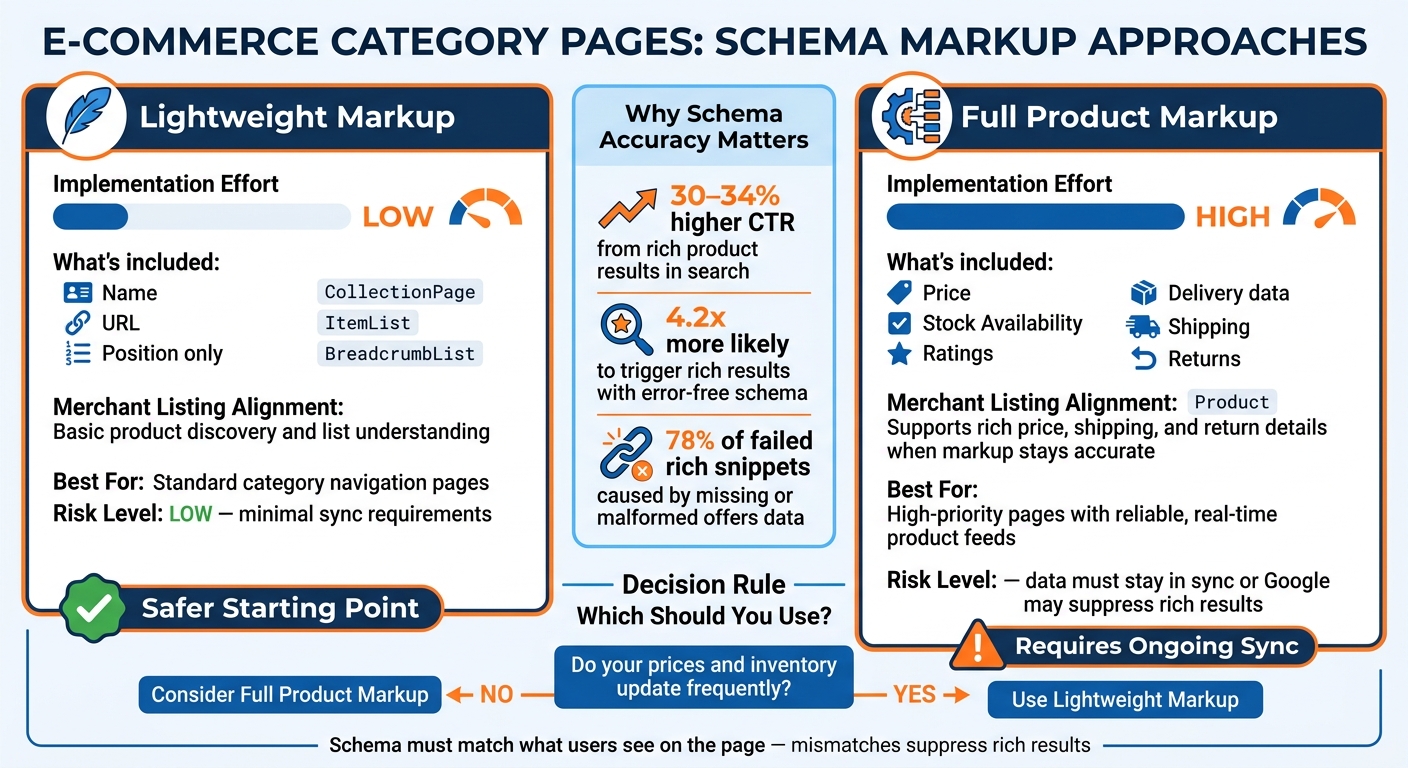
Lightweight vs. Full Product Schema Markup for E-Commerce Category Pages
Given the evidence, the next step is practical: pick the schema setup that matches how category pages actually work.
CollectionPage, ItemList, and Product: The Standard Structure
The standard setup is pretty simple. Use CollectionPage for the page itself and ItemList for the products shown on that page. Then place each Product inside an itemListElement [7][3][13].
Each itemListElement should include position and url. For the Product markup, keep it lean unless the page already shows more detail. You can add fields like sku, offers, availability, and ratings, but only when those details appear on the page [13][7].
If the category uses pagination, only mark up the products that users can see on the current page [13].
One more thing: don't label a category page as one single Product. That's the wrong fit. A category page is a list, so ItemList should represent it. If the page and the markup don't line up, rich results may get suppressed—a common issue found during a schema markup audit [7][4].
When to Add BreadcrumbList and Supporting Properties
Add BreadcrumbList on every category page [3][9]. It can help search engines show the navigation path in search results [7].
You can also use numberOfItems, mainEntity, and isPartOf when they make the page structure clearer [7]. They're optional, not required.
Lightweight vs. Full Product Markup on Listing Pages
There are two common ways to handle product markup on category pages. The better option depends on one basic issue: how often your price and inventory data change.
Lightweight markup keeps things simple. You include the name, URL, and position for each product. Full product markup goes further by nesting detailed Product data right into the listing, such as price, availability, and ratings. But there's a catch: if the JSON-LD doesn't match what users see on the page, Google may suppress the rich result [4].
| Feature | Lightweight Markup | Full Product Markup |
|---|---|---|
| Implementation Effort | Low - name, URL, and position only [13] | High - price, stock, and ratings must stay in sync [7] |
| Merchant Listing Alignment | Basic discovery and list understanding [13] | Can support price, shipping, and return details when markup stays accurate [7][3] |
| Best For | Standard category navigation [13] | High-priority pages with reliable, up-to-date feeds [7] |
For most small business teams, lightweight markup is the safer place to start.
From there, the next issue is how to put these patterns into place in Shopify, WordPress, and Webflow. For those using the latter, following a WordPress schema guide can help streamline the implementation.
Implementation and Validation on Shopify, WordPress, and Webflow
How to Add Category Page JSON-LD
Once you've picked the schema pattern, the next step is adding it to the platform template. The setup changes by platform, but the schema model itself does not.
| Platform | Where to Add JSON-LD | Key Dynamic Variables |
|---|---|---|
| Shopify | sections/main-collection.liquid |
collection.products, paginate.current_page, product.available |
| WordPress | SEO plugin hooks or custom PHP functions | WooCommerce $product object, product loop data |
| Webflow | Custom code blocks in Collection Page templates | CMS fields for price, stock status, and image URL |
A few platform-specific notes:
- Shopify: Edit the collection template so the JSON-LD updates on its own. Never hard-code product names, availability, or page numbers [14].
- WordPress: Use WooCommerce hooks or a custom loop in the schema output.
- Webflow: Map JSON-LD fields to Collection Page CMS fields.
Render JSON-LD in server-side HTML, not JavaScript. JavaScript-only markup can be missed by crawlers [7].
Common Data Problems on Product Listing Pages
The most common failures are stale price or availability data, duplicate schema blocks, and pagination conflicts.
Duplicate schema blocks show up a lot on Shopify and WordPress. An SEO app, a review plugin, and theme code can all output their own Product schema at the same time. When Google sees conflicting blocks, it may ignore all of them [12].
Pagination causes a different problem. If every paginated page uses the same @id, search engines have no clear way to tell those pages apart. The fix is simple: add the page number to the @id and url fields, such as ?page=2#collectionpage [14].
Use the canonical collection URL in the schema, and make sure infinite scroll still has a crawlable pagination setup [14][8].
How to Audit and Validate Markup Before and After Publishing
After setup, QA starts. Validate before and after publishing because indexing can surface errors that template checks miss.
The standard workflow follows schema markup fundamentals with two checks:
- Google's Rich Results Test for eligibility based on Google's own rules
- A schema auditing tool that checks structure and data issues at the URL level
Test mobile and desktop templates separately [6].
"The value of schema is that retrievers use it to build confidence. The cost of broken schema is that retrievers use it to lower confidence. You want monitoring that catches broken markup the day it breaks, not the quarter after." - Samir Bhattacharya, Shopify GEO Engineer, Surfient [16]
Schema Validator AI can audit category-page URLs for missing or broken schema and flag Rich Results issues [14][15]. Use Search Console's Rich Results and Unparsable structured data reports to catch post-indexing errors [8][14].
Conclusion: What the Evidence Supports for Category-Page JSON-LD
The evidence points to one clear rule: JSON-LD won’t rank category pages on its own. But when the markup lines up with what’s actually on the page, it can help improve click-through rate and support more organic revenue [17][8][11].
The biggest problem is simple: mismatch. If the schema says one thing and the page shows another, that’s where trouble starts. For category pages, use a CollectionPage with an ItemList of products, plus BreadcrumbList to reinforce site hierarchy [1][3][7][8]. And skip single-product review markup on category pages. That can hurt rich result eligibility.
Structured data also does more than help with standard search results. It gives machine systems a cleaner way to pull product facts from the page.
Key Takeaways for Small Business Teams
If you’re on a small team, keep the goal simple: make your markup accurate, in sync, and easy to check. A CollectionPage with a clean ItemList and correct breadcrumb markup is a safer long-term pick than a more complex schema setup that quietly breaks after a theme update. Schema isn’t a one-time task. It needs regular upkeep.
Use Schema Validator AI to audit, validate, and generate category-page JSON-LD, including Rich Results compatibility checks.
FAQs
Should category pages use Product schema at all?
No. Product schema should not be used on category pages.
It’s meant for individual product pages, where the details are tied to one item, stay consistent, and match what people see on the page.
For category or collection pages, use structured data that fits that page type instead, such as:
- BreadcrumbList
- ItemList
- FAQPage
Schema Validator AI can help confirm that the markup lines up with the page’s purpose.
What most often breaks category page JSON-LD?
The most common issue is using Product schema on category pages. That’s a bad fit.
Product rich results are meant for single-product pages. So when sites add them to category or collection pages, Google may ignore the markup or treat it as spammy.
Another problem is markup that’s incomplete, old, or out of sync with what users see on the page. This is often called data drift - when the schema no longer matches the visible content.
For category pages, BreadcrumbList schema should be the top priority.
How often should I validate category page schema?
Validate category page schema on a regular basis, not just once. That helps you catch data drift before it turns into a problem, like JSON-LD that no longer matches what users see on the page, such as price or stock status.
Use Schema Validator AI to check for critical errors and warnings. And after any platform migration, run a new audit to spot stale schema references left over from your previous CMS.