You do not need a higher ranking to get more clicks. In many cases, you need a better search listing.
I’d sum it up like this: if a page gets lots of impressions, ranks in a decent spot, and still pulls a low CTR, structured data may help Google show extra details like price, stock status, ratings, author info, or business details. And those details can lead to more clicks from the same search visibility.
Here’s the short version:
- CTR is clicks divided by impressions
- A page can rank well and still get ignored if the snippet looks plain
- Structured data does not change rank directly
- It can help your listing show rich results
- Rich results often get more clicks because they answer small questions before the click
- The schema types that tend to matter most are:
- Product
- Review / AggregateRating
- Article
- Breadcrumb
- Organization / LocalBusiness
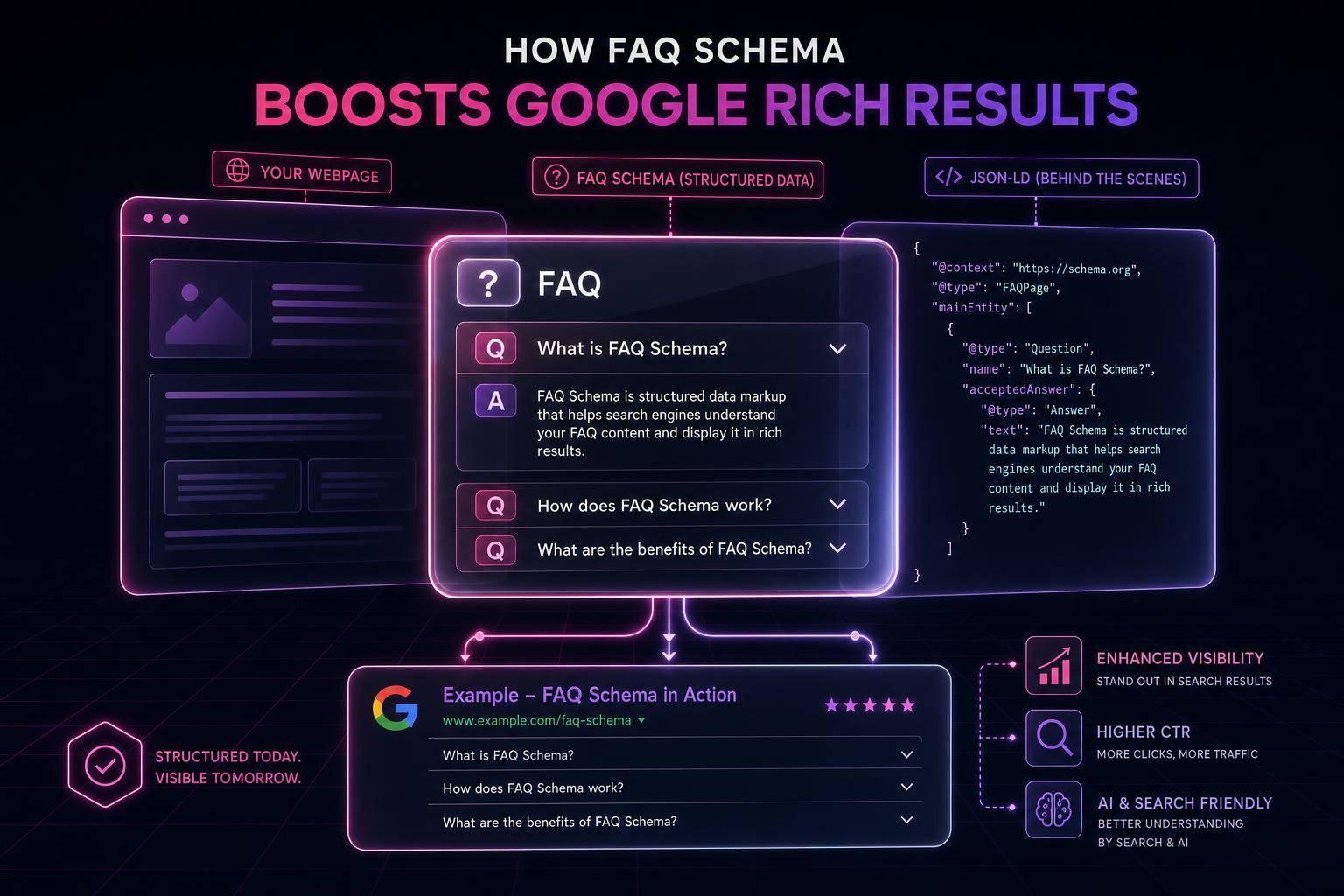
- FAQ rich results are now limited mostly to government and health sites as of May 2026
- The best pages to fix first are those with:
- high impressions
- low CTR
- rankings that should be getting more clicks
A few numbers make the point fast:
- Rich results can drive 17% to 35% higher CTR
- Some case studies reported lifts like 25% and even 82%
- A move from 2.4% to 6.1% CTR can almost triple traffic from the same impressions
If I were doing this on my site, I’d keep it simple:
- Check Google Search Console
- Find pages with high impressions and weak CTR
- Match each page with the right schema type and format
- Validate the JSON-LD
- Request re-crawling
- Compare the 30-day before-and-after CTR
The main idea is simple: structured data helps your result look more useful in search, and that can turn more impressions into visits.
Learn How To Use Structured Data To Improve Search Visibility & CTR
How structured data helps listings win more clicks
When a page ranks well but still doesn’t get enough clicks, the issue is often the listing itself.
Structured data gives search engines machine-readable labels for what’s on the page. Google prefers JSON-LD, and it sits in the page head without changing anything visitors see.
That part matters: structured data does not improve rankings. It changes how the page can appear at the position it already holds.
So the markup helps, but the visible details are what push people to click.
Why rich results stand out in Google Search
When valid markup matches the content users can actually see, Google may show extra details like ratings, price, availability, author, and breadcrumbs. Those details help people make a faster call on which result looks worth their time.
And the data is hard to ignore. Nestlé found that pages appearing as rich results achieved an 82% higher click-through rate compared to identical pages without structured data [1][5]. Rotten Tomatoes reported a 25% CTR improvement after implementing structured data for reviews and ratings across their listings [1][5]. Review stars alone can lift CTR by 30% or more [3].
Schema types that most often affect CTR
Not every schema type moves clicks in the same way. Some add details people care about right away. Others make a result look cleaner or easier to trust.
| Schema Type | Standard Listing | Rich Result Enhancement | Common Effect |
|---|---|---|---|
| Product | Plain title and description | Price, stock status, star ratings | Usually strongest for product pages [2] |
| Review / AggregateRating | No visual trust signal | Star rating display (e.g., 4.8/5) | Often noticeable across most page types [3] |
| Article | Standard blue link | Author byline, publish date, thumbnail | Moderate and consistent [2] |
| Breadcrumb | Raw URL string | Human-readable path (Home > Blog > Topic) | Smaller but useful [2] |
| Organization / LocalBusiness | Brand name only | Stronger brand and local trust signals | Helpful for trust and local-intent searches [4] |
For many sites, Product and Review markup create the clearest visual lift. They put buying and trust signals front and center, which is often what gets the click. Article, Breadcrumb, and Organization schema can help too, especially when the goal is to make the result look cleaner, more useful, or more trustworthy.
One caveat: FAQ rich results used to be a solid way to win more attention, but that’s changed. As of May 2026, Google restricts them mainly to government and health websites [6][7]. For most commercial and content sites, they’re no longer something you can count on.
Once you know which schema types can move CTR, the next job is finding the pages with the biggest gap between rankings and clicks.
How to find pages with weak click performance
Start with URLs that get a lot of impressions but a weak CTR. Schema updates only help when you aim them at the right pages.
Use Google Search Console to find high-impression, low-CTR pages
Open the Performance report in Google Search Console and sort pages by impressions, highest first. Then look for URLs with lots of impressions but not many clicks. Use expected CTR by position as a rough benchmark. If a page sits well below that mark, flag it.
Filter to the U.S., split desktop and mobile, and exclude branded queries. That gives you cleaner data and helps surface the real click gaps.
Find pages that miss rich result opportunities
Once you have a shortlist of weak URLs, search those queries in Google and compare your listing with the pages around it. If competing results show richer details, your page likely needs schema markup.
If a page already has structured data, check the Enhancements report to see if errors or warnings are holding back rich results.
Audit markup issues with Schema Validator AI
Missing required properties, broken JSON-LD, or markup that doesn’t match the page will often block rich results. Run your top-priority URLs through Schema Validator AI to spot missing, broken, or incompatible JSON-LD before you change anything.
The audit shows why a page is missing rich-result signals. It also helps you see which URLs need fixes first and which ones are worth your time.
Once you know which URLs are missing, broken, or blocked, match each page to the schema type that fits. In most cases, that means deciding whether the page needs Product, Article, or business identity markup.
sbb-itb-f4b2e1b
Structured data fixes for pages that need more clicks
Once you know which pages are lagging, the next move is simple: make sure the markup fits the page's actual content. Different page types call for different schema. When the match is tight, search results can look more useful, and that can help with clicks.
Add Product schema to show price, stock, and reviews
On e-commerce pages, Product schema should be first in line. A solid setup includes name, image, and the Offer object with price, priceCurrency set to USD, and availability. It should also include AggregateRating with ratingValue and reviewCount.
When you audit and validate your markup to ensure it lines up with the page, Google can show price, stock status, and star ratings in the search result. That extra detail can make a listing stand out without changing the page copy itself.
One thing matters a lot here: every value in the markup must match what's visible on the page. If the schema says one thing and the page shows another, that mismatch can trigger a manual action for misleading structured data. That’s why live dynamic fields matter. They help keep price and stock data current instead of letting stale values sit in the code.
For content pages, the focus changes. Instead of price and stock, you want author and date signals.
Use Article and FAQ schema on content that blends into the SERP
Informational pages often look like everyone else in the SERP. Article schema gives search engines clearer context by surfacing the author, date, and headline. Include author as a Person type with a url and sameAs links to verified profiles like LinkedIn. For datePublished and dateModified, use ISO 8601 format, such as 2026-07-16, so the date is parsed the same way each time.
As of May 2026, Google limits FAQ rich results mainly to government and health domains [6][8]. The markup can still help AI search systems parse and cite your content [8][5], but FAQ dropdowns will not appear in standard Google Search results for most sites.
So yes, FAQ schema still has a job. It just isn’t about winning those old dropdown results on most sites anymore.
For service pages, the focus shifts again to business identity.
Add business identity markup to service and local pages
Service-area and local pages often miss stronger visibility because the markup is missing or only partly filled out. LocalBusiness schema helps Google identify your business and can surface business hours, addresses, and phone numbers with more consistency in search results.
At a minimum, include:
nameaddressas aPostalAddresswith street, city, state, and ZIP codetelephoneopeningHoursSpecificationgeocoordinates [5][4]
You should also use a specific subtype like Dentist, Restaurant, or Plumber instead of the generic LocalBusiness to improve category relevance [9].
Match the schema to the page type, then check whether clicks move in the right direction.
Conclusion: A simple process to improve CTR with structured data
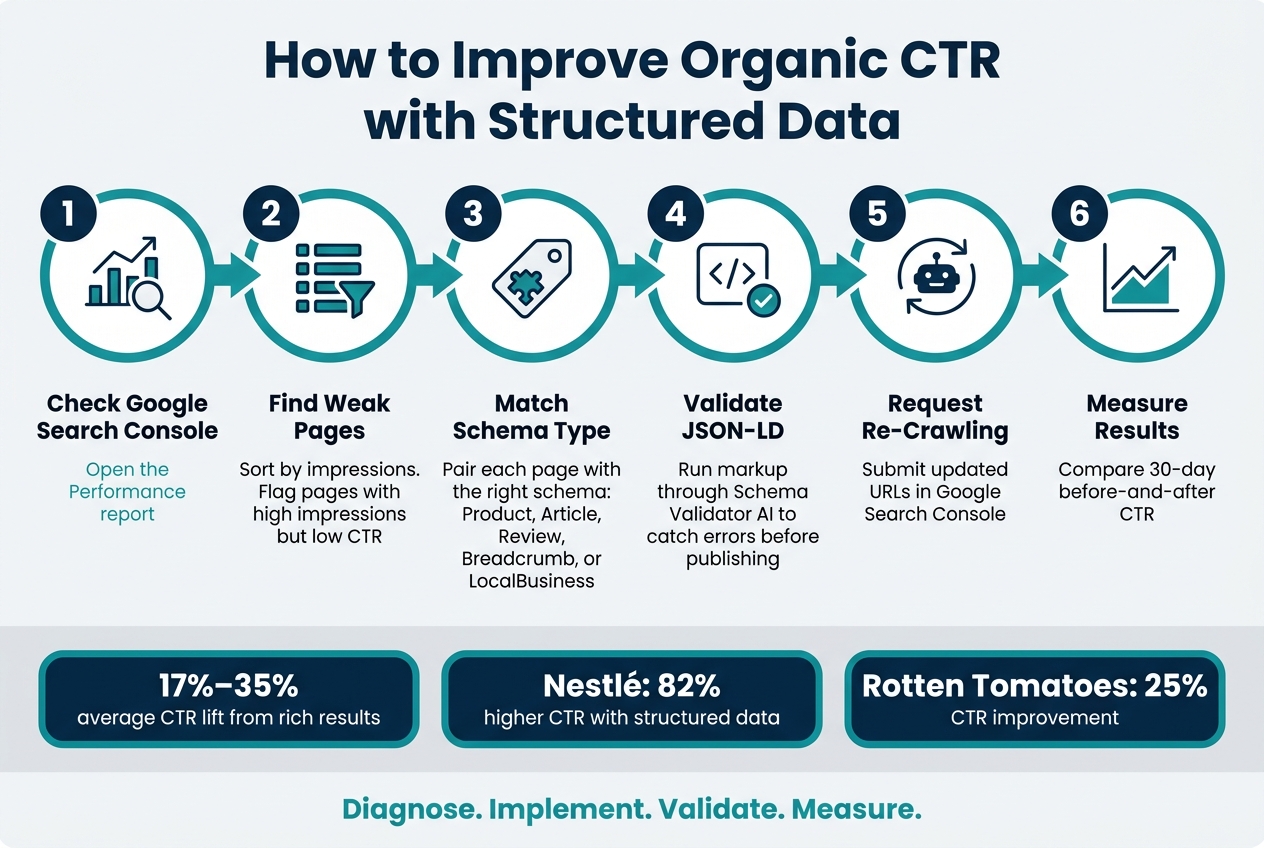
How to Improve Organic CTR with Structured Data: A 6-Step Process
Once you spot pages with weak clicks, use structured data to make the search listing more useful. Low organic CTR is often a presentation issue, not a ranking issue. In many cases, structured data can improve clicks by showing price, ratings, or bylines right in search results without changing position.
Now it comes down to doing the work: choose the schema type that fits the page, keep the data accurate, and track the change.
Next steps to take on your site
Start in Google Search Console. Pull a 30-day U.S. Performance report and sort by impressions. Then look for pages with a CTR that sits well below the average for their position. Those pages are your first targets.
Focus on pages with the biggest gap between impressions and clicks. Pick three to five URLs. Update the JSON-LD on each page, then run it through Schema Validator AI before you publish. After the update goes live, request re-crawling in GSC and compare the same 30-day window before and after.
If CTR still trails, take another look at what searchers actually see. Is the information showing in search competitive, clear, and useful? That’s usually where the answer is.
Keep it simple: Diagnose. Implement. Validate. Measure.
FAQs
Why is my organic CTR low if my page ranks well?
If your page ranks well but gets a low organic CTR, the problem is often the snippet, not the ranking itself.
In plain English: people see your page, but they don't feel like clicking.
That usually comes down to a few things. Your title tag or meta description may be weak. The title may not match what the searcher wants. Or the SERP may be crowded with features like AI Overviews or featured snippets that push your listing farther down the page.
Structured data can help here. It can make your listing stand out with rich results like star ratings, FAQ dropdowns, or product prices.
How long does it take for structured data to affect CTR?
After deploying structured data, you can usually see measurable CTR changes within 4 to 8 weeks. In some cases, you may spot movement in 2 to 4 weeks as Google crawls and re-indexes your pages. Newer sites, or pages tied to newly published content, often need 6 to 8 weeks.
Over time, a stronger CTR can also help support higher organic traffic and better rankings if Google sees that users prefer your result.
Which pages should I update with structured data first?
Start with pages that already rank fairly well but get fewer clicks than you'd expect. Focus first on high-impression pages and informational pages sitting in positions 3 or 4.
Then work through this order:
- Homepage (Organization)
- Content pages (Article or BlogPosting)
- Informational pages (FAQ)
- Commercial pages (Product or AggregateRating)
Use Schema Validator AI to audit the markup and make sure it matches the content people can actually see on the page.