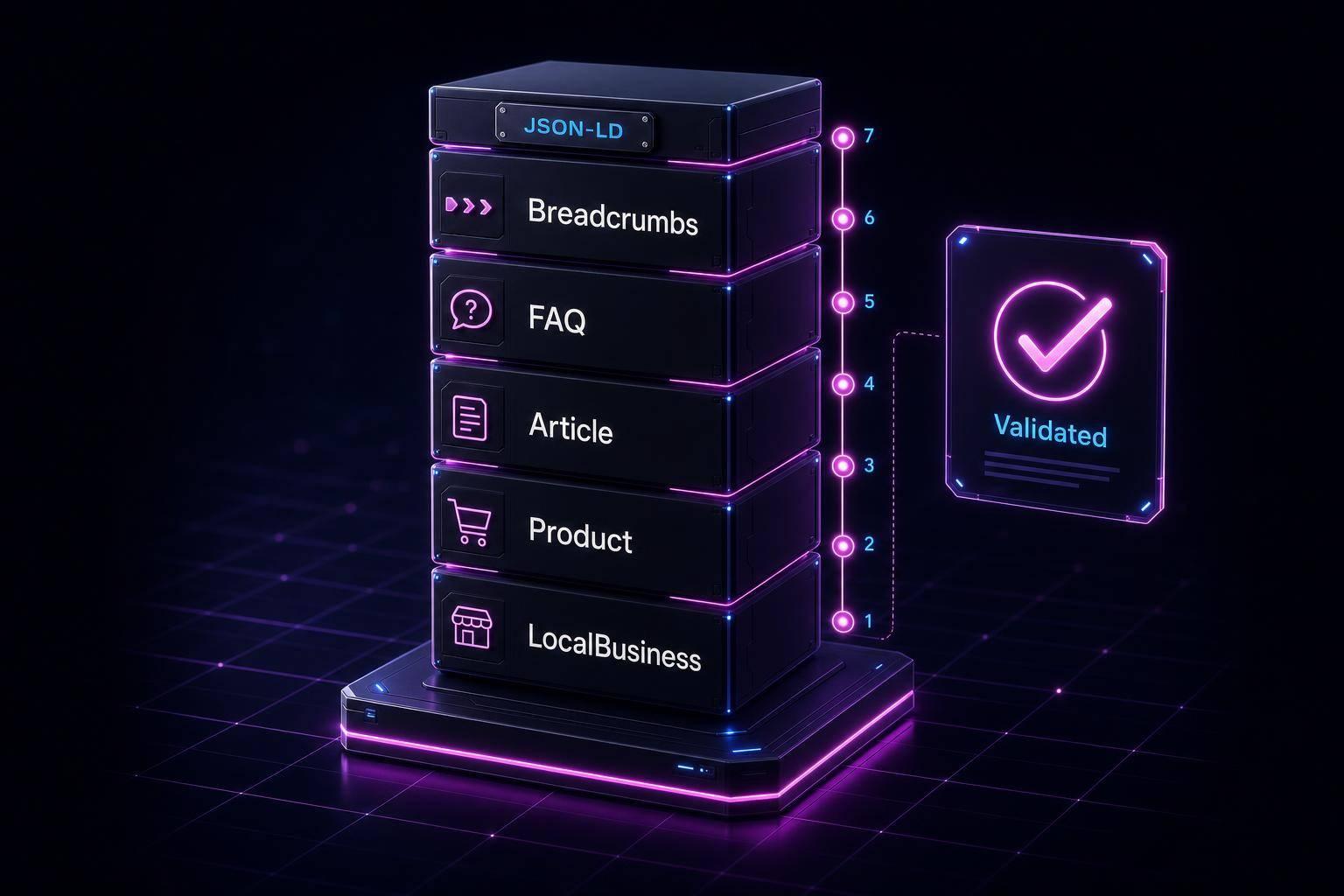
If you run a multi-language store, use Product for the item, Offer for market-specific sale details, and LocalBusiness only for store or pickup pages. The markup must match what people see on each local page: the same price, the same currency, the same language, and the same location details.
Here’s the short version:
- I use
Productto define the item itself. - I use
Offerto show price, stock, shipping, and returns for that market. - I use
LocalBusinessfor store pages, branch pages, and pickup-related location info. - I keep one stable
@idper product or branch across all language versions. - I make sure JSON-LD, visible page content,
hreflang, and Merchant Center data match.
A few details matter most:
- Prices in schema should use plain numbers like
129.99, not129,99 - Currency should use codes like
USD, not$ - Dates should use ISO 8601 like
2026-12-31 - U.S. pages should use American English and imperial units where shown on the page
- For store locations, addresses should use
PostalAddresswith fields likeaddressRegionandaddressCountry: "US"
One stat stands out: the article notes that 60% of local-business sites audited in 2026 used a generic business type when a more specific subtype would have fit better. That kind of mismatch can weaken location markup.
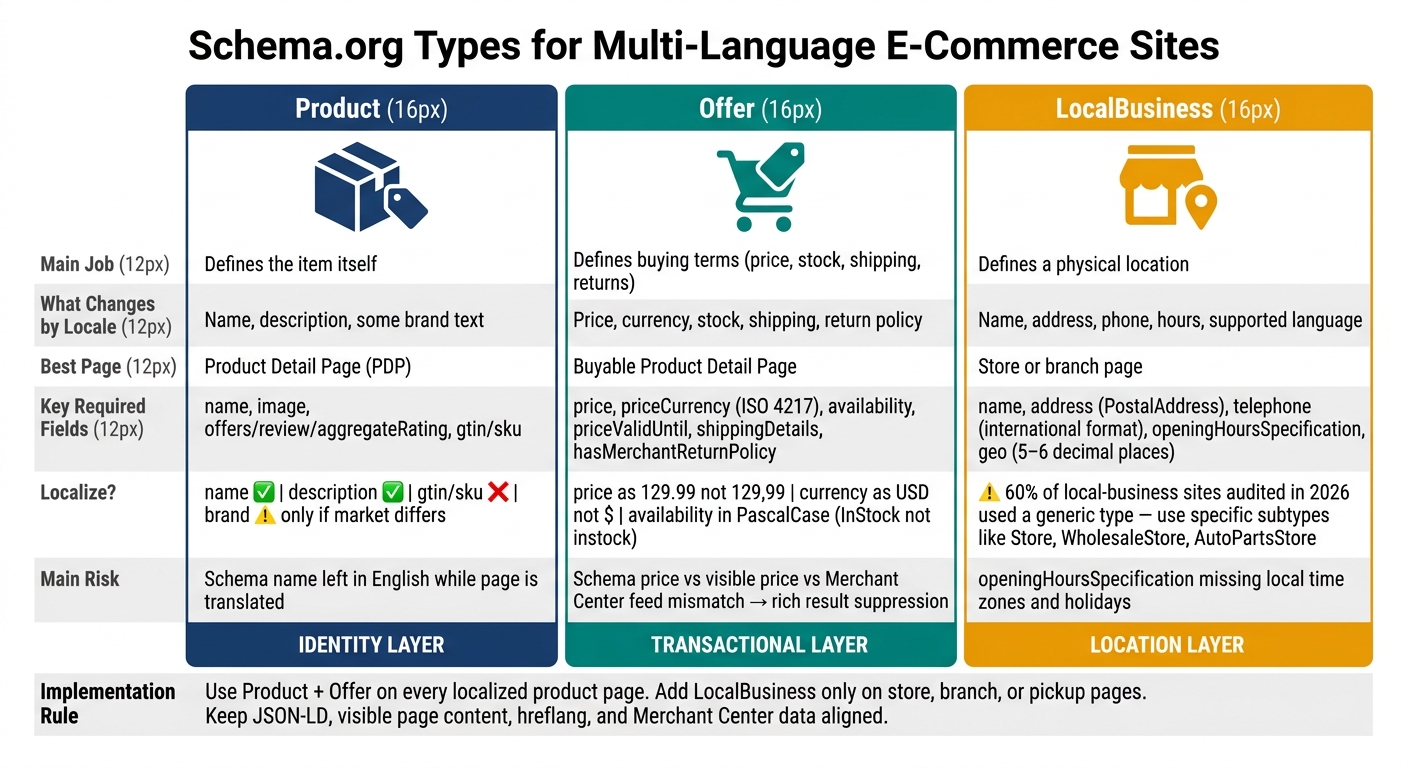
Schema.org Types for Multi-Language E-Commerce: Product vs Offer vs LocalBusiness
Best SEO Practices for Multilingual Websites (Drive More Targeted Traffic)
sbb-itb-f4b2e1b
Quick Comparison
| Type | Main job | What changes by locale | Best page |
|---|---|---|---|
Product |
Defines the item | Name, description, some brand text | Product detail page |
Offer |
Defines buying terms | Price, currency, stock, shipping, return policy | Buyable product page |
LocalBusiness |
Defines a physical location | Name, address, phone, hours, supported language | Store or branch page |
My takeaway: keep the product identity steady, let the offer change by market, and keep store data on location pages only. That setup cuts schema errors and helps search engines read each local page the right way.
1. Product
Primary purpose
Product identifies the item itself: its name, brand, identifiers, and core attributes. Keep that identity steady across locales. Only the page language and market-facing presentation should change.
It also helps to keep the job of each schema type clear. Product is not for pricing or store location. Pricing belongs in Offer, and store details belong in LocalBusiness. Choosing the right JSON-LD or Microdata format is the next step for implementation. The main thing to sort out is simple: which fields should change by locale, and which ones should stay the same?
Required properties
Google requires at least one of these for Product markup to be eligible for rich results:
offersreviewaggregateRating
Beyond that, name and image are must-haves. Use high-resolution images that meet Google's image rules.
Identifiers such as gtin or sku are also strongly recommended. They help search engines and AI systems match the same product across different locale versions [4].
Locale-sensitive fields
Localize text fields. Keep identifiers the same.
| Property | Localize? | Notes |
|---|---|---|
name |
Yes | Translate to match the page language |
description |
Yes | Translate and convert units for the market |
gtin / sku |
No | Keep the same across all language versions |
brand |
Only when the localized asset changes by market | Keep consistent unless the market uses a different official brand name |
The name and description fields should match how local shoppers search, not just mirror a word-for-word translation. On U.S. pages, that usually means American English spelling and imperial units where they make sense.
Page placement
Product schema belongs on Product Detail Pages (PDPs). Don't use Product on category pages. For those, use ItemList or CollectionPage instead.
Use Product on PDPs only. Use ProductGroup for variants, and keep one steady @id across all locales. That setup keeps product identity fixed while leaving market-level details to Offer.
Product defines the item. Offer handles the locale-specific price, currency, and availability.
2. Offer
Primary purpose
Offer is the market-layer match to Product. If Product explains what you sell, Offer explains how someone can buy it. That means price, stock status, and shipping. In plain English, it holds the commercial terms. For those new to structured data, understanding schema markup basics is essential before diving into complex nesting.
These fields often shift by country or language, which is why Offer is usually where multilingual schema starts to drift.
Offer sits inside Product through the offers property. The product itself stays the same in Product, while the buying terms in Offer change by locale. That makes Offer the part most likely to vary across markets.
Required properties
Core Offer fields:
| Property | What it does | Format |
|---|---|---|
price |
Numerical cost of the item | Number only (e.g., 129.99) |
priceCurrency |
Currency of the transaction | ISO 4217 code (e.g., "USD") |
availability |
Current stock status | Schema.org URL (e.g., https://schema.org/InStock) |
priceValidUntil |
When the price expires | ISO 8601 date (e.g., "2026-12-31") |
shippingDetails |
Shipping costs and destination | OfferShippingDetails |
Since 2023, Google has also required shippingDetails and hasMerchantReturnPolicy inside the Offer block for enhanced Merchant Listing eligibility [6].
Localization demands
If the Product identity stays fixed, Offer is where local changes need to be exact. This is also where multilingual markup tends to break, requiring a schema markup audit to identify nesting and syntax errors.
A few rules matter most:
priceCurrency: Use ISO 4217 codes every time. Write"USD", not"$".priceformat: Use a period for decimals no matter how the page shows the price to users. For example, use39.95, not"39,95".- Enumeration casing: Use PascalCase for values like
InStock,OutOfStock, andNewCondition. Lowercase versions are often ignored [6]. priceValidUntil: Keep this date in the future. An expired date can suppress price snippets [4]. If there’s no planned end date, set it a few months ahead and refresh it on a set cycle.- Region targeting: Use
eligibleRegionwith ISO 3166-1 alpha-2 country codes to show where an offer applies [8]. - Data consistency: Keep the visible page price, JSON-LD schema, and Merchant Center feed aligned. If one says one thing and another says something else, rich results can be suppressed [7].
Page placement
Place Offer inside the Product block. Don’t put full Offer data on category pages. Old offer data can cause price and stock conflicts.
Use one URL for each currency version. Don’t swap prices on the same URL with dynamic logic. That kind of stability matters most when the product stays the same across locales, but the buying terms do not.
3. LocalBusiness
Primary purpose
LocalBusiness ties your business to a physical location. Product covers the item. Offer covers the buying terms. LocalBusiness covers the place itself.
Use it for brands with stores, branches, or service areas. It helps with local search, Maps, and “near me” queries. Put simply, this is the location layer in your schema setup.
LocalBusiness connects a location page to a physical branch, including its address, hours, and contact details.
Required properties
In 2026, 60% of local-business sites audited used the generic type even when a more specific option like Store, WholesaleStore, or AutoPartsStore would have fit better [9]. So don’t stay generic if you don’t have to. Use the closest subtype, such as Store or WholesaleStore.
Here are the core properties to include:
| Property | What it does | Localization demand |
|---|---|---|
name |
Business name | Translate or adapt it to the local language and match the local Google Business Profile exactly |
address |
Physical location | Use the PostalAddress type and follow local postal conventions |
telephone |
Contact number | Use international format, for example +1-415-555-0142 |
openingHoursSpecification |
Store hours | Adjust for local time zones, holidays, and regional business habits |
geo |
Latitude/longitude | Use 5–6 decimal places for about 3 feet of accuracy [9] |
Localization demands
Unlike Product and Offer, LocalBusiness shifts by branch, not by product.
That changes how you handle localization. The fields that vary by locale are name, address, telephone, hours, and language support. Your name, address, and telephone should match your verified Google Business Profile exactly. Even small formatting differences can chip away at trust and may cause the markup to fail.
For each branch, keep one @id across every language version of that location page. Think of it like the store’s fixed ID card: the language can change, but the branch itself is still the same place. geo should also stay the same, since coordinates don’t change by language.
Localize name, address, openingHoursSpecification, and availableLanguage for the market you’re serving. Then use parentOrganization to tie each branch back to the main brand entity.
Page placement
If you have one location, place the LocalBusiness block on the homepage.
If you run a multi-location brand, each branch needs its own page with its own LocalBusiness record for that store. Don’t put multiple LocalBusiness nodes on one page. If you need a store directory, use an ItemList on the directory page and link out to the individual location pages instead.
Each branch should keep one record across language versions, with location data kept separate from product data. The branch identity stays fixed. Only the visible location details should change by locale.
Implementation Constraints and Localization Risk by Schema Type
Each schema type brings its own maintenance headache on multilingual e-commerce sites. The risk changes based on what the markup is meant to do: identify a product, show price and stock, or describe a physical location.
| Schema Type | Primary Localization Burden | Highest Validation Risk | Key Mismatch Point |
|---|---|---|---|
| Product | Translation burden | Missing name, image, or brand |
Translated page content vs. static schema fields |
| Offer | Pricing & availability | Invalid ISO 4217 currency code or price formatting | Schema price vs. visible price vs. Merchant Center feed |
| LocalBusiness | Geographic & operational | Address format and openingHoursSpecification |
Store hours vs. local time zones and holidays |
The table points to the main failure spots. The next section looks at how each type stacks up in day-to-day use.
Validation sensitivity by schema type
With Product, the most common issue is simple: the page name or description gets translated, but the JSON-LD in the template is still in English [2].
Offer is much more sensitive to formatting. For example, using 29,90 instead of 29.90 as the decimal separator leads to validation errors [5]. And if a European storefront shows "€29.90" on the page while the schema says "priceCurrency": "USD", that mismatch can lead to item disapprovals and cut rich result eligibility [1][10].
LocalBusiness tends to break around geographic details. The usual trouble spots are wrong address formats, missing international dialing codes, and store hours that ignore local holidays [2].
Where localization mismatches happen most often
For Product, the most common mismatch is leaving the schema name in English while the visible page content is fully translated.
With Offer, the biggest risk comes from using one currency across all localized pages. A separate URL for each currency version is the safer route. If you rely on dynamic IP-based switching, search engines may not index those versions correctly [7].
For LocalBusiness, the mismatch usually shows up in openingHoursSpecification. Each branch needs its own localized hours, with updates for local time zones and local holidays.
How to audit multilingual schema at scale
A simple weekly sample goes a long way: review 20–50 product URLs per language folder and compare schema fields with what users see on the page [11]. That kind of spot check helps catch drift before it spreads.
A few checks matter most:
- Generate JSON-LD from the same source feed as the storefront so price and availability stay in sync.
- Make sure localized product URLs in the schema match the page's
hreflangtags, since misalignment can confuse both search engines and AI assistants trying to serve the right language version [1]. - Use URL-level validation tools to catch issues such as stale
priceValidUntildates before they roll through a localized catalog.
These checks set up the trade-offs covered in the pros and cons section.
Pros and Cons
Each schema type does a different job in a multilingual buying journey, and you should validate your schema markup to ensure it doesn't break your visibility. The simple rule: use the lightest schema that still fits the page.
| Schema Type | Pros | Cons | Best Fit |
|---|---|---|---|
| Product | Stable product identity; supports variants via ProductGroup |
High translation overhead; identifiers must stay stable | PDPs |
| Offer | Carries price, currency, availability, shipping, and returns | Most sensitive to feed drift and currency formatting | Buyable PDPs |
| LocalBusiness | Best for stores, locators, and pickup pages | Limited value for online-only stores; harder to manage across many locations | Location pages |
The notes below boil each type down to its main strength, main limit, and best-fit page.
Product: strengths and limits
Product gives each locale a stable item identity. That sounds simple, but the hard part is translation. Your copy needs to match local search terms and local expectations, not just mirror the source text word for word.
The catch is maintenance. A multilingual catalog needs careful adaptation across markets, and that takes work. Keep the same @id across language versions so search engines can treat them as the same product.
Product sets the identity layer.
Offer: strengths and limits
Offer handles the buying details. It powers price, currency, and availability, which makes it the most fragile layer when data slips out of sync.
It tends to break first when price, currency, or availability on the page no longer match the markup. If the visible price, the schema priceCurrency, and the Merchant Center feed don’t line up, you can lose rich result eligibility or even face account suspension [7][3]. On multi-currency sites, separate URLs for each currency version are the safest option for keeping schema and page content aligned [7].
Offer sets the transactional layer.
LocalBusiness: strengths and limits
LocalBusiness matters most when branch-level details change by language, time zone, and holiday hours. In plain terms, each location page should have its own localized hours, address format, and contact details, and those details should match the verified Google Business Profile for that branch.
Use it on store, locator, and pickup pages. On pure product pages, it usually doesn’t add much.
LocalBusiness sets the location layer.
Conclusion
These types work in layers, not as either-or choices. Product identifies the item, Offer sets the market-level sale terms, and LocalBusiness covers the physical location. So the goal isn’t to pick one type over another. It’s to use the right stack for the page’s job.
The right schema mix for localized e-commerce pages
The default setup is simple: use Product with Offer on every localized product page. That pairing is the standard choice for price and availability rich results. Add LocalBusiness only when in-store details matter to the buyer, such as store pickup, local business hours, or a branch-level address.
There’s one catch: each locale’s markup needs to match the page exactly.
Final implementation takeaway
Your visible page content, JSON-LD values, and Merchant Center feed data all need to line up. If the displayed price doesn’t match the priceCurrency in schema, rich results may be suppressed.
Check each locale on its own, and keep the page content, JSON-LD, and Merchant Center data aligned so price, currency, shipping, and dates match exactly. A mismatch between visible content and structured data is the fastest way to lose eligibility.
FAQs
Can one product have different Offers by country?
Yes. One product can have different offers by country.
Use one canonical page per language and add multiple Offer objects inside the Product schema for regional pricing, currency, and availability.
Use eligibleRegion to show the country tied to each offer. Each offer should line up with its own region-specific URL.
One more thing: don’t mix currencies on one page. That can lead to data mismatches and search engine problems.
When should I use LocalBusiness on a product page?
Use LocalBusiness on a product page only if your e-commerce business has a physical storefront or another place customers can visit.
That markup helps search engines understand who you are, where you're located, and when you're open. It can also support your presence in local search results and Google Maps.
If the product page doesn't connect to a physical location, focus on Product and Offer schema instead.
If your business has more than one location, create a separate LocalBusiness entity for each one.
Why should each language version keep the same @id?
Using the same @id across language versions helps search engines treat the product as one stable entity, no matter which language appears on the page.
You can localize fields like name and description while keeping the product’s core identity the same. That keeps international versions connected and helps search engines match the same product with regional pages that show market-specific pricing, currency, and availability.